|

-
Oct 26th, 2017, 09:41 AM
#1
Thread Starter
New Member

 [RESOLVED] Scanned image page preview and scroll [RESOLVED] Scanned image page preview and scroll
Hello I am building a scanning application which will be used to archive documents - the user will create a virtual folder via the programm and add description to each document and the scan it using this http://www.chestysoft.com/ximage. So I would like to create interface with two Image Boxes - the first one will be bigger and will display the current selected by the user page of the document, and the second one should generate ImageBox control (OCX) for each page on runtime like shown on the picture:
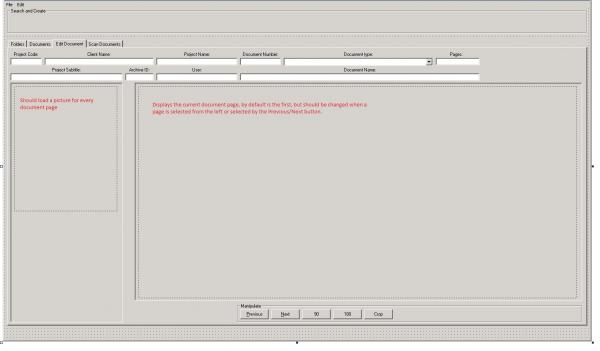
Bassicly this part of the program is expected to generate thumbnails for all the pages of the multi-page tiff.
I figure out how to load them at runtime and generate as many ImageBox controls as the pages of the document are, but I can't figure out how to add scroll to the ImageBox, which expands dynamically, also I noticed that if I first select one document the code successfully loads the page previews in the smaller Image Box, but when I go back to the Documents tab and select another document to be loaded, only the first page is refreshed the other images in the page preview ImageBox doesn't refresh and are the images of the last document.
I would be grateful if you give me a solution to these two problems. Bellow you will find my code for loading the document to the OCX ImageBox by Chestysoft.
Code:
    Dim i As Integer
    imgDocPreviewE.ReadImageNumber = 1 'Setva koi image ot multipage tiff-a da zaredi
    imgDocPreviewE.LoadFromFile (ReadIniValue(App.Path & "\config.ini", "Storage", "ADir") & filePath)  'Pulls the root directory from config.ini
    imgDocPreviewE.Zoom = 65
    imgPagePreviewE(0).LoadFromFile (imgDocPreviewE.LastFileName)
    imgPagePreviewE(0).AutoScale
    ReDim Pages(1) 'If you have a large array and you no longer need some of its elements, ReDim can free up memory by reducing the array size. On the other hand, if your code determines that an array needs more elements, ReDim can add them.
    Pages(1) = imgDocPreviewE.WriteBinary(gfBMP) 'Generira bitmap koito da postavi v prozoreca
    ImageCount = imgDocPreviewE.ImageCount(imgDocPreviewE.LastFileName) 'opredelia kolko images se sadurjat v multipagetiff-a zared chrez LoadFromFile
    If ImageCount > 1 Then
        ReDim Preserve Pages(ImageCount)
        For i = 2 To ImageCount
            imgDocPreviewE.ReadImageNumber = i
            imgDocPreviewE.LoadFromFile (imgDocPreviewE.LastFileName)


        Dim NextVal As Integer
        NextVal = imgPagePreviewE().Count
        Load imgPagePreviewE(NextVal)
        imgPagePreviewE(NextVal).Top = imgPagePreviewE(NextVal - 1).Top + imgPagePreviewE(NextVal - 1).Height
        imgPagePreviewE(NextVal).ReadImageNumber = i
        imgPagePreviewE(NextVal).LoadFromFile (ReadIniValue(App.Path & "\config.ini", "Storage", "ADir") & filePath)
        imgPagePreviewE(NextVal).LoadFromFile (imgPagePreviewE(NextVal).LastFileName)
        imgPagePreviewE(NextVal).AutoScale
        imgPagePreviewE(NextVal).Visible = True
            Pages(i) = imgDocPreviewE.WriteBinary(gfBMP)
            lblPageNumE.Caption = "Loading - Page " & i & " of " & ImageCount
            Me.Refresh
        Next i
    End If

    CurrentImage = 1
    imgDocPreviewE.ReadBinary2 Pages(CurrentImage)
    lblPageNumE.Caption = "Page " & CurrentImage & " of " & ImageCount
    If ImageCount > 0 Then
        cmdRotate90.Enabled = True
        cmdRotate180.Enabled = True
        cmdCrop.Enabled = True


        If ImageCount > 1 Then
            cmdPrevE.Enabled = True
            cmdNextE.Enabled = True
        Else
            cmdPrevE.Enabled = False
            cmdNextE.Enabled = False
        End If


    End If
Tags for this Thread
 Posting Permissions
- You may not post new threads
- You may not post replies
- You may not post attachments
- You may not edit your posts
-
Forum Rules
|
Click Here to Expand Forum to Full Width
|



 Reply With Quote