


 [RESOLVED] Unwanted trigger of an event.
I am not seeing why I have a problem with this. But here is the deal. I have a form with a databound Combobox as seen below. This is the form just after being loaded. Note that there is a value showing in the ComboBox.
The next action is to make a selection from the combobox using the following event. The results are that when I make a selection the event below is carried out and the window looks like the second screen shot.
The problem is that I do not want the combobox to show any values until I select a value. Not a problem, at the very beginning of the load event I clear that by using: ComboBox.SelectedIndex = -1. However, what occurs, when I do this, is that the code jumps directly to the SelectedIndexChanged event from there. I do not believe that setting the SelectedIndex = -1 should be considered a change, but the code obviously believes otherwise (please don't get on my case for using that terminology. It is perfectly appropriate.) since it jumps right to the SelectedIndexChanged from there.
One other point. The code will sometimes not make that jump and go through all of the code after setting the SelectedIndex in the Load Event.
As I stated previously, I do not believe that the jump to the SelectedIndexChanged event should occur. Can someone explain to me why I am wrong?
Code:Private Sub cmbDepartment_SelectedIndexChanged(sender As Object, e As EventArgs) Handles cmbDepartment.SelectedIndexChanged 'Trainee glbstrDept = cmbDepartment.Text Me.TblEmployeeTableAdapter.FillByDepartment(Me._MasterBase4_0ItemMasterDataSet.tblEmployee, glbstrDept) radDepartment.Visible = True radIndividual.Visible = True Dim strTrainMessage As String = "1. Click one of the radial buttons to add trainee(s)." + vbNewLine + " A. Click the By Department radial button to add a group of trainees." + vbNewLine + " B. Click the By Individual radial button to add a single trainee." With lblInfo .Visible = True .TextAlign = ContentAlignment.MiddleLeft .Text = String.Format("{0}", strTrainMessage) End With End Sub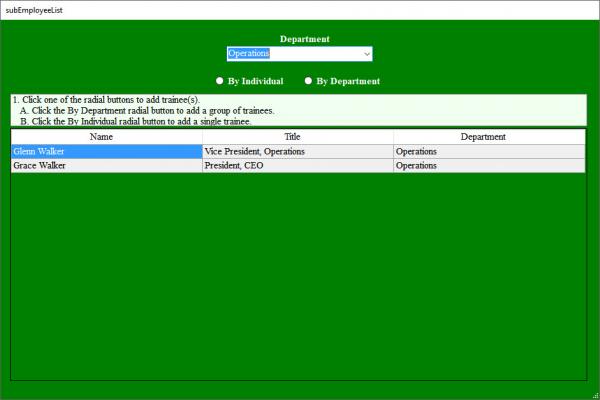

 Reply With Quote
