Revised 24 Oct 17. Revamped to allow user to modify values and/or auto-correcting if desired.
The Resource Editor (ResEditor) in VB can corrupt icon/cursor group data. The corruption is minimal, except PNG-encoded related entries. This corruption should not harm anything except in rare scenarios. Typically, you can expect no harm in these scenarios:
1. The icon/cursor files you add to the resource file via ResEdit only contain one image
2. When the file contains multiple images and all images are square (width = height)
However, this 'corruption' does result in reporting icon/cursor heights and cursor bit depths incorrectly. When multiple images exist for the icon/cursor, there is a potential that Windows will select the wrong image when using resource-related APIs: LoadImage, LookupIconIdFromDirectoryEx, etc.
Examples of corruption:
1. A 32x32 icon is reported as shown. The correct values are to the right, in blue
Width 32 32
Height 64 32
2. A 128x128 icon is reported as shown. The correct values are to the right, in blue
Width 128 128
Height 0 128
3. A 32x32 cursor is reported as shown. The correct values are to the right, in blue
Width 32 32
Height 32 64
Planes 0 1
BitCount 0 4
4. A 128x128 PNG-encoded icon is reported as shown. The correct values are to the right, in blue
Width 0 128
Height 0 128
Planes 18505 1
BitCount 21060 32
Note. After scanning/comparing dozens upon dozens of Windows executables/DLLs and extracting icon/cursor information, it is clear that the ResEditor utility fails to fill the group data correctly. Not surprisingly, icon/cursor group data extracted from vb6.exe, itself, is correctly filled.
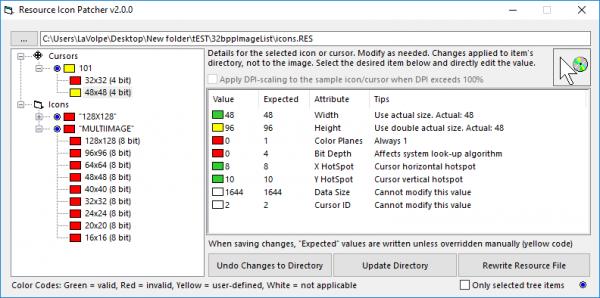
This utility will read a VB resource file (.res) and scan the icons/cursors. If any discrepancies are found, they will be displayed. You'll have the option of correcting them and rewriting the res file or saving the updates to a different res file. Might want to consider running this against your res file before you compile your app?
Point to take home. If you only use your resource file's Icons/Cursors section to store single-image icons/cursors, this tool really doesn't help you.
Last edited by LaVolpe; Oct 24th, 2017 at 11:53 AM.
Reason: Updated Version
Insomnia is just a byproduct of, "It can't be done"




 Reply With Quote