|

-
Sep 26th, 2017, 07:01 PM
#36
Thread Starter
Fanatic Member

Re: display DGV list from more than one table
I understand that, I think. I had the Data bound set in the DGV Task Window. However, I got rid of that and put that into the code instead........
Whoa!!!! I just looked again in the DGV task Window and the Data Bound property was indeed set to the dataset. So I did several things. In the Task Window I changed the Data Bound setting to None, and disposed of all of the columns I had added there.
 I then went back to the query and did the following: I then went back to the query and did the following:
SELECT intChangeID, strName, strJobTitle, strDept
FROM tblChangeApprove
WHERE intChangeID = ?
Here is the code as it is run now:
Private Sub SubSignList_Load(sender As Object, e As EventArgs) Handles MyBase.Load
Me.TblChangeApproveTableAdapter.FillByChangeID(Me._MasterBase4_0ItemMasterDataSet.tblChangeApprove, glbintCRNum)
dgvSignList.DataSource = Me._MasterBase4_0ItemMasterDataSet
dgvSignList.DataMember = "TblChangeApprove"
dgvSignList.Columns(1).HeaderText = "Change ID"
dgvSignList.Columns(2).HeaderText = "Name"
dgvSignList.Columns(3).HeaderText = "Job Title"
dgvSignList.Columns(4).HeaderText = "Department"
End Sub
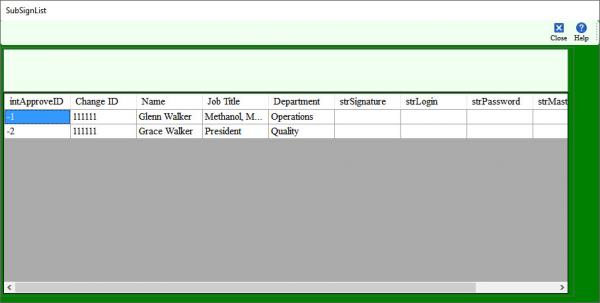
And here is the results as run in the application:
As can be seen, the data are all there and in the right place. The only remaining issue is why are the other fields showing. I have an idea I am going to try on that. Let me know what you see that needs to be done to finish this thorny issue.
Tags for this Thread
 Posting Permissions
- You may not post new threads
- You may not post replies
- You may not post attachments
- You may not edit your posts
-
Forum Rules
|
Click Here to Expand Forum to Full Width
|



 Reply With Quote