|

-
Aug 21st, 2017, 08:30 AM
#1
 [RESOLVED] MS Sans Serif --> Microsoft Sans Serif, RTB, some brainstorming [RESOLVED] MS Sans Serif --> Microsoft Sans Serif, RTB, some brainstorming
Okay, for the most part, things are going fine with me swapping out MS Sans Serif with Microsoft Sans Serif during runtime (allowing me to avoid a huge source code editing job).
However, I've run across one glitch. Just as an FYI, I'm talking about 100s of forms, so source code editing isn't a good choice.
Here's the problem. I've got these two UserControls I've used for decades (and wrote a LONG time ago). They're named RtfButton and RtfLabel. As you might guess, they're just controls that allow RTF text on a button or label caption. When in design mode, there's a little editor that can pop up (when "Edit" is clicked on the context menu of the control) which allows you to type (or Copy-Paste from WordPad) text that's "rich".
Okay, to the problem. This control has always defaulted to the MS Sans Serif font. (Ok ok, my bad back in 1999.) And now, this font is scattered throughout where these controls are used (which is extensive).
I've examined things, and the RTF caption text is just stored in the TextRTF property of the RTB that's part of the UserControl. Within the UserControl, this text is actually managed in a module variable named m_RTFCode (a string), and it's stored as a property named RTFCode. I've looked, and this property is stored in the .FRX file of a form with this UserControl. Here's a hex-editor's snooping of an "asdfasdfasd" caption for the RtfLabel control I used for testing:
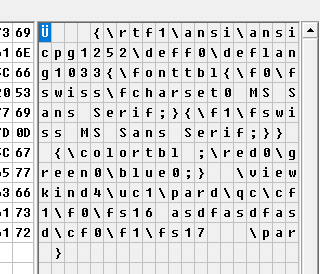
The above is just in a file named Test.frx.
Okay, here's what I need. I need a procedure that runs in Form_Load that searches for these two controls (RtfButton and RtfLabel), finds their text, examines whether or not it contains MS Sans Serif, and, if it does, swap it out for Microsoft Sans Serif.
Maybe, by writing it out here, I've outlined the solution. But I'm still certainly willing to listen to ideas. I'll continue working though.
Best Regards,
Elroy
EDIT1: Just for an example, here's a way that I use that RtfLabel control. On the following, except for the two buttons, that's all one RtfLabel. It truly allows me great flexibility in placing formatted text on a VB6 form:
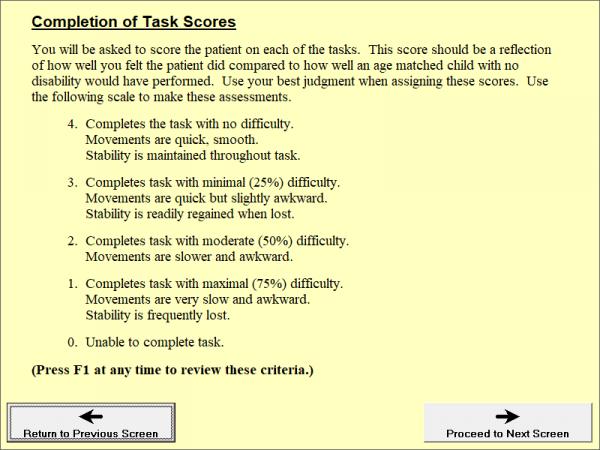
EDIT2: Also, I placed these controls in the codebank (with example) about a year ago. If you're further interested in how they work, here's the link to the codebank.
Last edited by Elroy; Aug 21st, 2017 at 09:03 AM.
Any software I post in these forums written by me is provided "AS IS" without warranty of any kind, expressed or implied, and permission is hereby granted, free of charge and without restriction, to any person obtaining a copy. To all, peace and happiness.
 Posting Permissions
- You may not post new threads
- You may not post replies
- You may not post attachments
- You may not edit your posts
-
Forum Rules
|
Click Here to Expand Forum to Full Width
|



 Reply With Quote