|

-
Jul 5th, 2017, 12:04 AM
#1
Thread Starter
Lively Member

Same code, different results?
Hello! So, I am having this issue with a snippet of code. I copy/pasted this code from one project to another, made no changes and the results are different. Here is the code:
Code:
 Dim fName As String = ""
        OpenFileDialog1.InitialDirectory = "c:\"
        OpenFileDialog1.Filter = "CSV files (*.csv)|*.CSV"
        OpenFileDialog1.FilterIndex = 2
        OpenFileDialog1.RestoreDirectory = True
        Dim result As DialogResult = OpenFileDialog1.ShowDialog
        ' OpenFileDialog1.ShowDialog()
        If (result = DialogResult.Cancel) Then

        ElseIf (result = DialogResult.OK) Then
            DataGridView1.Rows.Clear()
            DataGridView1.Refresh()
            fName = OpenFileDialog1.FileName
            Dim TextLine As String = ""
            If IO.File.Exists(fName) Then
                Dim Contents = IO.File.ReadAllLines(fName).ToList

                Contents.RemoveAt(0)
                Contents.RemoveAt(Contents.Count - 1)
                'Contents.RemoveAt(Contents.Count - 1)

                For x As Integer = 0 To Contents.Count - 1
                    Contents(x) = Contents(x).Replace(",,,", ",").Replace(",,", ",")
                    Contents(x) = Contents(x).Substring(0, Contents(x).Count - 1)
                    Dim RowItem = Contents(x).Split(","c)
                    DataGridView1.Rows.Add(RowItem)
                Next
            End If
        End If
This is a complete copy/paste from other code I have worked on that 100% successfully worked. The issue is, here is the file: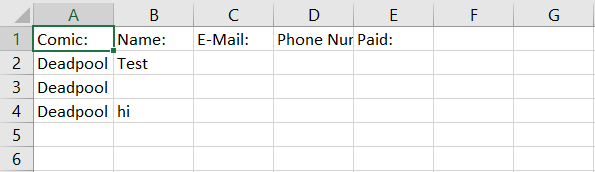
the line of Deadpool hi, that will not show but in the other program I have created, it will show all of the rows with no issue. Any ideas? The saving code is 100% copy/paste too and still, 100% successful with the other program.
Tags for this Thread
 Posting Permissions
- You may not post new threads
- You may not post replies
- You may not post attachments
- You may not edit your posts
-
Forum Rules
|
Click Here to Expand Forum to Full Width
|



 Reply With Quote