VBFlexGrid Control (Replacement of the MSFlexGrid control)
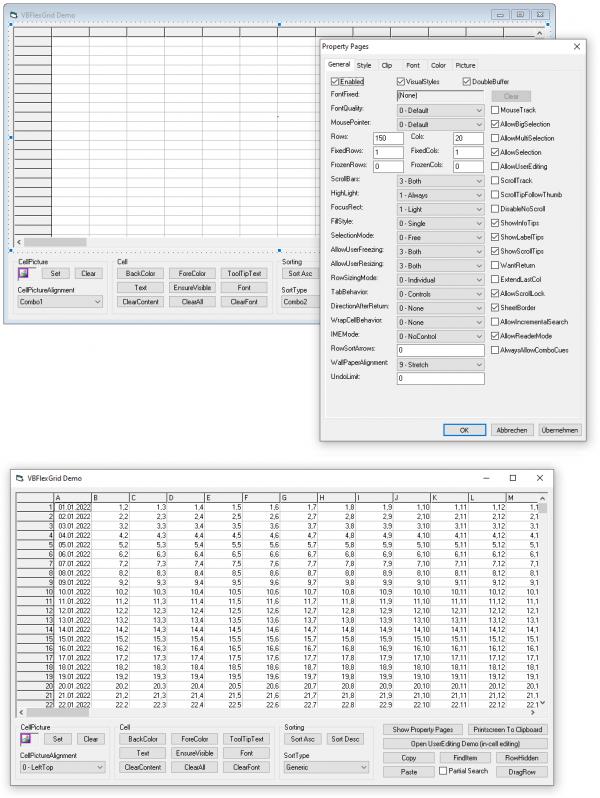
This project is intended to replace the MSFlexGrid control for VB6.
The "MSFLXGRD.OCX" can be replaced completly.
Even though some enhancements of the MSHFlexGrid control are included, it can't replace it completly (yet).
But there are also new features included that are not available on both MSFlexGrid and MSHFlexGrid.
The VBFlexGrid supports Unicode, is DPI-Aware and ready for 64-bit.
At design-time (IDE) there is only one dependency. (OLEGuids.tlb)
This is a modified version of the original .tlb from the vbaccelerator website.
But for the compiled .exe there are no dependencies, because the .tlb gets then compiled into the executable.
In order to use the DataSource/DataMember property a reference to msdatsrc.tlb (pre-installed since Win2k) is required.
Everything should be self explained, because all functions and properties have a description.
The source code of the project can also be viewed on GitHub.
ActiveX Control version, together with a Registration-Free (Side-by-side) solution: Version 1.8
Notes:
- When using the SetParent or MoveWindow API, pass .hWndUserControl and not .hWnd.
- When changing the "Project Name", have all forms open, else all properties are lost. Because the library to which the controls are referring to is the "Project Name" itself. Having all forms open will ensure that the .frx files will be updated with the new "Project Name".
List of revisions:
Code:
21-Jul-2026
- Included the FindTag function similar to how the FindItem function works.
  It has an optional AllowCoercing argument which defaults to False which means both data types must match exactly.
  Searching a Null tag will work. (unlike vsFlexGrid)
20-Jul-2026
- ColDataType(x) = vbError supported for the SaveArray function. (UseColDataType = True)
18-Jul-2026
- Included the UseColNullable argument in the SaveArray function.
  When True and ColNullable(x) is False then the variant item is not 'Null' anymore upon failed type conversion.
  It is then simply the original text. This can be useful for excel exports when a column is not strictly typed.
- Some minor internal improvements.
17-Jul-2026
- Included the Row/ColPositionFromNonHidden and Row/ColNonHiddenPosition read-only property, which maps between index and a non-hidden mapped position.
- Included Rows/ColsNonHidden read-only property.
13-Jul-2026
- Bugfix in the SaveArray function when ExcludeHidden is True.
  When type conversion failed (UseColDataType = True) the variant item is now 'Null'.
  It keeps being 'Empty' when the cell is vbNullString to protect the type conversion from false error.
  This enables to distinguish between "no value" and "error value" and is the most interoperable approach.
  ADO data types are now recognized as well as these are compatible with the numbering to the intrinsic data types.
11-Jul-2026
- Included the SaveArray function to write data into a variant or string array.
  It's significantly faster for an Excel export or copying into another VBFlexGrid control.
  Included new enum FlexArrayOrderConstants which is either FlexRowMajor or FlexColumnMajor.
  The SaveArray function defaults to FlexColumnMajor to be in sync with the LoadArray function.
08-Jul-2026
- The Cell property now overwrites the FillStyle property.
  It's either FlexFillStyleRepeat for a selection or else FlexFillStyleSingle.
25-May-2026
- Some minor internal improvements.
- Use of flag DCX_KEEPCLIPRGN in the WM_NCPAINT handler to solve a leak.
  This way the system region (wParam) will not be deleted by GetDCEx().
23-May-2026
- Usage of SetBkColor for the DrawFocusRect API so that it can work accurately.
03-May-2026
- The drop-down calendar (FlexComboModeCalendar) will now resize upon WM_THEMECHANGED/WM_STYLECHANGED.
  This allows to change theme/styles for the calendar on the EditSetupWindow event.
03-Feb-2026
- Cell flooding now has a padding in the size of the focus rect.
01-Feb-2026
- Included the UseForeColorSel property which defaults to True.
31-Oct-2025
- Included hWndToolTip/hWndScrollTip read-only run-time property.
16-Jul-2025
- ToolTipText of a cell (ShowInfoTips = True) now includes check box hit result.
11-Jul-2025
- Included the WheelScrollLines run-time property.
20-Jun-2025
- Some minor internal improvements.
13-Jun-2025
- Included the LoadArray function to load data from a variant or string array.
  It's significantly faster for large arrays instead of doing manually via .TextMatrix.
  To note is that RowDim/ColDim/PageDim are one-based values! (like for LBound/UBound; vsFlexGrid uses zero-based values)
  Also there are Rows/Cols/Row/Col arguments where you can control the amount to load and where to start.
  When RestrictRows/RestrictColumns are set to True then .Rows/.Cols cannot be increased/decreased by the function. (default False to match vsFlexGrid)
10-Jun-2025
- Included enum FlexHighLightAlwaysFocusRect for the HighLight property. (FlexHighLightAlways is default)
  If new enum set and the control does not have the focus then the focus rect is also drawn highlighted. (like vsFlexGrid behavior)
  MS(H)FlexGrid does not behave like this. This new enum allows to support both behaviors. (default MS(H)FlexGrid behavior; vsFlexGrid cannot behave like this)
05-Jun-2025
- AllowSelection/AllowMultiSelection property does not enforce anymore possible selection change. (like vsFlexGrid)
  As the MS ListView does also not enforce it when turning off MultiSelect property.
  AllowMultiSelection still clears or initialize the selected flags. (though vsFlexGrid only clears; OK to be different)
04-Jun-2025
- When AllowMultiSelection is True and AllowSelection is False the AllowBigSelection property now
  controls the behavior whether multiple single selections can be done via shift+ctrl or ctrl.
  When AllowBigSelection is set to False (defaults True) it is not allowed anymore and truly single selection.
  That is that .SelectedRows can then return only 1 or 0.
03-Jun-2025
- Bugfix in the AllowMultiSelection property.
01-Jun-2025
- RemoveItem method now allowed to remove the last non-fixed row. (like vsFlexGrid)
26-May-2025
- Bugfix in the scrollbar capture of the combo drop-down list. (related to 10-May-2025 update)
16-May-2025
- Included the MultiSelChange event which occurs when the selection of multiple (non-contiguous) ranges of cells changes.
  Of course the AllowMultiSelection property must be set to True.
- Included the MultiSelChangeTime property to set the time in milliseconds before the MultiSelChange event is fired
  by a window message after a change in the multi-selection. A value of 0 indicates that it is fired immediately.
14-May-2025
- Bugfix in the internal ProcessLButtonUp handler that it can scroll unintentionally
  when the focused cell is out of view and clicking on a combo cue / fixed cell checkbox etc.
- .SelectedRows and .SelectedRow property enhanced to include the selection range while mouse drag move. (inverted or not)
  While mouse drag move the selected state is not yet commited but will be upon LButtonUp.
10-May-2025
- Bugfix in the scrollbar capture of the combo drop-down list.
08-May-2025
- Major performance improvement in the .SelectedRow property. (used in conjunction with the .SelectedRows property)
29-Apr-2025
- Improved mouse handling of the combo drop-down list to enable auto scroll while mouse move (mouse button must be down)
  and to commit upon mouse button up instead of mouse button down.
  It now feels and behaves more like a real combo box.
22-Mar-2025
- Scroll wheel down was not working on 64-bit.
24-Oct-2024
- Included enum FlexClipModeLookupConv/FlexClipModeLookupConvExcludeHidden for the ClipMode property.
  This translates to Value in Get .Clip and to Key in Let .Clip. (Method AddItem also affected)
  The translation only occurs if a column has a lookup defined.
12-Oct-2024
- Included the ColTextIndent property and CellTextIndent event.
  When ColTextIndent is set to True the CellTextIndent event is fired for all cells within this column.
  By this you can define a Left/Right indentation of the text block.
11-Oct-2024
- Included the ColSortMode property and the FlexSortModeConstants enum.
  It defaults to 0 - Normal but can be changed to 1 - TextDisplay.
08-Oct-2024
- Included the FontQuality property.
  This can be convenient when using 'Microsoft Sans Serif' to have more unicode chars supported but to exactly look like 'MS Sans Serif'.
13-Sep-2024
- Bugfix in the internal GetBestWidth function related to sort arrow. (GetBestHeight not affected)
06-Sep-2024
- UndoLimit now capped at 1000.
05-Sep-2024
- Included the Undo/Redo/ResetUndoQueue methods and CanUndo/CanRedo functions.
  This is useful for clip operations (Cut, Paste and Delete) and for user editing.
- Included the UndoLimit property which defaults to 0. (disabled feature)
07-Aug-2024
- Included the GetMetrics method.
05-Aug-2024
- Included the ComboButtonMeasure event which fires when an combo button's width needs to be determined. (button only, not drop-down)
04-Aug-2024
- Included the ComboButtonCustomDraw event which fires after the background has been drawn and before the content is drawn. (button only, not drop-down)
  The Handled parameter must be set to True to overwrite the default behavior.
01-Aug-2024
- Included the AlwaysAllowComboCues property with new ComboCueClick event.
  The combo cues can then be displayed always even when AllowUserEditing = False.
  The ComboCueClick event is fired when either AllowUserEditing = False or a user attempt to edit has been canceled.
- Improved the ComboButtonClick event to remove any WM_LBUTTONDOWN/WM_LBUTTONDBLCLK message
  afterwards for the combo button window only so that we can get a toggle effect on the combo button.
24-Jul-2024
- Included the ComboBoundColumn/ColComboBoundColumn run-time property.
  This defines the column which will be bound to the text box for the multi-column drop-down list.
23-Jul-2024
- Included the ComboHeader/ColComboHeader run-time property.
  This allows to define a header for the multi-column drop-down list.
21-Jul-2024
- Support of vbTab in the ComboItems/ColComboItems run-time property.
  This allows for a real multi-column drop-down list. (owner-drawn)
19-Jul-2024
- The width of the combo drop-down list now auto-fits.
  Changing the width via SetWindowPos on EditSetupWindow event will continue to work as it fires after initial setup.
02-Jul-2024
- Included Horz/Vert enum variants for the GridLines/GridLinesFixed/GridLinesFrozen property.
27-Jun-2024
- Bugfix on the WallPaper property related to the .Picture property and VP_FORMATRANGE message.
26-Jun-2024
- Included enum FlexPictureTypeEnhMetafile for the PictureType property.
  This enables much better results on Printer.PaintPicture on the .Picture property. (vbPicTypeEMetafile)
  The VP_FORMATRANGE message will render according to the PictureType property. (Color, Monochrome or EnhMetafile)
20-Jun-2024
- Use of integer division \ instead of double division / where applicable.
18-Jun-2024
- Optimized the TextArray property.
11-Jun-2024
- Invoke .Clear after row/col setup on set of .DataSource. (like MS(H)FlexGrid)
- Remove .FlexDataSource when setting .DataSource. (like vsFlexGrid)
09-Jun-2024
- Support of the VP_FORMATRANGE message. (like MS(H)FlexGrid and vsFlexGrid)
  This allows for easy rendering for page print (and multi-page) incl. print preview.
  https://www.vbforums.com/showthread.php?752333-VB6-Simple-EMF-based-FlexPrint-Reporting-(incl-Print-Preview)
30-May-2024
- Improvement in the "capture mouse move" scroll.
  The "down" and "right" scroll build up acceleration due to MouseRow/MouseCol.
  However, the "up" and "left" scroll was too simple and just did a single line scroll.
  Now the number of lines are calculated based on the distance and edge of fixed rows/cols.
  So, all directions behave and feel now the same for the user.
11-Apr-2024
- Return key will be forwarded according to DirectionAfterReturn property after editing. (like as the TabBehavior property)
29-Mar-2024
- Included the MimicTextBox and ColMimicTextBox/ColMimicTextBoxFixed property. (Defaults to False)
  DT_EDITCONTROL will mimic the text-displaying characteristics of a multiline text box. This includes to break on characters instead on words.
  This is only meaningful if the word wrap property is set to true.
  The main benefit is to have no drawing difference anymore when editing a cell.
11-Mar-2024
- Included the LookupConv function which returns a converted lookup string of the current or a specified column.
  Use either FlexLookupConvValue or FlexLookupConvKey. (new enum)
18-Feb-2024
- Included the DragRow/DragCol function used to rearrange rows/cols by dragging the specified row/col with the mouse to a new position.
  To note is that this is NOT an OLE drag/drop operation and the function will enter a modal message loop to just return the new moved position.
  Example code: .RowPosition(i) = .DragRow(i)
  The demo project is updated to use this new function.
- Combo list locked (not clickable) when it has no items.
  This avoids release of mouse capture when clicking inside a no items drop-down list. Just like a ComboBox does.
09-Feb-2024
- Included enum FlexDirectionAfterReturnEdit/FlexEditReasonReturn.
  By this the edit mode is initiated by the return key, but only when shift state is 0.
  It is intentionality included in the DirectionAfterReturn property to not
  change default behavior and it's logical because you can either move the cursor or start edit mode, but not both.
02-Feb-2024
- Space/BackSpace key now only invoke cell editing when shift state is 0.
- Space key now only invoke cell checkbox check when shift state is 0.
30-Jan-2024
- Included the OLEDragDropScrollOrientation property which can be 0 - Horizontal, 1 - Vertical or 2 - Both (default).
- Included the IncrementalSearch event.
- WM_CANCELMODE will now cancel the incremental search, if applicable.
29-Jan-2024
- Included the CanPaste function. The Paste method pastes only when there is a text format available in the clipboard.
- Included the IncrementalSearchTime run-time property.
- Included the AllowDropFiles property and DropFiles event.
24-Jan-2024
- Label tips now updated to cell font over which it is displayed to have an perfect overlay.
  Info and scroll tips remain on the standard default font of the tool tip.
23-Jan-2024
- FlexClearText for the .Clear method can now be used even when a custom data source is set.
- Added FlexClearClip enum (clip range) which the .Delete method now uses instead of FlexClearSelection.
- Added FlexClipPasteModeExtended/FlexClipPasteModeExtendedAutoSelection enum.
  If ClipPasteMode is >= Extended then FlexClearClip deletes also the extended selection. (opposite action)
11-Jan-2024
- ReaderMode shows now a half blended cursor image indicating the anchor position. (like in WordPad)
10-Jan-2024
- Included the AllowReaderMode property. (auto-scrolling and panning)
  It defaults to False, when set to True it uses the DoReaderMode API upon WM_MBUTTONDOWN.
09-Jan-2024
- WM_MOUSEHWHEEL support. (horizontal mouse wheel)
30-Dec-2023
- Const VARIANT_CB now 24 instead of 16 for Win64.
12-Dec-2023
- Included the ColCheckBoxesHitTestInvisible/ColCheckBoxesHitTestInvisibleFixed run-time property.
  It determines whether check boxes are visible but not hit-testable. (cannot interact with mouse cursor)
  This can be useful for representation only check boxes (e.g. FlexTextAsCheckBox) where hot-light is not needed and CellClick (etc.) events should fire.
  However, this does not avoid changing the checked state by space key.
  To avoid that use the FlexDisabled* checked states or set Cancel = True on the CellBeforeCheck event.
09-Dec-2023
- Fixed that no invalidation occurs when setting Rows/Cols to 0. (regression 13-Nov-2023)
- Included the ClearRowInfo/ClearColInfo method which clears the info structure for the specified row/column.
  An index of -1 will clear the info structure for all rows/columns.
02-Dec-2023
- Included the SelectAll method which is useful to call for providing a Ctrl + A feature within the KeyDown event.
14-Nov-2023
- Added enum 4 - Extended for the ClipCopyMode property. (and 5,6,7 for Fixed* variants)
  This is useful for FreeByRow, FreeByColumn selection mode or for AllowMultiSelection.
  The extended clip copy mode contains the visual selection and not the technical single selection.
13-Nov-2023
- No crash anymore in internal AddSelectedRows/RemoveSelectedRows when grid is empty. (AllowMultiSelection property)
- No illogical Row/Col combination (e.g. -1/0) possible anymore when grid is empty. (Rows = 0 or Cols = 0)
  Such combination could occur when changing for example FixedRows and Rows is > 0 but Cols still 0.
07-Nov-2023
- Included the ComboButtonNonClientWidth/ComboButtonNonClientHeight property.
- Exposed the GetGridLineOffsets method which retrieves the grid line offsets between cells. (optional row/col subscripts)
  The internal method got renamed to GetGridLineOffsetsStruct.
03-Nov-2023
- Edge case bugfix in the CopyFromRecordset function and minor tweaks.
02-Nov-2023
- Included the CopyFromRecordset function which copies the contents of an ADO or DAO Recordset onto the flex grid.
  It works like the Excel function which returns the number of fetched records and copies from the current position to EOF.
  The number of maximum rows and columns can be specified.
  If omitted it is maximum remaining rows and columns that the grid can receive relative to the destination starting point.
  The grid will not grow and it just ignores the overflow of rows and columns. (like Excel)
  The destination row/col can be specified where the pasting onto the flex grid starts.
  If omitted it is the first non-fixed row and first non-fixed column.
30-Oct-2023
- Divider resize drag will not be applied anymore when the divider drag never moved. (like MS(H)FlexGrid)
  This solves also the problem with FlexRowSizingModeUniform and double click divider to auto size.
28-Oct-2023
- Changing SelectionMode property does not reset selection anymore. (like MS(H)FlexGrid)
  However, at design-time it still does change and reset the selection.
26-Oct-2023
- Included the InsertMark/InsertMarkMode run-time property.
  The InsertMarkMode can be set to 0 - ByRow (default) or 1 - ByColumn.
- Included the HitTestInsertMark function which returns the insert mark row or column.
- Included the InsertMarkColor property.
25-Oct-2023
- Included the DropHighlight/DropHighlightMode run-time property.
  The DropHighlightMode can be set to 0 - ByRow (default) or 1 - ByColumn.
24-Oct-2023
- Internal DrawCellCheckBox function now clipped to the cell rect boundaries.
- Included the OLEDragDropScroll property which defaults to True.
23-Oct-2023
- Internal GetBestWidth/GetBestHeight doesn't measure anymore hidden text.
  Text can become hidden by FlexTextAsCheckBox or by an image list.
- Added enum FlexCellTextHidden for the Cell property. (read-only)
- Added enum FlexCellHasCustomFormatting/FlexCellHasTag for the Cell property.
  It returns True if memory is allocated. Set to False to release the memory or True to force allocation.
22-Oct-2023
- Included the ColImageList As Variant property. (like in vsFlexGrid)
  Either an ImageList object or an hImageList handle can be set. (vsFlexGrid allows only handle)
  Numeric text will be treated as an image index. (both, object or handle)
  Otherwise it will be tried to access the image index by it's key. (object only)
  The image alignment is based on the text alignment. (CellAlignment/ColAlignment/FixedAlignment)
  The cell text will become hidden if an image got drawn.
- Included the CellImageCallback event where the app can provide the image value.
  The Handled parameter must be set to True to overwrite the default behavior.
  It enables also a way to ensure that no image will be tried to retrieve for certain cells. (e.g. for fixed rows)
20-Oct-2023
- Included enum FlexAlignmentGeneralTop/FlexAlignmentGeneralCenter/FlexAlignmentGeneralBottom.
  The enum FlexAlignmentGeneral keeps valid and is the default column alignment value.
19-Oct-2023
- Included the CellTag property which holds a variant to store any extra data.
  The variant is allocated only when needed to keep memory usage low.
- Included enum FlexClearTag for the .Clear method.
- Included enum FlexCellTag for the .Cell property.
09-Oct-2023
- Bugfix for CellLeft/ClientLeft and WS_EX_LAYOUTRTL. (Container vs. Control)
05-Oct-2023
- Changing TopRow/LeftCol by app code now works even when there are no scrollbars. (like in vsFlexGrid)
  It can be considered a mis-behavior in the MS(H)FlexGrid that this is not possible.
  This allows to sync column scroll to a footer style grid that has no scrollbars.
04-Oct-2023
- Included the ColWordWrapOption/ColWordWrapOptionFixed run-time property.
  This allows to change per column of how text is displayed. Like in the MSHFlexGrid.
  Enum FlexWordWrapOptions: 0 - None (default), 1 - WordBreak, 2 - SingleLine and more..
02-Oct-2023
- Included the ClientLeft/ClientTop and ClientWidth/ClientHeight read-only/run-time property.
01-Oct-2023
- Linefeed character (Ctrl+Enter) now allowed for incremental searches.
- Backspace character now allowed for incremental searches.
  It undoes the last typed letter. Continuing to hit the backspace key takes you back farther.
- Enhanced the internal DrawIncrementalSearch method so it can highlight multiple lines of word break text. (recursion)

[...]

14-Jun-2017
- First release.




 Reply With Quote