|

-
Jan 29th, 2017, 09:43 PM
#1
Thread Starter
Hyperactive Member

IExtractImage
Hi, I have this function to get the thumbnails of files and folders, and it works fine, but in windows 7, it does not work with folders, the function uses "IExtractImage", in window 7 the error is when you call GetUIObjectOf (-2144927486)
Also try to use IShellItemImageFactory but this did not even work on windows 10
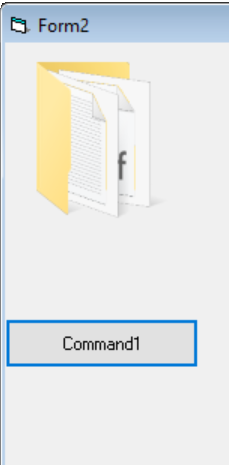
The strangest thing is that in a moment he walked but when he reset the project stopped working.
----------EDIT-----------------------------------------
For some strange reason when compiling the project, the IDE starts working, some library is loaded in memory that makes it work but what will be the library?
----------------------------------------------------------
vb Code:
Public Function GetThumbnailImage(ByVal fileName As String, ByVal lWidth As Long, ByVal lHeight As Long) As Long
     Dim DesktopFolder As IShellFolder
    Dim SomeFolder As IShellFolder
    Dim ExtractImage As IExtractImage
    Dim Pidl As Long
    Dim FilePidl As Long
    Dim IID_IShellFolder As UUID
    Dim IID_IExtractImage As UUID
    Dim ThePath As String
    Dim tSize As SIZE
    Dim FolderName  As String
    Dim ShortFileName As String
     CLSIDFromString StrPtr("{000214E6-0000-0000-C000-000000000046}"), IID_IShellFolder
    CLSIDFromString StrPtr("{BB2E617C-0920-11d1-9A0B-00C04FC2D6C1}"), IID_IExtractImage

      FolderName = Left$(fileName, InStrRev(fileName, "\") - 1)
    ShortFileName = Mid$(fileName, InStrRev(fileName, "\") + 1)
     SHGetDesktopFolder DesktopFolder

    Call DesktopFolder.ParseDisplayName(0&, 0&, StrPtr(FolderName), 0, Pidl, 0)
    Call DesktopFolder.BindToObject(Pidl, 0&, IID_IShellFolder, SomeFolder)
     Call SomeFolder.ParseDisplayName(0&, 0&, StrPtr(ShortFileName), 0, FilePidl, 0)
    Call SomeFolder.GetUIObjectOf(0&, 1, FilePidl, IID_IExtractImage, 0&, ExtractImage)
      ThePath = String$(MAX_PATH, 0)

    tSize.cx = lWidth
    tSize.cy = lHeight

    ExtractImage.GetLocation StrPtr(ThePath), MAX_PATH, 0&, tSize, 32, IEIFLAG_NOBORDER Or IEIFLAG_SCREEN Or IEIFLAG_OFFLINE

    GetThumbnailImage = ExtractImage.extract

     'Dim ISIIF As IShellItemImageFactory
    'Dim IID_IShellItemImageFactory As UUID
    'Dim hr As Long
    'Dim hBmp As Long

    'CLSIDFromString StrPtr("{BCC18B79-BA16-442F-80C4-8A59C30C463B}"), IID_IShellItemImageFactory
    'hr = SHCreateItemFromIDList(FilePidl, IID_IShellItemImageFactory, ISIIF)
    'hr = ISIIF.GetImage(tSize.cx, tSize.cy, SIIGBF_THUMBNAILONLY, hBmp)

    'GetThumbnailImage = hBmp
     CoTaskMemFree (Pidl)
    CoTaskMemFree (FilePidl)
 End Function
vb Code:
Private Sub Command1_Click()
    Dim hBmp As Long
    Dim hImgList As Long

    hBmp = GetThumbnailImage(Environ("userprofile"), 120, 120)
    hImgList = ImageList_Create(120, 120, ILC_COLOR32 Or ILC_MASK, 0, 0)
    Call ImageList_Add(hImgList, hBmp, 0)
    ImageList_Draw hImgList, 0, Me.hdc, 0, 0, ILD_TRANSPARENT

    DeleteObject hBmp
End Sub
I clarify, my intention is to obtain the thumbnails, not the icon
Last edited by LeandroA; Jan 29th, 2017 at 10:45 PM.
Tags for this Thread
 Posting Permissions
- You may not post new threads
- You may not post replies
- You may not post attachments
- You may not edit your posts
-
Forum Rules
|
Click Here to Expand Forum to Full Width
|



 Reply With Quote