|

-
Oct 26th, 2016, 03:23 AM
#1
Thread Starter
Junior Member

 [RESOLVED] Loop in a Cell - Wrapped Cell [RESOLVED] Loop in a Cell - Wrapped Cell
Hey Guys,
I'm writing a VBA Macro which splits a long String in a lot of substrings and copies them in new Columns.
My problem now is, that there is a Column called "Spare Parts" and in that Column there are only Cells which contain wrapped text.
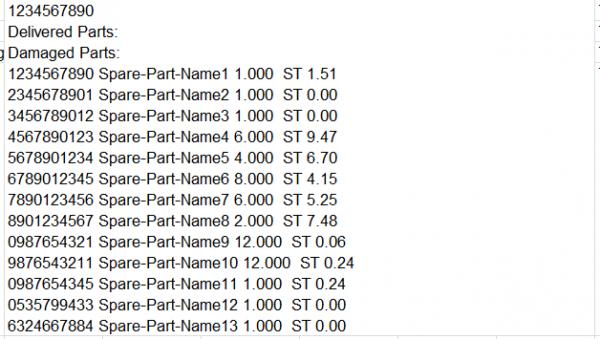
The lines in the cells, except of the first 3, always look the same:
---> Spare Part ID(10Digits) , Spare Part Name , Number of Units , Price per Unit
And I need to split those 4 parts into individual strings.
I already managed to split those 4 parts and copy them in new Columns if there is only one String in a cell.(=No wrapped cell)
But I dont know how to do that in a Wrapped Cell?
I think I need to get the index of the position of the first "line break" character and save that value and then work with that ?
Somebody has any ideas and maybe some code examples or something like that?
Thank you guys in advance!
Last edited by capk; Oct 26th, 2016 at 08:22 AM.
Tags for this Thread
 Posting Permissions
- You may not post new threads
- You may not post replies
- You may not post attachments
- You may not edit your posts
-
Forum Rules
|
Click Here to Expand Forum to Full Width
|



 Reply With Quote