|

-
Mar 15th, 2016, 02:23 PM
#1
Thread Starter
Lively Member

Two tab tips free of charge!
OK, so I am a newbie programmer and am enjoying it very much, but made a rookie mistake. I had built a form that looked and acted exactly as I wanted it to. It is a two tab form so users would enter data in the first tab, then switch to the second tab to see the results of the data entry. I had the user click on a button on the second tab to calculate and display the results in a datagridview. Since the data changes each time the user makes changes, why make the user click on the button to see the changes. Why not have the program compute the data when the user moves to the second tab. So I decided to fix it. I looked up an example on the internet and added a new tab to try it out. It worked perfectly, so I deleted the third tab....
First Tip! Do not hit the delete key on the tab control itself. This will delete the tab. Go to the collections button on the properties box to delete the tab. Lesson one learned. (I know this isn't worthy of a post, but wait'll tip two.)
Second Tip! I panicked and hit control Z and got my tab control back. The problem that I had was the main data entry was blank with a couple of labels and text boxes. I opened the form designer and all of the controls were listed, but I could't see them. I tried to create a new button with the same name, but it would't allow it. The error I got was that the button already existed. I knew my controls were there, just couldn't see them. After looking all over the internet for a solution, I realized what the problem was.
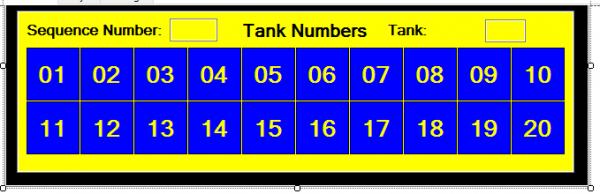
An example of the form is shown below. It has 20 buttons numbered 1 through 20. The user clicks on a button, the data is added to a file, the button turns red and is disabled until the file is saved and the next round of data is added. In order to make it look nicer, I added two text boxes of different colors to add a border around the buttons, each being a different color. As you can see, the buttons are blue, the first background is yellow and the second background is black. (This is just a partial screenshot, I keep the form beneath the text boxes white for other reasons). When I hit control z, it moved the order of of the buttons and text boxes. The yellow was forward, the black was second and the buttons were in the back hidden by the forms. All I had to do was to move the order of the controls to what they were originally and I am back in business.
There were many posts about this subject,but none of them that I read had this solution.
I appreciate this forum and wanted to contribute a tiny bit to it.
Thanks
Tags for this Thread
 Posting Permissions
- You may not post new threads
- You may not post replies
- You may not post attachments
- You may not edit your posts
-
Forum Rules
|
Click Here to Expand Forum to Full Width
|



 Reply With Quote