|

-
Feb 9th, 2016, 03:08 AM
#1
VB6 Threading-Examples using the vbRichClient5 ThreadHandler
As the Title says, three Threading-Examples which make use of the vbRichClient5-cThreadHandler-Class.
(as requested in this thread here: http://www.vbforums.com/showthread.p...=1#post4991011)
Make sure (in addition to downloading the SourceCode), that you download and install a new RC5-version (>= 5.0.40)
first before running the second, more advanced example (since it requires SQLites support for "FileURIs",
which were not yet recognized in the cConnection.CreateNewDB-method in RC5-versions below 5.0.40).
Here's the SourceCode for the three examples:
ThreadingRC5.zip
The Zip contains three Project-Folders (_Hello World, ThreadedDirScan and AsyncFolderCopy) -
please make sure, before running the Main-VB-Projects in those Folders,
to compile the appropriate ThreadLib-Dlls from their own LibProject-SubFolders - then
placing the compiled Thread-Dll-Files in the ParentFolder (where the Main-Projects reside).
Ok, how does it work - best we start with the simpler Example, the one in the _Hello World-Folder:
VB6-Threading works best and most stable (since it was designed for that), when the
"threaded Routines" reside in a compiled ActiveX-Dll(Class) - that's the one thing which
is a bit of a "hurdle" for those who never used or compiled ActiveX-Dll-Projects so far.
But it's really quite simple... When you start out fresh - and plan to use threading
(because you have a routine which is a long-runner, blocking your UI) - then the
first step should be, to move that critical Function (and its Sub-Helper-Routines) into:
1) a Private Class in your Main-Project first
- test it there, so that you're sure everything works Ok
- also check that this Class gets everything over Function-Parameters and doesn't rely on "global Variables" outside of it
if you already have such a Class in your Main-Project - all the better - you can now move this Class:
2) as a Public Class into a new ActiveX-Dll-Project (setting its Class-Instancing-Property to 5 - MultiUse)
In case of the _Hello World-Demo, this ThreadClass' is named cThread and its Code-Content looks entirely normal:
Code:
Option Explicit

Public Function GetThreadID() As Long
  GetThreadID = App.ThreadID
End Function

Public Function StringReflection(S As String) As String
  StringReflection = StrReverse(S)
End Function
Just two simple Routines, you plan to execute on the new Thread, which
your compiled SimpleThreadLib.dll is later instantiated on (by the Main-Thread).
As already mentioned, you can now compile this ActiveX-Dll Project, placing the Dll-Binary
in its ParentFolder (_Hello World), where the Main-StdExe-Project resides.
This StdExe-Project (ThreadCall.vbp in _Hello World) contains only a single Form, which in turn has this code:
For instantiation of the above ThreadDll-ThreadClass (cThread)
Code:
Option Explicit

Private WithEvents TH As cThreadHandler 'the RC5-ThreadHandler will ensure the communication with the thread-STA

Private Sub Form_Load() 'first let's instantiate the ThreadClass (regfree) on its own thread, returning "a Handler" (TH)
  Set TH = New_c.RegFree.ThreadObjectCreate("MyThreadKey", App.Path & "\SimpleThreadLib.dll", "cThread")
End Sub
And for Execution of the two Thread-Functions (from within Form_Click) it contains:
Code:
Private Sub Form_Click()
Dim StrResult As String, ThreadID As Long
  Cls
  Print Now; " (ThreadID of the Main-Thread: " & App.ThreadID & ")"; vbLf
  Print "Let's perform a few calls against the ThreadClass which now runs on its own STA "; vbLf

  'first we demonstrate synchronous Calls against the Thread-Instance, which was created regfree in Form_Load
  StrResult = TH.CallSynchronous("StringReflection", "ABC")
  Print "Direct (synchronous) StringReflection-Call with result: "; StrResult

  ThreadID = TH.CallSynchronous("GetThreadID")
  Print "Direct (synchronous) GetThreadID-Call with result: "; ThreadID; vbLf

  'now the calls, which are more common in threading-scenarios - the asynchronous ones, which don't
  'make the caller wait for the result (instead the results will be received in the Event-Handler below)
  TH.CallAsync "StringReflection", "ABC"
  TH.CallAsync "GetThreadID"

  Print "The two async calls were send (now exiting the Form_Click-routine)..."; vbLf
End Sub

'Our TH-Object is the clientside ThreadHandler, who's able to communicate with the Thread
'raising appropriate Events here, when results come back (in case of the async-calls)
Private Sub TH_MethodFinished(MethodName As String, Result As Variant, ErrString As String, ErrSource As String, ByVal ErrNumber As Long)
  If ErrNumber Then Print "TH-Err:"; MethodName, ErrString, ErrSource, ErrNumber: Exit Sub

  Print "MethodFinished-Event of TH for: "; MethodName; " with Result: "; Result
End Sub
That's all - I hope the above code-comments are sufficient - feel free to ask, when something is not clear.
Forgot to attach a ScreenShot of the Output produced by the Form_Click-Event above:
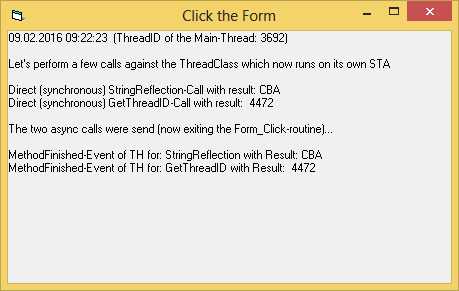
Will describe the second, more advanced example in a follow-up post in this thread.
Edit: The Demo-Zip now contains a third example (in SubFolder \AsyncFolderCopy),
to show how a low-level copying of an entire Folder-structure (with full control at the File-Level) can be implemented.
Olaf
Last edited by Schmidt; May 24th, 2016 at 02:09 PM.
 Posting Permissions
- You may not post new threads
- You may not post replies
- You may not post attachments
- You may not edit your posts
-
Forum Rules
|
Click Here to Expand Forum to Full Width
|



 Reply With Quote