|

-
Feb 4th, 2016, 05:19 PM
#1
Thread Starter
New Member

Trying to ftp my project with FileZilla
Hello,
I am trying to ftp my project with FileZilla.
In Visual Studio, in the Solution Explorer: I right clicked and selected Publish.
In Profile I selected New and named it.
In publish method, I selected Ftp, but it is only a guess, I don't know which one I am suppose to take. I then entered all my credentials, tested the connection it it came back "connected".
In configuration, I selected release, but again, I don't know what is behind that selection...
Then I hit Publish and if I go to my website, this is what I see:
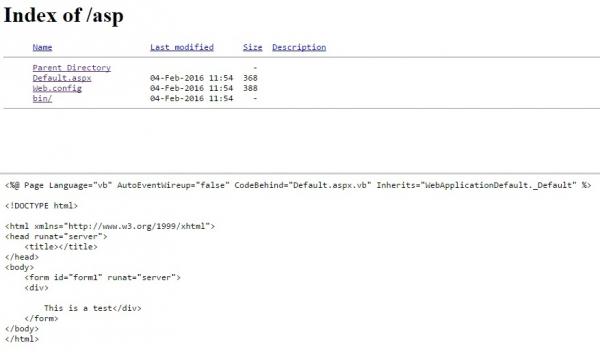
I tried different combinations with the wizard, but none of them seems to be working. Am I even at the right place??
Also, I googled a bit around and is the main page of a project (home page) is supposed to be named index.aspx or Default.aspx, it seems I can not find an answer on that as well.
Thank you kindly for helping me in advance!
Tags for this Thread
 Posting Permissions
- You may not post new threads
- You may not post replies
- You may not post attachments
- You may not edit your posts
-
Forum Rules
|
Click Here to Expand Forum to Full Width
|



 Reply With Quote