|

-
Dec 8th, 2015, 04:54 AM
#1
[VB6] Jet SQL Help in the IDE
Here's a very quick tutorial on getting help with Jet SQL syntax from within the VB6 IDE.
Some Background
Note that this is limited to Jet 3.5 SQL syntax since that is the help file VB6 shipped with and has Help links to. For information on Jet 4.0 SQL, ACE SQL, etc. you would have to install the appropriate version of MS Access to get those newer help files - but they can't be accessed this way from within VB6 as far as I know.
E.g. MS Access 2000, 2002, and 2003 come with JETSQL40.CHM, normally placed under a directory such as:
C:\Program Files\Common Files\microsoft shared\OFFICE11\1033
VB6 ships with and links to JETSQL35.HLP, normally placed under:
C:\Windows\Help
You may well be missing that VB6 help file if you skipped installing "database tools" when you installed VB6. This seems to be a common mistake.
Before you can use any of the HLP files that shipped and install with VB6 you may have to deal with installing HLP support if you are running a modern version of Windows. See:
Error opening Help in Windows-based programs: "Feature not included" or "Help not supported"
This has links to downloads of WinHelp32 installers for various versions of Windows. Also note the section there: How to enable macros on a single computer after you install WinHlp32.exe, which tells how to get rid of an annoying dialog that can pop up.
Once set up
Once you have the necessary help environment things are easy. Consider the following:
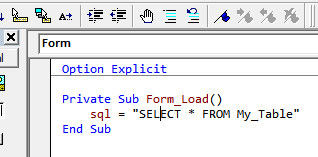
With the cursor over "SELECT" I press the F1 key and:

Oddly enough the VBA SELECT topic is the VB6 Select keyword as in Select Case, while VB Select here is the Jet SQL SELECT. So now I select the VB help instead of the VBA topic and click the Help button:

Voila!
For whatever reason people seem to have forgotten about this assistance. In any case a little preparation is required in order to make use of it on modern supported versions of Windows.
Also
I find it useful to create shortcuts to these help files, because sometimes I want to browse them for syntax details. You can create chortcuts to the Jet 3.5 SQL help and if you have them the Jet 4.0 SQL, ACE 12.0 SQL, etc. help as well.
Last edited by dilettante; Dec 8th, 2015 at 05:00 AM.
 Posting Permissions
- You may not post new threads
- You may not post replies
- You may not post attachments
- You may not edit your posts
-
Forum Rules
|
Click Here to Expand Forum to Full Width
|



 Reply With Quote