|

-
Dec 15th, 2014, 12:13 AM
#1
 [RESOLVED] Hit Testing + Rotation, Scaling & More [RESOLVED] Hit Testing + Rotation, Scaling & More
Just looking for some food for thought. Please refer to this image as you read the scenarios. Consider the 'white' area transparent. Sorry for the large read. Thought it would be helpful to give as much detail as I could & I'm sure I didn't predict everyone's questions in advance. This is not a priority of mine. I think it is more of a challenge than a problem...
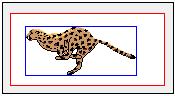
I am upgrading a control. Rewriting it is more accurate. One of the things I am improving is the hit testing of the control. There are 4 hit test options + a user-defined option. Regardless of the option, the image within the control can be rendered with various properties and those properties can affect the hit testing algorithm:
Centered/Left Aligned, Rotated, Scaled/Stretched, X/Y Offsets, Border offsets, and Mirroring Here are the hit test options:
Entire control dimensions with/without borders - black rectangle
Image Bounds (scaled from actual image size or stretched) - red rectangle
Trimmed Image Bounds (removes excess transparency but stays rectangle) - blue rectangle
Shaped (the cheetah image, no transparent pixels) - this would be a Windows region Here are permanent cached dimensions
the scaled image bounds (white area of the picture)
the control dimensions (area enclosed by black rectangle)
I'm obviously interested in speed. Hit tests should be accurate and fast IMO. The 1st hit test option above is a no-brainer. The other areas are dynamic and can change due to animation, resizing, mirroring, rotation, etc. For a quickie on how key properties affect those hit test areas:
Rotation: Red/Blue rectangles are rotated, Shape/Region is rotated; sizes may alter slightly
Scaling: Red/Blue rectangles change size & position depending on centering. Same for Shape/Region
Mirroring: Red rectangle does not change, but Blue rectangle & Shape/Region position can change
Optional Offsets/Borders: Red/Blue rectangles & Shape/Region change positions
The Image Bounds hit test option requires no extra work and its size is cached, not its position. But the last two require the image to be touched. To trim an image (Blue Rectangle), the image pixels are scanned to find the tightest rectangle encompassing all non-transparent pixels. And to create a shaped region, every pixel must be touched to determine what is added to the region. So, these last two options are the speed bumps.
I'll now cut to the chase. I've pretty much made up my mind to perform hit tests by not trying to calculate all the possible sizes/positions/angles that the rectangles and region can be in and using some sort of Point In Polygon algo to determine hit tests for rectangles. This wouldn't help much for regions anyway. What I've fixated on was rotating/scaling/shifting the X,Y coordinate passed for hit testing to the pertinent hit test area as if it were not rotated/scaled/shifted.
I'm happy with the result except for 1 specific case. Touching the image when some properties change.
For the Trimmed (Blue Rectangle) option, I've chosen to cache the trimmed dimensions for the full size image which means image has to be touched once. When scaling occurs, I scale that rectangle based on the full-size & scaled-size ratios. Works well, caching just 4 extra points (Single vartype). Mirroring can effect positioning, but I've got that down too
For the Shaped/Region option, here's where I'd like some thoughts. Obviously, I'd like to touch the image just once. Rotation, mirroring, and offsets/shifting are handled without ever touching the image again. But scaling is a concern. Windows regions are lots of rectangles (Long vartype). APIs exist that will scale a region so one doesn't have to retrieve & process the region rects. Scaling causes rounding due to Long vartypes. Rounding results in loss of accuracy for the hit tests, especially with small areas in the region that can get basically zeroed out.
I am against caching the full-size region just to scale it, as needed, when the image scales. That requires keeping 2 regions and each region can contain 100's/1000's of rectangle structures. I don't like the idea of retrieving & processing each rectangle or doing hit testing on each. Ideas? Currently, I'm stuck with re-scanning the image whenever scale changes to re-create the region (on demand). Not a horrible predicament, but would like better.
Last edited by LaVolpe; Dec 15th, 2014 at 01:00 AM.
Reason: without metioning transparency, seems like no problem at all. Oops
 Posting Permissions
- You may not post new threads
- You may not post replies
- You may not post attachments
- You may not edit your posts
-
Forum Rules
|
Click Here to Expand Forum to Full Width
|



 Reply With Quote