|

-
Jul 4th, 2014, 06:34 AM
#1
Thread Starter
Lively Member


 [RESOLVED] Problem with paste text on right location. [RESOLVED] Problem with paste text on right location.
Hello guys,
I got a problem...
How do I paste the text between,
the 2 linebreaks,
I googled some but I am not so familiar with "selection.paste"
Please help me out
see the picture
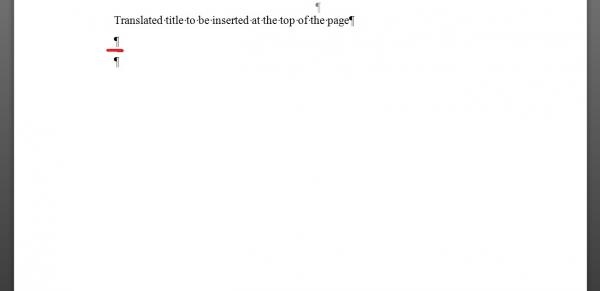
Here is the code (see below)
Sub test()
'
' test
'
'
Dim oRng As Word.Range
Set oRng = ActiveDocument.Range
With oRng.Find
.Text = "Claims"
.Font.Name = "Arial"
.Font.Bold = True
Do While .Execute
oRng.MoveEndUntil Chr(11)
oRng.MoveEnd wdCharacter, 1
oRng.MoveEndUntil Chr(11)
oRng.HighlightColorIndex = wdBrightGreen
oRng.Collapse wdCollapseEnd
Loop
End With
Dim thisdoc As Document
Dim Str
Set thisdoc = ActiveDocument
Dim targDoc As Word.Document
Set targDoc = Application.Documents.Open("G:\patent\NewEuropat.dot")
Documents(thisdoc).Activate
For Each Str In ActiveDocument.StoryRanges
Str.Find.ClearFormatting
Str.Find.Text = ""
Str.Find.Highlight = True
While Str.Find.Execute
Str.Copy
Documents(targDoc).Activate
' Here------------------------
Selection.Paste
' Here-----------------------
Documents(thisdoc).Activate
Wend
Next
With cleanform
Documents(targDoc).Activate
Selection.WholeStory
Options.DefaultHighlightColorIndex = wdNoHighlight
Selection.Range.HighlightColorIndex = wdNoHighlight
Selection.Font.Bold = wdToggle
Selection.Font.Name = "Times New Roman"
Selection.Font.Size = 12
End With
End Sub
Please help a newb out
Thank you in advance,
Tags for this Thread
 Posting Permissions
- You may not post new threads
- You may not post replies
- You may not post attachments
- You may not edit your posts
-
Forum Rules
|
Click Here to Expand Forum to Full Width
|



 Reply With Quote