|

-
Feb 28th, 2014, 04:03 PM
#1
VB6 lightweight PNG-Controls (4-State-PngButtons and a moveable Png-Image/Sprite)
The small Demo shows a lightweight Implementation of GDI+ based Png-Handling,
encapsulated in two small and resource-friendly windowless Controls...
It's a variation (with some improvements) from my other CodeBank-post here:
http://www.vbforums.com/showthread.p...ely-per-WIA%29
One is for (Moveable) Images or Sprites -> ucPngPicture.ctl - the other is to handle
"4-State-Png-Image"-based Buttons (Normal, Hovered, Pressed, Disabled) -> ucPngButton.ctl.
Here's a ScreenShot, what the combined 4-State-Button-Pngs look like:
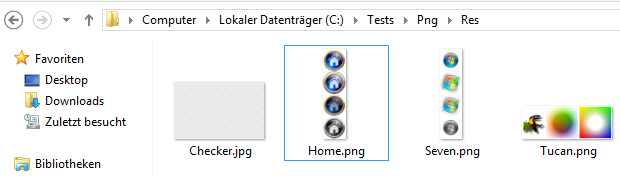
The Button-States-PngResources could also be adjusted to work with 5 States (e.g. when
you want to introduce also a "Focused" State - its just about enhancing the Png-Resource
about the new "State-Area" - and adding a few lines of code, which ensure the correct
Offset within the Controls "Refresh-Drawings"-routine.
To incorporate it into your existing Projects, you will have to include the 4 Files:
- modPngCache.bas <- only contains a global Definition of PngCache As cPngCacheGDIp
- cPngCacheGDIp.cls <- the GDI+ Handling (APIs and conversion into a 32Bit VB-StdPicture-DIB)
- ucPngPicture.ctl <- the Png-Image- or Png-Sprite-Control
- ucPngButton.ctl <- the (currently) 4-State-Png-Button-Implementation
Here's the Download-Link:
http://vbRichClient.com/Downloads/Pn...AndButtons.zip
The Source-Code within the Form is quite small (BTW, also demonstrating the
usage of VBs Usercontrols built-in HitTest-capabilities):
Code:
Option Explicit

Private Sub Form_Initialize() '<- early loading of all Png-Resources under their Keys (before Main-Form_Load)

  'here we add true Alpha-Channel-Png-Images to the cache (with 4 Button-States per Image)
  PngCache.AddImage "Home", App.Path & "\Res\Home.png"
  PngCache.AddImage "Seven", App.Path & "\Res\Seven.png"

  'now we cache another Alpha-Png, which will be rendered in a moveable Control
  PngCache.AddImage "Tucan", App.Path & "\Res\Tucan.png"
End Sub

Private Sub Form_Load()
  'just VBs normal LoadPicture-Function, providing the Forms BackGround-Img from a *.jpg
  Set Picture = LoadPicture(App.Path & "\Res\Checker.jpg")
End Sub

Private Sub Form_Resize() 'this adjusts the two Btns, which share the "Seven"-Key at the LeftBottom-Form-Edge
  ucPngButton(3).Move 7, ScaleHeight - ucPngButton(3).Height
  ucPngButton(4).Move 54, ScaleHeight - ucPngButton(4).Height
End Sub

Private Sub Form_Paint() '<- now that's iportant here for flickerfree rendering
  'to receive Form_Paint-Events, the Form needs to remain at the default (AutoRedraw = False)
  'then we need to ensure, that each and every Png-Usercontrol we use on this Form, gets refreshed

  '...starting with the Z-ordering "Bottom-Up" (the first refr. ucPng-Ctl is "bottom-most", a.s.o.)
  ucPngPicture1.Refresh

  Dim i As Long 'after the movable Png-Picture-Ctl above, we follow up with our 4 Png-Buttons below
  For i = 1 To 4: ucPngButton(i).Refresh: Next
End Sub

Private Sub ucPngButton_Click(Index As Integer)
  Caption = "ucPngButton " & Index & " -> " & ucPngButton(Index).Key
End Sub

'just a demonstration of the HitTest-Event (which by default, when not explicitely handled - would
'detect a Hit on the current *rectangular* Ctl-Region) - here we adjust the Hit-Detection with the
'"circle-formula" -> R = Sqr(x^2 + y^2), to the circular region of the round Buttons, so when you move
'the Mouse diagonally across the Button-"edges", it should give a hit only when you cross the circumference
Private Sub ucPngButton_HitTest(Index As Integer, X As Single, Y As Single, HitResult As HitResultConstants)
  Const R = 20 '<- we define a Radius of 20 Pixels for our userdefined HitTest
  Dim cx: cx = ucPngButton(Index).Width / 2
  Dim cy: cy = ucPngButton(Index).Height / 2

  HitResult = IIf(Sqr((X - cx) ^ 2 + (Y - cy) ^ 2) < R, vbHitResultHit, vbHitResultOutside)
End Sub
And the appropriate ScreenShot of the small Demo-App:
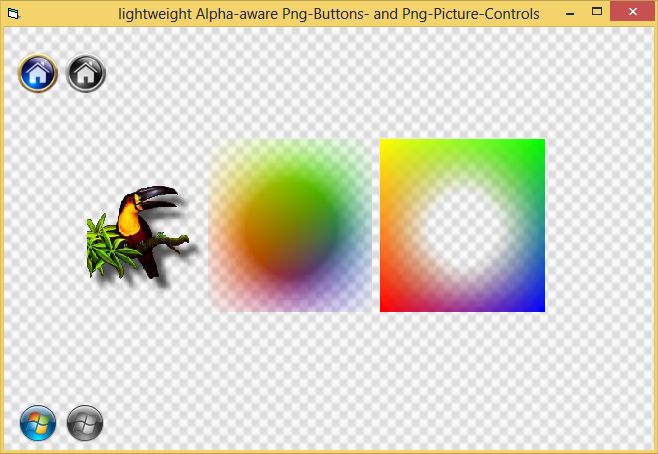
Have fun with it...
Olaf
Last edited by Schmidt; Feb 28th, 2014 at 06:22 PM.
 Posting Permissions
- You may not post new threads
- You may not post replies
- You may not post attachments
- You may not edit your posts
-
Forum Rules
|
Click Here to Expand Forum to Full Width
|



 Reply With Quote