|
-
May 8th, 2013, 08:00 AM
#1
Thread Starter
Addicted Member

DatatGridView Advanced Styling
Hi Need help in styling a DGV that is attached to a Dataset using the database built in to VB,
1)How do i go about changing the color of each row
Example :-
First Row Background Color = #F1F1F1
Next Row Background Color = #FFFFFF
Every Row after that is repeated
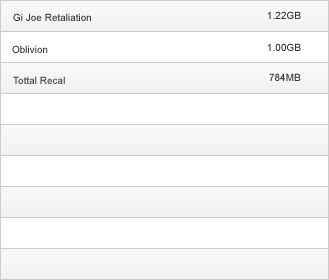
2) How do i Go about having No Border for a column But Border For Rows i.e
Demo Pic also includes the Row color example from question 1

3) How can i have the whole DGV area filled with empty rows when the form loads
Example :-
Say the dataset only has 3 rows of data but the DGV area on the form can contain 9
How can i make the remainding 6 rows show on screen empty.
Sorry if this is all to much but i have honestly been playing in vb around and browsing google for 2 weeks trying to work this out but have had no luck
Thanks in advanced
 Posting Permissions
- You may not post new threads
- You may not post replies
- You may not post attachments
- You may not edit your posts
-
Forum Rules
|
Click Here to Expand Forum to Full Width
|



 Reply With Quote