|

-
Mar 20th, 2013, 09:34 AM
#1
Thread Starter
Junior Member

Putting mutliple scroll bars in the middle of the sheet.
I'm working on a COM add in, but I would be happy to have this solved in VB or VBA. I have user reports that are generated based off selections from a database, then the sheet is added into an existing sheet. I've been told I need to keep the same basic format and leave it in Excel. The problem is that these lists within the form could be of a much longer length than there is space for.
Here is what the current form looks like:
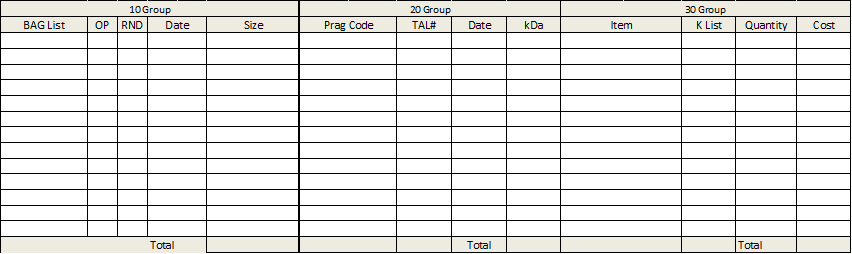
My thought on a solution was to drop the total to the theoretical end of the Worksheet (these are the bottom of the form), and then have the middle scroll with a scroll bar.
Is there a way to have 3 separate scroll bars that only scrolls each table (again there is stuff above these that wouldn't scroll)? I've only seen scroll bars that scroll the whole sheet.
Is there a better approach?
Tags for this Thread
 Posting Permissions
- You may not post new threads
- You may not post replies
- You may not post attachments
- You may not edit your posts
-
Forum Rules
|
Click Here to Expand Forum to Full Width
|



 Reply With Quote