|

-
Dec 5th, 2012, 12:02 AM
#1
Thread Starter
Junior Member

 [RESOLVED] Icon won't change on Explorer [RESOLVED] Icon won't change on Explorer
Hello guys!
So, I'm having a damn issue... I've changed my app's icon by doing this:
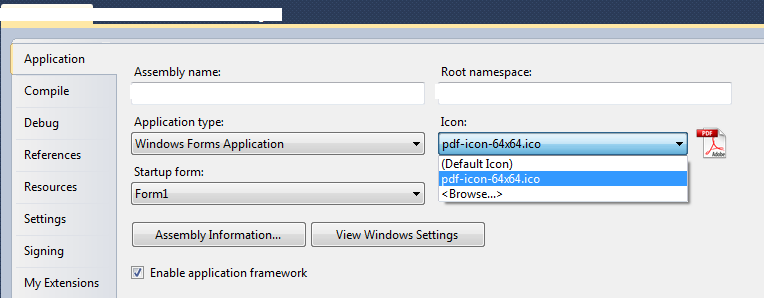
As you can see, there's only 1 icon in the history. But I've used others previously, so I did delete them...
The problem is: always when I change my app's icon by this way, the new build of my app is going to have the previous icon, not the new one! This occurs in the Explorer view... It seems that the old icons are attached to the previous name of my build, as you guys can see here:

If I change my app's name to the previous one (the name that I used when it had an old icon), the icon changes to the previous one! As you can see in the image, the EXEs are ALL the same (same build, same MD5), I've used 3 icons previously, and just because I renamed them, they change their icon.
If I use a new name to my app, the icon changes to a new one... I don't know how to explain this, it's really strange. I think this happened to me years ago and I had to figure out by myself, because I couldn't find anything in the internet.
I hope the images help, and I've already tried rebuilding Windows Icons Cache and rebooting the system...
Last edited by vitorc93; Dec 5th, 2012 at 12:30 AM.
 Posting Permissions
- You may not post new threads
- You may not post replies
- You may not post attachments
- You may not edit your posts
-
Forum Rules
|
Click Here to Expand Forum to Full Width
|



 Reply With Quote