|

-
Sep 3rd, 2012, 05:35 PM
#1
Thread Starter
New Member

Responding to Browser prompt
Not sure if this is the correct forum for this question. I'm working in VBA - Excel (2010)
I'm attempting to download a CSV file from a web based data logging system. Unfortunately, the system does not provide the URL to the CSV file. Instead, the URL triggers a CGI Script (the URL looks something like this - http://www.vendortool.com/cgi-bin/cg...d=site_ID=1071)
After sending this URL, the browser responds with a dialog box (hopefully, shown below)
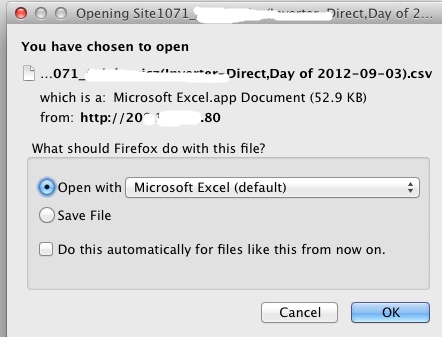
My choices are "open with Excel" or "Save File"
How do I automatically start the download and capture the subsequent CSV data (I don't need to save the data, just process a few numbers)
I should note, that I'm doing this on a Windows 7 machine with Office 2010 and I'm creating an instance of Explorer and sending the URL (the Firefox graphic above was for illustration only) I have no difficulty capturing the page that comes down just before the csv dialog box is presented :-(
Thanks in Advance,
Mark
Last edited by durrenm; Sep 3rd, 2012 at 05:42 PM.
Reason: more info
Tags for this Thread
 Posting Permissions
- You may not post new threads
- You may not post replies
- You may not post attachments
- You may not edit your posts
-
Forum Rules
|
Click Here to Expand Forum to Full Width
|



 Reply With Quote