|

-
Sep 1st, 2012, 12:03 PM
#6
Re: Small desktop application. I need an experienced VB user to help me on a few poin
i'd use a class (call it record), with public properties for:
- Title
- Artist
- Type
- Year
- Image
vb.net Code:
<System.Serializable()> Public Class record Private _Title As String Private _Artist As String Private _Type As String Private _Year As Integer Private _Image As Image Public Property Title() As String Get Return _Title End Get Set(ByVal value As String) _Title = value End Set End Property Public Property Artist() As String Get Return _Artist End Get Set(ByVal value As String) _Artist = value End Set End Property Public Property Type() As String Get Return _Type End Get Set(ByVal value As String) _Type = value End Set End Property Public Property Year() As Integer Get Return _Year End Get Set(ByVal value As Integer) _Year = value End Set End Property Public Property Image() As Image Get Return _Image End Get Set(ByVal value As Image) _Image = value End Set End Property End Class
you need to create a dialog for adding new records, with 3 textboxes, a numericupdown, a picturebox + 3 buttons (see image).
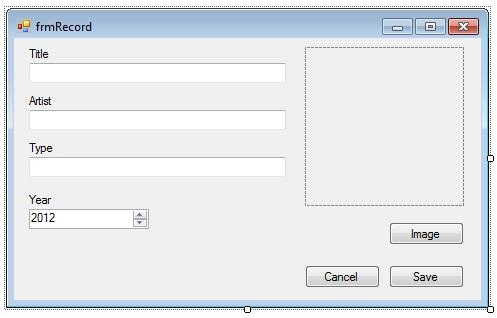
note: the cancel button's dialogresult property is Cancel + the save button's dialogresult property is OK.
in the dialog form's sub new you'd load the controls from the instance of record passed in.
it could either be a new record, or you've reopened an existing record:
vb.net Code:
Public Class frmRecord Private _currentRecord As New record Public Property currentRecord() As record Get Return _currentRecord End Get Set(ByVal value As record) _currentRecord = value End Set End Property Public Sub New(ByVal r As record) InitializeComponent() TextBox1.Text = r.Title TextBox2.Text = r.Artist TextBox3.Text = r.Type NumericUpDown1.Value = If(r.Year <> 0, r.Year, Now.Year) PictureBox1.Image = r.Image currentRecord = r End Sub Private Sub TextBox1_TextChanged(ByVal sender As System.Object, ByVal e As System.EventArgs) Handles TextBox1.TextChanged currentRecord.Title = TextBox1.Text End Sub Private Sub TextBox2_TextChanged(ByVal sender As System.Object, ByVal e As System.EventArgs) Handles TextBox2.TextChanged currentRecord.Artist = TextBox2.Text End Sub Private Sub TextBox3_TextChanged(ByVal sender As System.Object, ByVal e As System.EventArgs) Handles TextBox3.TextChanged currentRecord.Type = TextBox3.Text End Sub Private Sub NumericUpDown1_ValueChanged(ByVal sender As System.Object, ByVal e As System.EventArgs) Handles NumericUpDown1.ValueChanged currentRecord.Year = CInt(NumericUpDown1.Value) End Sub Private Sub Button1_Click(ByVal sender As System.Object, ByVal e As System.EventArgs) Handles Button1.Click 'declare new OpenFileDialog + set it's initial properties Dim ofd As New OpenFileDialog With { _ .Title = "Select image file", _ .Filter = "BMP (*.bmp)|*.bmp|GIF (*.gif)|*.gif|JPG (*.jpg)|*.jpg|PNG (*.png)|*.png|All Files (*.*)|*.*", _ .FilterIndex = 0, _ .InitialDirectory = Environment.GetFolderPath(Environment.SpecialFolder.MyDocuments)} 'show the dialog If ofd.ShowDialog = DialogResult.OK Then PictureBox1.Image = New Bitmap(ofd.FileName) currentRecord.Image = PictureBox1.Image End If End Sub End Class
then in your main form a list(of record) + an add new record button, an imageList, + a listview setup for large icon.
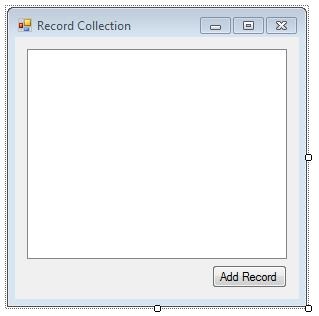
in the button_click event, create a new instance of record class + a new instance of your add dialog form + pass the record variable
in the listview doubleclick, you'd open the selected item in the add new dialog.
at form_closed you'd serialize the list(of record) as binary, then in form_load you'd check if the binary file exists + if so, deserialize it back in to your list(of record)
vb.net Code:
Public Class Form1 Dim records As New List(Of record) Dim iml As New ImageList Private Sub Form1_FormClosed(ByVal sender As Object, ByVal e As System.Windows.Forms.FormClosedEventArgs) Handles Me.FormClosed Dim formatter As New Runtime.Serialization.Formatters.Binary.BinaryFormatter Dim myWriter As New IO.FileStream("test.bin", IO.FileMode.Create) formatter.Serialize(myWriter, records) myWriter.Close() End Sub Private Sub Form1_Load(ByVal sender As System.Object, ByVal e As System.EventArgs) Handles MyBase.Load ListView1.LargeImageList = iml iml.ImageSize = New Size(64, 64) If IO.File.Exists("test.bin") Then Dim formatter As New Runtime.Serialization.Formatters.Binary.BinaryFormatter Dim fs As New IO.FileStream("test.bin", IO.FileMode.Open) records = DirectCast(formatter.Deserialize(fs), Global.System.Collections.Generic.List(Of record)) fs.Close() For Each r In records iml.Images.Add("", New Bitmap(r.Image, 64, 64)) Dim item As ListViewItem = ListView1.Items.Add(r.Artist & Environment.NewLine & r.Title, iml.Images.Count - 1) item.Tag = r Next End If End Sub Private Sub Button1_Click(ByVal sender As System.Object, ByVal e As System.EventArgs) Handles Button1.Click Dim r As New record Dim frm As New frmRecord(r) If frm.ShowDialog = Windows.Forms.DialogResult.OK Then records.Add(frm.currentRecord) iml.Images.Add("", New Bitmap(frm.currentRecord.Image, 64, 64)) Dim item As ListViewItem = ListView1.Items.Add(frm.currentRecord.Artist & Environment.NewLine & frm.currentRecord.Title, iml.Images.Count - 1) item.Tag = frm.currentRecord End If End Sub Private Sub ListView1_MouseDoubleClick(ByVal sender As Object, ByVal e As System.Windows.Forms.MouseEventArgs) Handles ListView1.MouseDoubleClick If ListView1.HitTest(e.Location).Item.Index > -1 Then Dim item As ListViewItem = ListView1.HitTest(e.Location).Item Dim frm As New frmRecord(DirectCast(item.Tag, record)) If frm.ShowDialog = Windows.Forms.DialogResult.OK Then records(ListView1.HitTest(e.Location).Item.Index) = frm.currentRecord iml.Images(ListView1.HitTest(e.Location).Item.Index) = New Bitmap(frm.currentRecord.Image, 64, 64) ListView1.HitTest(e.Location).Item.Text = frm.currentRecord.Artist & Environment.NewLine & frm.currentRecord.Title ListView1.HitTest(e.Location).Item.Tag = frm.currentRecord End If End If End Sub End Class
Last edited by .paul.; Sep 1st, 2012 at 12:15 PM.
- Coding Examples:
- Features:
- Online Games:
- Compiled Games:
Tags for this Thread
 Posting Permissions
- You may not post new threads
- You may not post replies
- You may not post attachments
- You may not edit your posts
-
Forum Rules
|
Click Here to Expand Forum to Full Width
|



 Reply With Quote