|

-
Jan 6th, 2012, 08:59 AM
#1
Thread Starter
Member

Pasting a word document to an intranet page
Hello everyone, am very new to the forum but my very limited experience here so far has been positive.
I am trying to build a word automation macro.
Background:
In my day job I am responsible for maintaining an intranet site for a large bank. One of the most monotonous and time consuming parts of my job is to take articles from word documents and copy + paste them onto the intranet, so I thought I would try to build a macro that can do this for me.
Aim:
I want a macro that will take an article from Microsoft Word 2003 and turn that article into an article page on SharePoint. If you haven’t used SharePoint before then rest assured its nothing complicated, its just a an Internet Explorer based way of creating and administrating intranet pages, very simple.
Technical details and limitation:
• My workplace runs Microsoft SharePoint 2007, Microsoft Word 2003, Internet Explorer 8 and VBA version 6.5.1053.
• As far as I know, the only program that I could write a macro in is the VBA that comes with Microsoft Office VBA (i.e going into word and bringing up VBA with Alt +F11).
• I cannot install anything on my work computer but I can create a macro as VBA is already a part of Microsoft Office.
• I have extremely limited experience with Macros, I have used Macro’s in the past by recording a macro for some simple tasks and then replaying them, I know how to look at code and step through it but I don’t really know what the code itself means. My lack of knowledge might become a communication barrier so apologise in advance for stupid questions and I greatly appreciate your patience.
What I need the macro to do step by step.
1. It should be possible to launch the macro from any article. For my explanation ill use a mock article about the Smurfs. For the purpose of this projects lets call this Word document ‘SampleArticle’. Once I have opened ‘SampleArticle’ I would like to be able to press Alt+F8 and run the macro.
2. The Macro should open the following page using internet explorer: http://onebank.intranet/news/_layouts/CreatePage.aspx
this is the page used by SharePoint to create article pages. For the purpose of this project lets call this page ‘CreatePage’. In this page the following form appears:
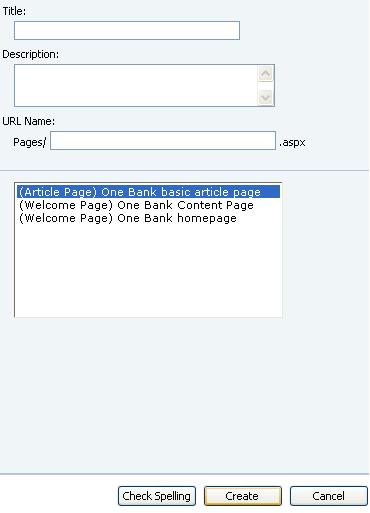
As you can see from the screen shot, ‘CreatePage’ has several text boxes. The important ones are ‘Title’and ‘URL Name’. The cursor starts in the ‘Title’ box.
3. The Macro should take cut the first line (The title) from the ‘SampleArticle’ and paste it into the ‘Title’ box in ‘CreatePage’
4. The Macro should then paste take the same text and paste it into the ‘URL Name’ box but it needs to remove all the non-letter characters and replace all the spaces with hyphens. The end result should look like this:
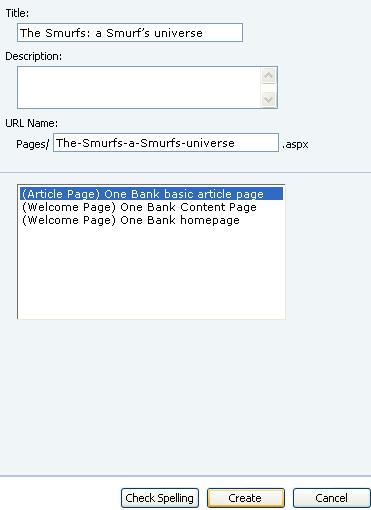
As you can see, the characters “:”and “’” appear in the first box but are removed in the second box, also, any spaces have been replaced with hyphens. Now here is a tricky point. If the title had had a hyphen in it, that hyphen would also need to be deleted and replaced by a hyphen. I know this sounds a bit weird but this creates problems down the line if this is not done.
I was thinking that navigation between the boxes should be done using SendKeys but alas, my skills with VB are not good enough to do this, for some reason it doesn’t work for me. The cursor starts in the ‘Title’ box, it takes two presses of TAB to navigate to ‘URL Name’ box and 3 presses of TAB to get to ‘Create’. Then the Macro should press the ‘Create’ button to create the page. I have been told that SendKeys are sort of the idiots way of doing this and that a macro can actually select boxes directly if you have their element ID, unfortunately I don’t know how to find this out in internet explorer (only in Chrome) so if someone could give me some directions I could always come back with some more info.
Once you click create, SharePoint will create a page with the following URL:
http://onebank.intranet/news/Pages/T...layMode=Design
This page will look like this:
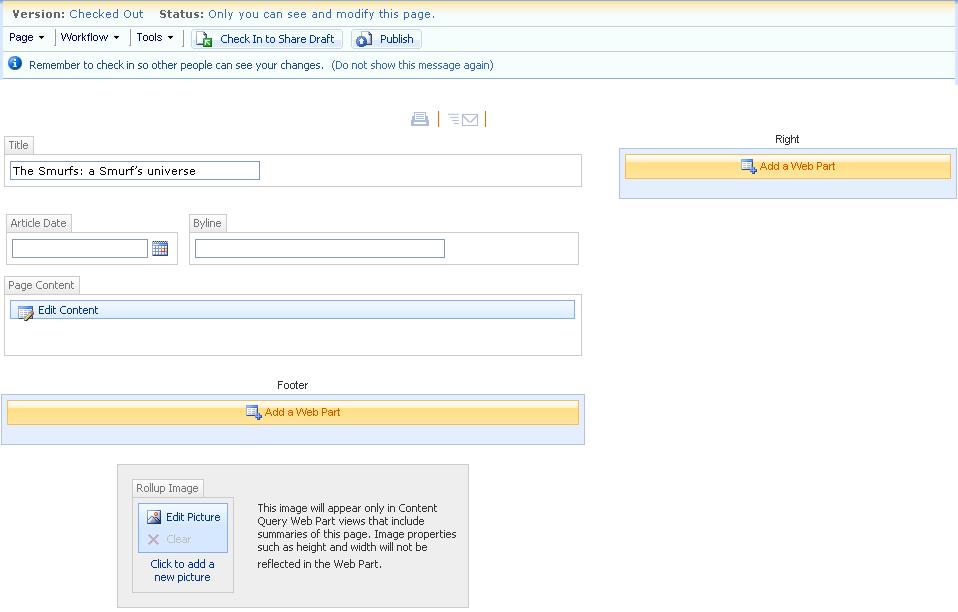
Side note: The middle part of the URL titled ‘The-Smurfs-a-Smurfs-universe’ is taken directly out of the ‘URL Name’ box on the previous page. So if you had put something different in that box say ‘Test-one-two-three’, the URL would be:
http://onebank.intranet/news/Pages/T...layMode=Design
Also, as you may notice, the title box is automatically filled out using the text from the previous page.
5. The macro now needs to enter the date. And paste the remainder of the article into the big box ‘Page Content’. Again, the cursor starts in the ‘title’ box. Using SendKeys, six tabs (i.e TAB->TAB-TAB->TAB->TAB->TAB) will navigate from the title box to the ‘Page Content’ box.
Now the macro needs to publish the remainder of the text from ‘SampleArticle’.
Then SendKeys can be used to navigate back to the Datebox and enter the current date. The commands should be: Ctrl +home -> Shift+tab -> Shift+tab -> Shift+tab -> Shift+tab -> Enter -> Enter.
This will fill the current dates into the date box.
The final result will look like this:
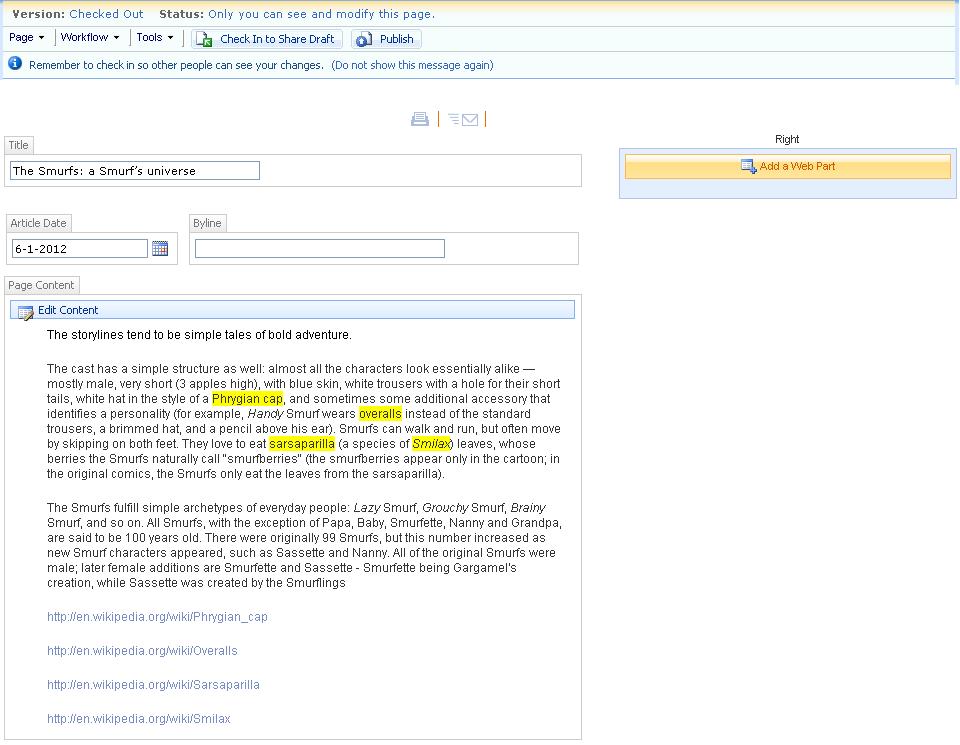
Now the Macro needs to press publish, I am not sure how to do this with SendKeys so will probably need someone to help me out with how this might be done.
These 5 things would already greatly increase the efficiency of my work. I have some other issues with how the text that is pasted needs to be formatted which can also be automated (i.e how to automatically hyperlink the yellow highlighted key words) but ill wait and see if this first part is solvable first.
Looking forward to your advice.
Hugely appreciative.
P.S: the tragedy and irony of this whole thing is that Microsoft has already written some code for this process. As of Word 2007 upwards, users can save a Word page directly onto SharePoint. Unfortunately I have no way of upgrading to Word 2007. Corporate bureaucracy….
P.P.S: I cant seem to insert pictures into my post, I can only attach them at the bottom. The 'Insert Image' icon is not clickable for me (resolved 10.01.13)
Last edited by Mango Eldar; Jan 10th, 2012 at 05:07 AM.
Reason: Updating problems that have been resolved.
Tags for this Thread
 Posting Permissions
- You may not post new threads
- You may not post replies
- You may not post attachments
- You may not edit your posts
-
Forum Rules
|
Click Here to Expand Forum to Full Width
|



 Reply With Quote