If you ever have a situation where you cannot use the built-in Process class to launch a process (like if you need to launch the process with a specific access token for example) but you need to be able to redirect the input and output (StdIn and StdOut) of the process to your own program then this should help you out. This only really applies if you are wanting to launch and interact with console applications because GUI applications dont tend to ever look at StdIn or StdOut.
It is not very straight forward and took me ages to get it working so I would certainly advise people to try and use the built in Process class and its redirection abilities wherever possible rather than using this method... but as mentioned above, unfortunately there are some scenarios where this is not possible.
Ive attached the project files for a demo application I've written that lets you launch a process, send text input to it, and read its output in a background thread. I have added loads of comments to it but feel free to ask if you have any questions about how it works.
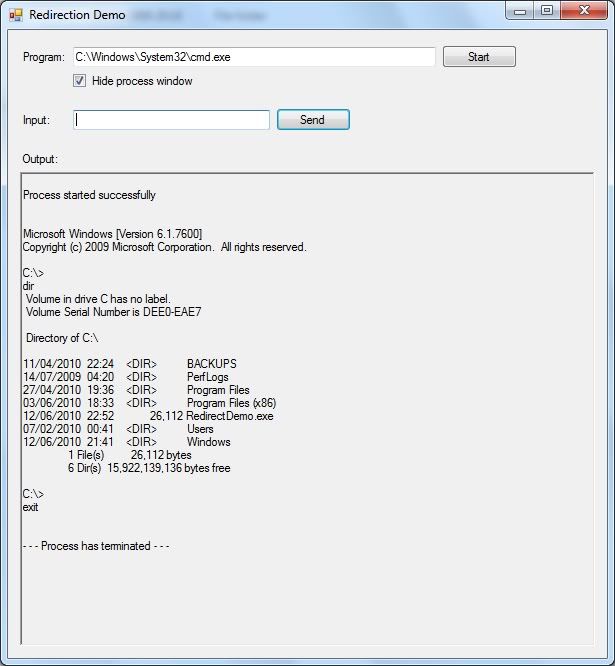
See end of post for attached project files, but here's an example of what it does:
So as you can see in the example above, I've launched command prompt (hidden) and sent the command "dir" to it (which makes it list all files and folders in the current folder) then sent the command "exit" which makes the command prompt terminate itself, and the program realises and shows an appropriate message.
There are a few quirks, which are as follows: --- On Windows XP some characters in the output do not get displayed correctly - no idea why this is, as I had the same issue on Windows 7 but then I changed the encoding of the text to the encoding that command prompt uses (cp850) rather than ASCII and that sorted it out on Windows 7 but made no difference on XP. Its only some special characters so most people probably wont ever notice this. --- Telnet does not want to work at all, even though every other program I've tried does. --- On Windows XP the output for some commands doesnt have line breaks where it should - ipconfig is the main one I've had issues with. Its still usable, just a bit harder to read because everything is on one line (wrapped). Again this is not an issue on Windows 7.
This code uses the following Windows APIs: CreatePipe ReadFile (for reading the pipe, not a file ) WriteFile (same as above) CloseHandle DuplicateHandle CreateProcess PeekNamedPipe WaitForMultipleObjects
which have of course all been added to my Windows API library that I'm writing see here for more details - http://www.vbforums.com/showthread.php?p=3813700
Project files for redirection demo attached below.
Last edited by chris128; Jun 12th, 2010 at 05:01 PM.



)


 Reply With Quote