|

-
May 22nd, 2006, 03:26 AM
#1
[FAQ's: OD] How do I use .NET to make an Add-In for an Office application?
Using VS.NET 2003...
Start a new project and select - New Project > Other Projects > Extensibility Projects > "Shared Add-In" (Fig. 1). Fill in the Name and press OK.
Fig. 1
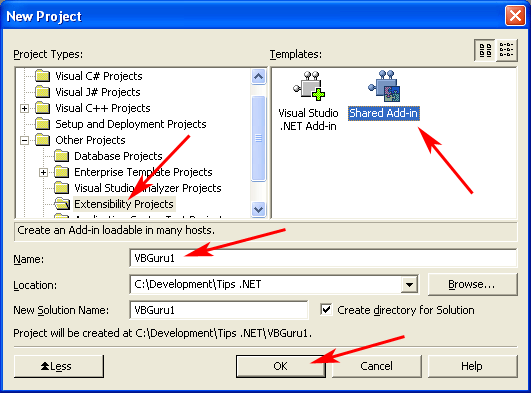
Then you will get a "Welcome to the Add-In Wizard" extensibility wizard that will help you finish configuring your add-in.
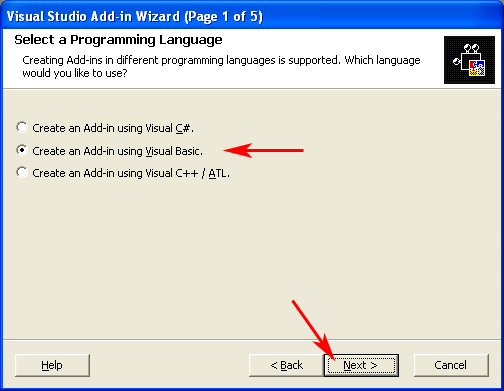
AddIn Wizard Step 1: Choose the language you want to write it in - Visual Basic, Visual C#, Visual C++/ALT (Fig. 2).
Fig. 2
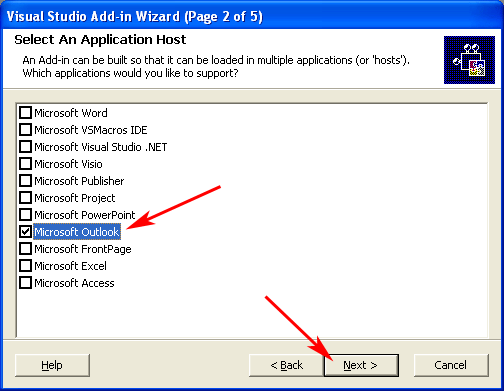
AddIn Wizard Step 2: Is where you will be presented with a checked list of which office apps you want it shared with. Ie: each paticular office app, vs addin, etc (Fig. 3). For this demo I am going to choose Outlook only. Then click Next.
Fig. 3
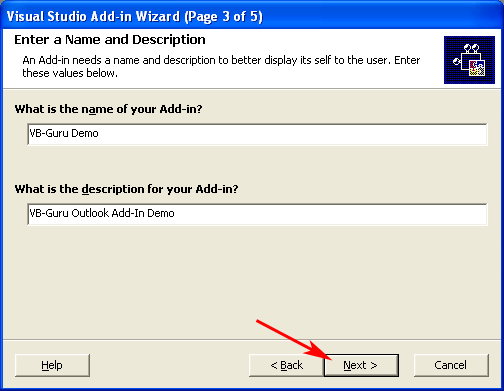
AddIn Wizard Step 3: Give your add-in a name and description. These show in the COM AddIn dialog if the AddIn is manageable by the user. Then click Next (Fig. 4).
Fig. 4
AddIn Wizard Step 4: This is where you can specify the Add-Ins loading behavior. Choices can be edited later (via registry edit) and include: Load when application loads, load on demand, not loaded (Fig. 5).
The other option is to specify if the Add-In is to be available to all users on the system or a particular user (Private). for the example I will choose All Users (Fig. 5). For special notes and elaboration on the consequences of "Just Me" vs. "All Users", please see post #3 below.
Fig. 5
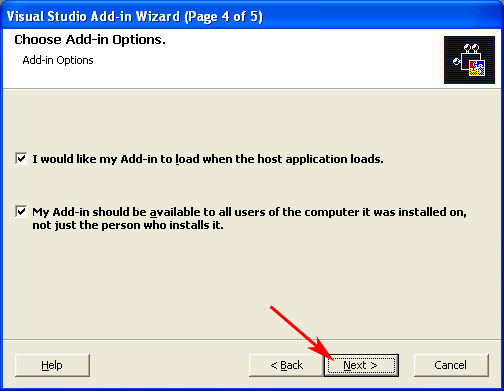
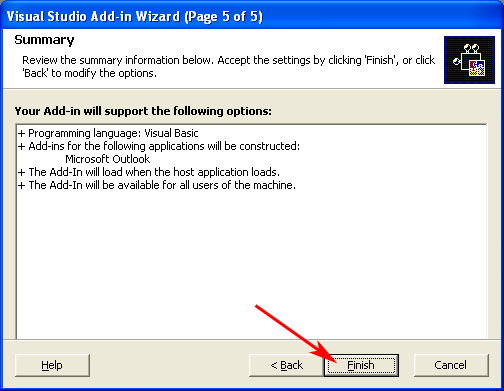
AddIn Wizard Step 5: This last step is just a summary screen (Fig. 6). Click Finish to have the wizard apply the settings and selections.
Fig. 6
Almost done. Now its time to get down to some actual c0d. 
The wizard will generate a template of code based upon your selections.
VB.NET Code example below in post #2.
C# Code example below in post #4 (Added 01.16.2007)
Installation procedures and characteristics of your setup package are continued below in post #3. 
Last edited by RobDog888; Jan 16th, 2007 at 04:01 PM.
Reason: Moved code example to a separate post.
VB/Office Guru™ (AKA: Gangsta Yoda™  ®) ®)
I dont answer coding questions via PM. Please post a thread in the appropriate forum. 
Microsoft MVP 2006-2011
Office Development FAQ (C#, VB.NET, VB 6, VBA)
Senior Jedi Software Engineer MCP (VB 6 & .NET), BSEE, CET
If a post has helped you then Please Rate it! 
• Reps & Rating Posts • VS.NET on Vista • Multiple .NET Framework Versions • Office Primary Interop Assemblies • VB/Office Guru™ Word SpellChecker™.NET • VB/Office Guru™ Word SpellChecker™ VB6 • VB.NET Attributes Ex. • Outlook Global Address List • API Viewer utility • .NET API Viewer Utility •
System: Intel i7 6850K, Geforce GTX1060, Samsung M.2 1 TB & SATA 500 GB, 32 GBs DDR4 3300 Quad Channel RAM, 2 Viewsonic 24" LCDs, Windows 10, Office 2016, VS 2019, VB6 SP6
 Posting Permissions
- You may not post new threads
- You may not post replies
- You may not post attachments
- You may not edit your posts
-
Forum Rules
|
Click Here to Expand Forum to Full Width
|



 Reply With Quote