|

-
Feb 20th, 2006, 06:33 PM
#1
VB6.0 – Sound and DirectXSound Tutorial
Please DO NOT post in this thread.
If you have any comments about this thread, please post here: Sugestions or Comments about my Sound Tutorial
AGAIN, PLEASE DO NOT POST HERE
Or you will get in trouble  See this: http://www.vbforums.com/showthread.php?t=388557 See this: http://www.vbforums.com/showthread.php?t=388557
My Objectives:
Basic
 A small explanation about sound, and sound format. A small explanation about sound, and sound format.
How to read/write to a wave file.
How to play short length sounds with DirectXSound buffers (loading the entire sound file at once)
Medium difficulty
How to record/play with DirectXSound using split buffer for very long sounds, (for streaming).
How to display the wave data (oscilloscope).
How to convert from one format to another (like 8 bit to 16 bit, or 11000 Hz to 8000 Hz, Stereo to Mono, etc.)
How to split a stereo sound to 2 mono sounds.
How to mix sounds, change the volume digitally.
What is sound ?
In computers, sound is digital. That means that sound is represented by a long array of numbers. (That is not the official definition by the way). Therefore if you want to modify the sound (the volume for example), you have to change those numbers in a way or another (I’ll explain how to do that later).
Sound format: What is ... ?
Bit Rate: In a wave file, the bit rate can be of 8 bit and 16 bit. 8 bit is one byte, therefore the sound is stored in arrays of Byte type, and 16 bit waves (2 bytes) are store in Integer array type. Though you can also store a 16 bit wave in a Byte array also (as long as the length is always divisible by 2). Don’t get me wrong, this does not mean that you can’t store sound in any other data type, in fact, sound can be stored in almost any data type, even strings, as long as you know how to handle the data buffer it really does not matter. But preferably, it is better to store the sound in simple data types like Byte and Integer, corresponding to 8 bit and 16 bit waves. Another reason why you should store the sound in Byte and Integer data type is that it is easier to manipulate the sound (i.e. change the volume, etc.)
Stereo, Mono: Everyone who has any clue about music should know this. It is how many channels the wave file has. Mono means one channel, Stereo means two channels.
Samples Per Second: When the sound card converts from analog to digital, it takes “samples” of the wave, and it does it really fast, as in thousands of times per second. Usually sample rates range from 8,000 Hz to 44,100 Hz, though I’ve seen sample rates from 4,000 Hz to 110,000 Hz. When the sound is mono, it reads 1 number per sample, when the sample is stereo, then it reads 2 numbers per sample. So a sample includes either one channel or two channels of data.
Block Align: This is the most complicated one. Block Align is a number that tells the program how much it should read (how many bytes) to get a complete sample. The sample can be 8 or 16 bit, and also Stereo or Mono.
It is calculated using this formula: BlockAlign = BitsPerSample * Channels / 8
So, if you have a sound that is 8 bits, and mono, then the block align should be 1 byte, if your sound is 16 bits, and stereo then it should be 4 bytes.
Average Bytes Per Second: Yes you guessed it, this tells the program how many bytes are in one second for this sound format.
The easiest way to calculate this number is with this formula: AvgBytesPerSec = SamplesPerSec * BlockAlign
Frequency: A frequency is how many impulses are in one second. A frequency is represented by hertz (Hz). For example if the frequency is 1000 Hz, then it means that the sound has 1000 impulses per second.
Impulse: An impulse looks like a sine (or cosine) when represented graphically, it looks like this:
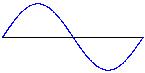
An impulse consists of un upper "bump" and a lower "bump".
Last edited by CVMichael; Dec 23rd, 2008 at 09:29 AM.
 Posting Permissions
- You may not post new threads
- You may not post replies
- You may not post attachments
- You may not edit your posts
-
Forum Rules
|
Click Here to Expand Forum to Full Width
|



 Reply With Quote