Label control that supports hyperlinks, different colors and font styles
I've created a control that can be used as a replacement for the regular VB Label control. This HyperLabel control supports a mixture of regular text and hyperlinks. The hyperlinks shows the hand cursor when the mouse is hovering over them and can also automatically navigate to that link if the AutoNavigate property is set to True, otherwise a HyperlinkClick event is raised and you can write your own logic of what should happen when the user click on a hyperlink. This could for example be to open a dialog box, show a help file, or anything else you can think of.
This is however not all this control can do. It supports a mixture of different font styles like bold, italic, and underlined text. You can also use different colors for different words. Moreover you can also create bullet lists inside the control.
This is done by simply using BBTags (the same kind of tags you use to format text in different forums, like this one) inside the Caption property. The supported tags are (without the spaces between the brackets):
[ b ] bold [ /b ]
[ i ] italic [ /i ]
[ u ] underline [ /u ]
[ color = #RRGGBB ] colored text [ /color] - Can also used these named color constants: black, white, red, green, blue, yellow, magenta, and cyan.
[ url=http://www.vbforums.com ] hyperlink [ /url ]
[ list ][*] bullet list.[*] item 2 [ /list ]
[ ] - Empty tag (no space) = NewLine
The fact that you can use an empty tag to create a newline inside the Caption allows for faster assignment of text since you don't need to use the slow concatenation operation of different strings just to insert a line break.
The control is very light-weight and competly user-drawn (it doesn't contain any constituent controls). If you like you can even make it even lighter by setting the WindowLess property of the UserControl to True, however you'll need to remove the BorderStyle property for that.
The attached ZIP file contains a project group with the HyperLabel control and a demo project that shows the different properties and events. Please also take the time to read the short Help.txt file for complete information about the control. To try it out simply open the gHyperLabelTest.vbg project group file.
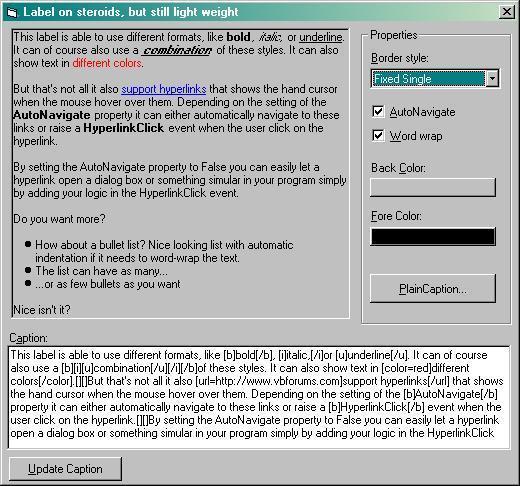
Here's a screenshot of the demo application (the image got a bit blurred when I used MS Paint to convert it to a JPG but you'll get the idea).
Please note that this demo have the RenderToContainer property set to True and the Visible property set to False (see post #7 below). You must change that for the BackColor and BorderStyle properties to work.
Last edited by Joacim Andersson; Jan 8th, 2008 at 05:32 PM.




 Reply With Quote