|

-
[VB6] FlexGrid to XLSX (and CSV/PDF) Exporter — no Excel installation required
Download from GitHub.
This code was made mainly by Claude Sonnet v4.6 and v5.0, but also with some collaboration from Gemini, ChatGPT, DeepSeek and off course from me.
It exports any FlexGrid-family control directly to a real .xlsx file**, without going through Excel automation and without any third-party XLSX library. It writes the OOXML (zip + XML) format directly.
For the zip compression it uses wqweto's cZipArchive.cls class.
Optionally, it can also output PDF files. For that feature to work, it needs BSPrinter ocx accessible for the project (whether registered or through SxS). When it is available the user will see the PDF option in th save dialog.
Supported grids
- MSFlexGrid
- MSHFlexGrid
- VSFlexGrid
- VBFlexGrid
- (should work with any other API-compatible FlexGrid variant — it only relies on the standard TextMatrix/CellFontAttributes-style properties that all of these share)
What gets exported to XLSX
- Cell values with correct types (text, numbers, dates/times using Excel's native date system)
- Fonts, colors, bold/italic/underline, per-cell alignment (including vertical)
- Cell borders (from the grid's own GridLines/GridLinesFixed settings)
- WrapText (from the grid's WordWrap property or embedded line breaks)
- Row heights / column widths matched from the grid
- Frozen panes (matching the grid's fixed rows/columns), optional.
- AutoFilter, optional.
- Merged cells — detected from the grid's own MergeCells/MergeRow/MergeCol state,
including simultaneous row+column merging
Embedded pictures (CellPicture), with correct anchoring for every CellPictureAlignment value (Stretch, and all 9 combinations of Left/Center/Right × Top/Center/Bottom), so images resize/reposition correctly if the user later resizes rows or columns in Excel
Optional extras
- CSV export, with proper UTF-8 + BOM handling and locale-aware separators
- PDF export, but only if the optional BSPrinter30.ocx (BSPrinter component) is registered on the machine — the exporter detects this at runtime and only offers the PDF option if it's available. No PDF dependency is required otherwise.
Under the hood
- No dependency on Microsoft Excel being installed — it writes the .xlsx zip/XML structure directly.
- No typelib required.
- Pure VB6, no ActiveX Data Objects required for the export itself.
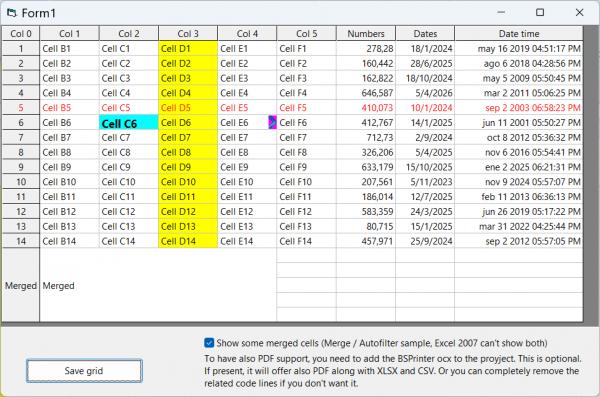
Actual grid:
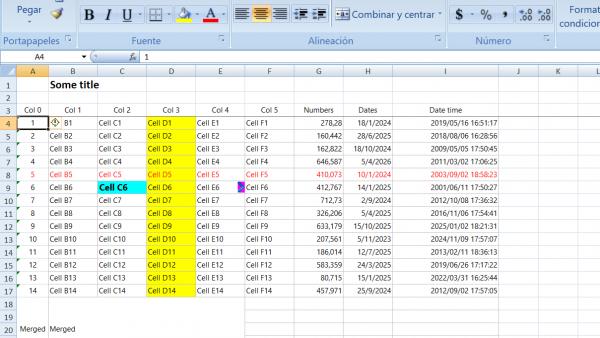
Excel export:
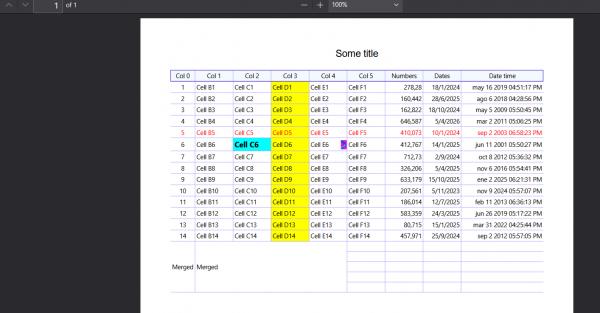
PDF export:
Download from GitHub.
 Posting Permissions
- You may not post new threads
- You may not post replies
- You may not post attachments
- You may not edit your posts
-
Forum Rules
|
Click Here to Expand Forum to Full Width
|



 Reply With Quote