|

-
Dec 10th, 2025, 05:00 AM
#1
Thread Starter
Lively Member

Value not valid for 'RowPositon' in Visual Studio when moving a designer control
In Visual Basic (VS 2017 / 2019 / 2022, including 2017 Express), I keep encountering a strange issue when working with the WinForms designer.
Whenever I move or drag a control (e.g., a TextBox) in the designer, and then start the debugger, Visual Studio shows the following error message box three times before the application runs normally:
InvalidArgument=Value of '-2147483648' is not valid for 'RowPosition'
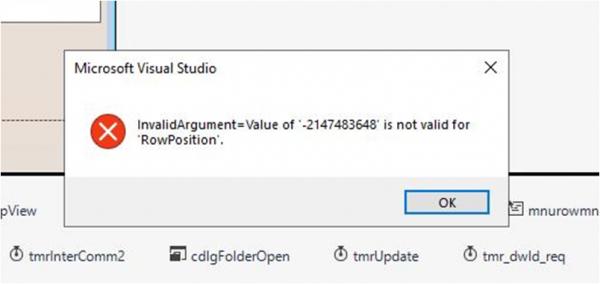
My question is, why does it appear. And how can it be fixed?
What I’ve already tried (no effect):
Build ? Clean Solution, then Rebuild Solution
Commented out all lines that call set_RowPosition in designer code
Verified that none of my code runs before the error appears
More information:
Happens across multiple Visual Studio versions (2022, 2019, 2017 Express)
The error is from Visual Studio, not from my application
Windows Forms project targeting .NET Framework 4.0
Last edited by IT_Researcher; Dec 10th, 2025 at 05:01 AM.
Reason: title correction
-
Dec 10th, 2025, 09:20 AM
#2
Re: Value not valid for 'RowPositon' in Visual Studio when moving a designer control
That is odd. Is this happening at compilation or at runtime (that then crashes)?
Tags for this Thread
 Posting Permissions
- You may not post new threads
- You may not post replies
- You may not post attachments
- You may not edit your posts
-
Forum Rules
|
Click Here to Expand Forum to Full Width
|



 Reply With Quote

