|

-
Oct 17th, 2018, 01:27 PM
#2081
Fanatic Member

Re: CommonControls (Replacement of the MS common controls)
 Originally Posted by Krool

I can't replicate this.  I tested with OCX and Std-EXE version.. (at least on XP and 7)
Now I wanted to throw together a small sample, and I can't replicate as well.
Nothing happened in the meantime, only a PC standby.
The small problem bothered me for so long, and now it is solved automatically.
I don't understand.
I'll watch more closely to know when the problem occurs and come back (or not).
Thanks for your effort
EDIT:
The effect is back again.
Unfortunately, I have no clue what happened.
A restart of the IDE cures the symptom.
After a while it comes back.
Krool, do you have an idea what I should check?
(There is no code in the UC that I test with.)
EDIT2:
Short after the UC issue an additional issue came up.
Hosam already reported it in #2047.
It's about command buttons don't react on the first click.
Perhaps this triggers your fantasy?
Last edited by Karl77; Oct 18th, 2018 at 05:35 AM.
-
Oct 21st, 2018, 05:32 PM
#2082
Re: CommonControls (Replacement of the MS common controls)
Internal improvement in the CommonDialog class for ShowPrinterEx function.
Prior to this update a WH_CALLWNDPROCRET hook for ShowPrinterEx (when 'HookEvents' = True) was used. (in order to raise InitDialog)
Now a more effective (no hook) lightweight IPrintDialogCallback is used to raise the InitDialog.
If needed in future, more features related to IPrintDialogCallback (and possibly IPrintDialogServices) may be added to interact more with the dialog while it's open.
-
Oct 22nd, 2018, 04:53 AM
#2083
Fanatic Member
Re: CommonControls (Replacement of the MS common controls)
TOOLTIP APPEARANCE QUESTION
The tooltips on TabStripW, ToolbarW and some more are fine, and they support even multiline.
Also the appearance is fine.
Other controls like CommandButtonW, FrameW etc. show different looking tooltips.
Here is an example:
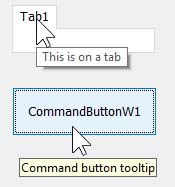
Is there any chance to get the same tooltips as with TabStripW etc. in any control?
Thanks.
-
Oct 22nd, 2018, 08:12 AM
#2084
Addicted Member
Re: CommonControls (Replacement of the MS common controls)
Hi Krool,
Writing here after quite some time.
As ever, remaining immensely thankful to your controls. They are proving to be of immeasurable benefit to the society. My thanks in TONS once again.
Well, I use the non-ocx version (always) and I wish to place the following two observations. Please note that I observed the following while testing with the latest non-ocx version too. I did not test with any of the ocx versions though, so far.
Observation 1.
To set a word as hyperlink in a RichTextBox control (for e.g. to set the word "works" in a RichTextBox named 'rtb1' as a hyperlink), I keep the word "works" selected and call the following code:
Code:
Dim myFormat As CHARFORMAT2
With myFormat
        .cbSize = LenB(myFormat)
        .dwEffects = CFE_LINK
        .dwMask = CFM_LINK
End With
SendMessage rtb1.hWnd, EM_SETCHARFORMAT, SCF_SELECTION, myFormat
The above code works in Windows7. The word "works" does turn into a hyperlink (i.e. it does get underlined, does get displayed in blue color and when the mouse hovers over the word "works", the cursor does change to hand pointer).
But, the code does not work in Windows10. In Windows 10, the word "works" remains as it is, without turning into a hyperlink.
So, what has to be done for Windows10? Kindly please help, when possible.
(I tried certain things but they did not help. So, I checked whether the above code works when the normal 'MS RichTextBox' Control is used in Windows 10. It does work. The word "works" does turn into a hyperlink in a RichTextBox created using the 'MS RichTextBox' Control)
Observation 2.
In a RichTextBox, when the MaxLength propery is left at its default value of '0', I am able to internally set texts of length more than the 64kb. But, when I copy/paste text from outside sources OR try to type in the text area, no characters appear if the text length of our RichTextBox has crossed 64kb already. For this, what I have been doing is to explicitly set the MaxLength of our RichTextBoxes to '2147483647'. This works well. No problems while copying texts from external sources OR when trying to type. Even if the text length has already crossed 64KB, everything works correctly. But, I personally feel it is safer for the developer only if even with the default value of '0', normal behavior is exhibited. So, if possible to set right this issue, kindly please set it right.
Hope my above observations were/are right. If not, kindly please bear with me and please let me know what mistake I have done and guide me on what to do to set right the above issues.
My best wishes to you at all times, for your supremely phenomenal work!
-
Oct 22nd, 2018, 04:27 PM
#2085
Re: CommonControls (Replacement of the MS common controls)
Originally Posted by softv
Observation 1.
To set a word as hyperlink in a RichTextBox control (for e.g. to set the word "works" in a RichTextBox named 'rtb1' as a hyperlink), I keep the word "works" selected and call the following code:
Code:
Dim myFormat As CHARFORMAT2
With myFormat
        .cbSize = LenB(myFormat)
        .dwEffects = CFE_LINK
        .dwMask = CFM_LINK
End With
SendMessage rtb1.hWnd, EM_SETCHARFORMAT, SCF_SELECTION, myFormat
The above code works in Windows7. The word "works" does turn into a hyperlink (i.e. it does get underlined, does get displayed in blue color and when the mouse hovers over the word "works", the cursor does change to hand pointer).
But, the code does not work in Windows10. In Windows 10, the word "works" remains as it is, without turning into a hyperlink.
So, what has to be done for Windows10? Kindly please help, when possible.
(I tried certain things but they did not help. So, I checked whether the above code works when the normal 'MS RichTextBox' Control is used in Windows 10. It does work. The word "works" does turn into a hyperlink in a RichTextBox created using the 'MS RichTextBox' Control)
Thank you softv for your points.
Concerning this point I can say that you should try to set the 'AutoURLDetect' property to False. It's by default to True in the RichTextBox.
Because MSDN says:
Do not set SetAutoURLDetect to TRUE if your edit control uses the CFE_LINK effect for text other than URLs. SetAutoURLDetect enables this effect for URLs and disables it for all other text
Also good to point out this because my RichTextBox is lacking a 'SelLink' property. Will be put in Todo. Currently I would like to maintain sync between ocx and non-ocx that's why I will for the moment not release such a new feature.
Originally Posted by softv
Observation 2.
In a RichTextBox, when the MaxLength propery is left at its default value of '0', I am able to internally set texts of length more than the 64kb. But, when I copy/paste text from outside sources OR try to type in the text area, no characters appear if the text length of our RichTextBox has crossed 64kb already. For this, what I have been doing is to explicitly set the MaxLength of our RichTextBoxes to '2147483647'. This works well. No problems while copying texts from external sources OR when trying to type. Even if the text length has already crossed 64KB, everything works correctly. But, I personally feel it is safer for the developer only if even with the default value of '0', normal behavior is exhibited. So, if possible to set right this issue, kindly please set it right.
Hope my above observations were/are right. If not, kindly please bear with me and please let me know what mistake I have done and guide me on what to do to set right the above issues.
That's right. According to MSDN:
Specifies the maximum amount of text that can be entered. If this parameter is zero, the default maximum is used, which is 64K characters. A COM object counts as a single character.
Originally Posted by Karl77
The tooltips on TabStripW, ToolbarW and some more are fine, and they support even multiline.
Also the appearance is fine.
Other controls like CommandButtonW, FrameW etc. show different looking tooltips.
Here is an example:
Is there any chance to get the same tooltips as with TabStripW etc. in any control?
I understand fully. However, it's not possible to overwrite the in-built 'ToolTipText' of the VBControlExtender.
For instance with the TabStrip control. I can't overwrite the 'TabStrip1.ToolTipText' property. Of course I can provide a better tooltip for the tabs, e.g. 'TabStrip1.Tabs(1).ToolTipText'
Last edited by Krool; Oct 22nd, 2018 at 04:48 PM.
-
Oct 23rd, 2018, 01:23 AM
#2086
Fanatic Member
Re: CommonControls (Replacement of the MS common controls)
Originally Posted by Krool
However, it's not possible to overwrite the in-built 'ToolTipText' of the VBControlExtender.
For instance with the TabStrip control. I can't overwrite the 'TabStrip1.ToolTipText' property. Of course I can provide a better tooltip for the tabs, e.g. 'TabStrip1.Tabs(1).ToolTipText'
What about a ToolTipTextW property then?
Just an idea.
-
Oct 23rd, 2018, 03:10 AM
#2087
Addicted Member
Re: CommonControls (Replacement of the MS common controls)
Originally Posted by Krool
Thank you softv for your points.
Concerning this point I can say that you should try to set the 'AutoURLDetect' property to False. It's by default to True in the RichTextBox.
Because MSDN says:
Do not set SetAutoURLDetect to TRUE if your edit control uses the CFE_LINK effect for text other than URLs. SetAutoURLDetect enables this effect for URLs and disables it for all other text
Thanks for your prompt reply, as ever, Krool.
The workaround suggested by you does help for Windows10. It works and Thank You so much. 
Well, you must be knowing the following already with regard to Windows7 systems but yet stating it hereunder since, based on the same, I have a question.
In Windows 7, even with AutoURLDetect property set to True, I am able to easily set hyperlinks for our RichTextBox's text containing 100s of absolute URLs (e.g. http://google.com) and named URLs (e.g. "Click here to visit Google"). The AutoURLDetect property (which is set to True) takes care of setting the hyperlinks for the absolute urls, automatically. So, I need to take care of setting the hyperlinks for the named URLs alone, programmatically (using the already mentioned code, which uses CFE_LINK and CFM_LINK).
Based on the above, I have a question for Windows 10 systems.
In Windows 10 (may be in Windows 8 too; I do not have a Windows 8 system), it is clear now that setting 'AutoURLDetect property to False' for our RichTextBox (say rtb1) alone can help me set hyperlinks for named URLs in rtb1's text, when using the 'CFE_LINK and CFM_LINK' method. That being the case, the only way I have now (in Windows 10 systems) to set hyperlinks for all the URLs when rtb1's text contains both named and absolute URLs (in 100s) is:
- Set the AutoURLDetect property of rtb1 to False.
- Set the hyperlinks for the named URLs in rtb1's text, as usual. i.e. set them programmatically (using the already mentioned code, which uses CFE_LINK and CFM_LINK)
- Programmatically detect all the absolute URLs in rtb1's text.
- Set hyperlinks for the detected absolute URLs using the same 'CFE_LINK and CFM_LINK' method, the one used for setting hyperlinks for named URLs.
Is my above approach right? If not, when possible, either you or any other member may kindly let me know the better/easier approach. Thanks.
My hearty thanks and best wishes, at all times, for all your noble deeds, Krool.
-
Oct 23rd, 2018, 05:42 AM
#2088
Fanatic Member
Re: CommonControls (Replacement of the MS common controls)
LABELW REFRESH PROBLEM
A LabelW gets a new caption in a loop.
To let it display, I let it .Refresh.
This has no effect.
The new caption is not displayed.
I tried with an intrinsic label, and that works ok.
And surprise, if an intrinsic label gets the .Refresh, then the LabelW updates as well.
A miracle...
Try in the attached sample.
To see LabelW becoming lazy, it is sufficient to set the standard label .Visible = false.
Thank you
Label Refresh.zip
-
Oct 23rd, 2018, 07:24 AM
#2089
Re: CommonControls (Replacement of the MS common controls)
A Repaint routine can be implemented as a stronger alternative to Refresh like this
thinBasic Code:
Private Sub pvPumpMessages(ByVal hWnd As Long, ByVal lFromMsg As Long, ByVal lToMsg As Long)
    Dim uMsg            As APIMSG

    Do While PeekMessage(uMsg, hWnd, lFromMsg, lToMsg, PM_REMOVE) <> 0
        Call DispatchMessage(uMsg)
    Loop
End Sub
 Public Sub Repaint()
    pvPumpMessages ContainerHwnd, WM_PAINT, WM_PAINT
End Sub
. . . or Karl77 can call pvPumpMessages in client code after batch updating the other 100s of labels on the form in question :-))
cheers,
</wqw>
-
Oct 23rd, 2018, 05:03 PM
#2090
Re: CommonControls (Replacement of the MS common controls)
Originally Posted by Karl77
LABELW REFRESH PROBLEM
Should be solved now. Thanks also to wqweto.
It's now properly implemented into the LabelW control.
Originally Posted by Karl77
What about a ToolTipTextW property then?
Not so bad idea. Will be put in the Todo's.
Originally Posted by softv
Is my above approach right?
Yes, but for Windows 7 I did the following observation:
True. In Windows 7 you can have AutoURLDetect to True and set manual links.
However, when I type something on a word block that have a partial link it will be gone if any char is typed.
Example: "asdasdasdasdasdasdasdx"
When the blue was marked as link and I put an x at end of the word block the blue link is erased.
But that's only the case when AutoURLDetect is True. If it's False then there is no harm.
In Windows 10 then you have no way to make manual links when AutoURLDetect is True. Which is in accordance to the MSDN description.
So my opinion is that this was a "behavior bug" in Windows 7 and was corrected then. Manual links shouldn't be possible when AutoURLDetect is True.
-
Oct 24th, 2018, 01:37 AM
#2091
Fanatic Member
Re: CommonControls (Replacement of the MS common controls)
(LABELW REFRESH PROBLEM)
Originally Posted by Krool
Should be solved now. Thanks also to wqweto.
It's now properly implemented into the LabelW control.
Confirmed.
Works ok now.
Thanks to both of you.
-
Oct 27th, 2018, 04:05 PM
#2092
Re: CommonControls (Replacement of the MS common controls)
Update released.
Major performenance boost when interacting with the .ComboItems collection in the ImageCombo control.
The following figures (in seconds) illustrate the effect. (run in IDE)
old:
Code:
10000x Add (index missing) = 0,754062
10000x Add (index:1) = 450,999812
10000x Item (index:i) = 0,142875
10000x Item (index:1) = 0,046875
10000x Remove (index:1) = 427,6133
new:
Code:
10000x Add (index missing) = 0,749937
10000x Add (index:1) = 5,776812
10000x Item (index:i) = 0,046875
10000x Item (index:1) = 0,031250
10000x Remove (index:1) = 5,814750
It's embarrassing to show this. The old figures got proportionately slower the more items.
Last edited by Krool; Oct 28th, 2018 at 05:11 AM.
Reason: re-tested, updated figures
-
Oct 29th, 2018, 05:26 PM
#2093
Re: CommonControls (Replacement of the MS common controls)
Housekeeping update.
Enumeration.cls got removed and replaced by a lightweight COM replacement (based on DEXWERX's [VB6] IEnumVARIANT / For Each support without a typelib) directly in VTableHandle.bas.
The Enumeration is now faster and less complicated.
-
Oct 30th, 2018, 02:09 AM
#2094
Fanatic Member
Re: CommonControls (Replacement of the MS common controls)
Originally Posted by Krool
The Enumeration is now faster and less complicated.
Sounds good.
I wanted to start to take over the new code into 'my' OCX.
But first I have a question.
In the new VTableHandle.bas, there is this line:
Code:
If VTableIPAOData.RefCount > 0 Or 1 > 2 Then
I don't understand the > 0 Or 1 > 2.
Isn't 1 > 2 always false?
Karl
-
Oct 30th, 2018, 04:46 AM
#2095
Re: CommonControls (Replacement of the MS common controls)
Originally Posted by Karl77
In the new VTableHandle.bas, there is this line:
Code:
If VTableIPAOData.RefCount > 0 Or 1 > 2 Then
I don't understand the > 0 Or 1 > 2.
Isn't 1 > 2 always false?
The Or 1 > 2 is a leftover and can be removed, which I will do at next oppurtinity.
Luckily this has no impact/effect if it's there or not, but of course not needed.
Reason for this was that I wanted to test something and exclude this block.
Therefore I did:
Code:
If VTableIPAOData.RefCount > 0 And 1 > 2 Then
So the line is never True. (For testing)
Then I wanted to allow (temporary) the block and changed to:
Code:
If VTableIPAOData.RefCount > 0 Or 1 > 2 Then
It was intended that at the end this temp 1 > 2 is removed.
However, again. Luckily this forgotten removal has no impact and will be cleaned at next occasion.
-
Oct 30th, 2018, 04:42 PM
#2096
Re: CommonControls (Replacement of the MS common controls)
Important update released for VTableHandle.bas.
Possible delay in *_Terminate events in Forms, UserControls etc. (could cause possible gdi overloads)
I am so sorry for this incompetence. 
Code:
Public Sub DeActivateIPAO()
On Error GoTo CATCH_EXCEPTION
If VTableIPAOData.OriginalIOleIPAO Is Nothing Then Exit Sub
Dim PropOleObject As OLEGuids.IOleObject
Dim PropOleInPlaceSite As OLEGuids.IOleInPlaceSite
Dim PropOleInPlaceFrame As OLEGuids.IOleInPlaceFrame
Dim PropOleInPlaceUIWindow As OLEGuids.IOleInPlaceUIWindow
Dim PropOleInPlaceActiveObject As OLEGuids.IOleInPlaceActiveObject
Dim PosRect As OLEGuids.OLERECT
Dim ClipRect As OLEGuids.OLERECT
Dim FrameInfo As OLEGuids.OLEINPLACEFRAMEINFO
Set PropOleObject = VTableIPAOData.OriginalIOleIPAO
Set PropOleInPlaceActiveObject = VTableIPAOData.OriginalIOleIPAO
Set PropOleInPlaceSite = PropOleObject.GetClientSite
PropOleInPlaceSite.GetWindowContext PropOleInPlaceFrame, PropOleInPlaceUIWindow, VarPtr(PosRect), VarPtr(ClipRect), VarPtr(FrameInfo)
PropOleInPlaceFrame.SetActiveObject PropOleInPlaceActiveObject, vbNullString
If Not PropOleInPlaceUIWindow Is Nothing Then PropOleInPlaceUIWindow.SetActiveObject PropOleInPlaceActiveObject, vbNullString
Set VTableIPAOData.OriginalIOleIPAO = Nothing
Set VTableIPAOData.IOleIPAO = Nothing
CATCH_EXCEPTION:
End Sub
The bugfix is marked as red in above internal function 'DeactivateIPAO'.
After restoring the IPAO to VB's original IPAO it is necessary to de-reference our objects in VTableIPAOData.
As this was not done previously there was a reference link that hindered the UserControls to fire _Terminate event and also Form_Terminate.
So please replace. It will for sure solve other issues you may have encounter.
-
Oct 31st, 2018, 02:56 AM
#2097
Re: CommonControls (Replacement of the MS common controls)
Originally Posted by Krool
Reason for this was that I wanted to test something and exclude this block.
Therefore I did:
Code:
If VTableIPAOData.RefCount > 0 And 1 > 2 Then
So the line is never True. (For testing)
FWIW, I'm using And False to disable predicates like this
thinBasic Code:
If VTableIPAOData.RefCount > 0 And False Then
and later enable with Then ' before fake conjunction like this
thinBasic Code:
If VTableIPAOData.RefCount > 0 Then ' And False Then
cheers,
</wqw>
-
Nov 2nd, 2018, 04:26 AM
#2098
Fanatic Member
Re: CommonControls (Replacement of the MS common controls)
Originally Posted by Krool
Important update released for VTableHandle.bas.
This is not incompetence, it is the exact opposite.
Same is true for 'embarrasing' in post #2092.
You can and do solve things.
Regarding the change in VTableHandle, it has indeed a big impact on stability.
With this change it is the 1st time MZTool's Programm analysis runs through my large project.
Before it always hung at some point and crashed VB in the end.
Very good!
Up to now I didn't see the unresponsive command buttons as well (see e.g. #2081).
EDIT:
The strange active UC problem, reported in #2079, is not healed by the change.
Last edited by Karl77; Nov 2nd, 2018 at 12:28 PM.
-
Nov 2nd, 2018, 10:20 AM
#2099
Re: CommonControls (Replacement of the MS common controls)
This is just a great project / contribution to the community.
It has far surpassed the original CCRP. (not to mention the original was closed source, and died without fixing some major bugs)
-
Nov 2nd, 2018, 11:03 PM
#2100
Re: CommonControls (Replacement of the MS common controls)
I'd just like to throw my vote of confidence in too.
Krool, this is an absolutely phenomenal project, and your diligence to maintaining it says volumes about your integrity.
All The Best,
Elroy
Any software I post in these forums written by me is provided "AS IS" without warranty of any kind, expressed or implied, and permission is hereby granted, free of charge and without restriction, to any person obtaining a copy. To all, peace and happiness.
-
Nov 3rd, 2018, 09:06 AM
#2101
Re: CommonControls (Replacement of the MS common controls)
Originally Posted by Karl77
The strange active UC problem, reported in #2079, is not healed by the change.
This is ActivateIPAO problem. vbAccelerator's impl had this problem and so every control "borrowing" it has the same issue.
DoVerb OLEIVERB_UIACTIVATE impl in #1424 fixes this.
cheers,
</wqw>
-
Nov 3rd, 2018, 10:01 AM
#2102
 Re: CommonControls (Replacement of the MS common controls) Re: CommonControls (Replacement of the MS common controls)
Originally Posted by wqweto
This is ActivateIPAO problem. vbAccelerator's impl had this problem and so every control "borrowing" it has the same issue.
DoVerb OLEIVERB_UIACTIVATE impl in #1424 fixes this.
cheers,
</wqw>
Thanks. However I responded in #1426 why it makes no difference.
The problem Karl77 faces is apparently something different.
So a TextBoxW in another UC, then the Ambient.UserMode is True and therefore the TextBoxW is subclassed and handles WM_MOUSEACTIVATE and activates it on click. Normally 'ComCtlsRootIsEditor' should avoid such case but I think there is a glitch sometimes. I can't replicate the issue and also Karl77 only has it sometimes.
The solution would be to not use
But rather use:
Code:
GetTopUserControl(Me).Ambient.UserMode
-
Nov 4th, 2018, 07:25 AM
#2103
Fanatic Member
Re: CommonControls (Replacement of the MS common controls)
LISTBOX QUESTION
In the ListViewW, we have the very handy SortType option.
The ListBoxW doesn't have it, it can only sort alphabetically.
I can fill the data into an invisible ListViewW, let it sort and transfer it to the ListboxW.
It would be nice if it would work without this step.
Just a wish.
Last edited by Karl77; Nov 4th, 2018 at 08:06 AM.
-
Nov 4th, 2018, 03:24 PM
#2104
Re: CommonControls (Replacement of the MS common controls)
Originally Posted by Karl77
LISTBOX QUESTION
In the ListViewW, we have the very handy SortType option.
The ListBoxW doesn't have it, it can only sort alphabetically.
I can fill the data into an invisible ListViewW, let it sort and transfer it to the ListboxW.
It would be nice if it would work without this step.
This would be possible only per WM_COMPAREITEM.
However, that is only "available" without LBS_HASSTRINGS. So practically "Half-VirtualMode".
Because for "Full-VirtualMode" the LBS_NODATA prevents LBS_SORT at all, which makes sense since the sorting should be done on client side.
I will put this in Todo to add feature "Full-VirtualMode" because that can be a necessity.
But "Half-VirtualMode" makes no sense at all to just have a better sorting..
For ComboBox "Full-VirtualMode" would also be possible. But there I would need superclassing to catch WM_CREATE for class 'ComboLBox' to apply LBS_NODATA on ComboLBox creation.
Originally Posted by Karl77
The strange active UC problem, reported in #2079, is not healed by the change.
That problem is not connected to VTableHandle.bas.
It's rather a "subclass activated in design mode" issue.
As said recently the below would ensure "never a subclass in design mode":
Code:
GetTopUserControl(Me).Ambient.UserMode
However, I'm afraid that this would be not a good idea.
Because maybe the UC that hosts those control are dependent that the control is 100% "on". (subclass=yes)
But let's try a hotfix on your side to just see if another workaround solves the issue and to isolate it actually.
So in your OCX version just change (temporary until verified it solved) in TextBoxW the following:
Code:
Case WM_MOUSEACTIVATE
    Static InProc As Boolean
    If ComCtlsRootIsEditor(hWnd) = False And GetFocus() <> TextBoxHandle Then
into
Code:
Case WM_MOUSEACTIVATE
    Static InProc As Boolean
    If GetTopUserControl(Me).Ambient.UserMode = True And GetFocus() <> TextBoxHandle Then
and report if you still encounter the issue.
Last edited by Krool; Nov 4th, 2018 at 03:44 PM.
-
Nov 5th, 2018, 02:06 AM
#2105
Fanatic Member
Re: CommonControls (Replacement of the MS common controls)
Originally Posted by Krool
But let's try a hotfix on your side to just see if another workaround solves the issue and to isolate it actually.
So in your OCX version just change (temporary until verified it solved) in TextBoxW the following:
Code:
Case WM_MOUSEACTIVATE
    Static InProc As Boolean
    If ComCtlsRootIsEditor(hWnd) = False And GetFocus() <> TextBoxHandle Then
into
Code:
Case WM_MOUSEACTIVATE
    Static InProc As Boolean
    If GetTopUserControl(Me).Ambient.UserMode = True And GetFocus() <> TextBoxHandle Then
and report if you still encounter the issue.
Still there, but different.
I have one UC that contains a next UC, and in this UC there are a)some UCs using TextBoxW b)some UCs using SpinBox.
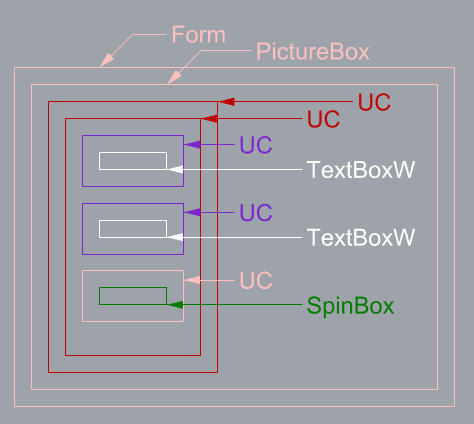
In the IDE, the Form is selected.
Now I click the UC with TextBoxW (white).
All is good.
I click the UC with SpinBox (green).
Not ok, the cursor is active in the SpinBox, I can change the value by typing or mousewheel.
After that, I click a UC with TextBoxW (white).
Cursor is active in the TextBoxW, I can change the text by typing.
Then I click another UC with TextBoxW (white).
Cursor is active in the TextBoxW.
I select the form now.
Then I click a UC with TextBoxW (white).
Now it's ok until I click the UC with SpinBox (green).
---
The change in WM_MOUSEACTIVATE seems to work partially.
Unfortunately, I can't show this in a sample app, even not with the same UCs.
Last edited by Karl77; Nov 5th, 2018 at 02:17 AM.
-
Nov 5th, 2018, 02:37 AM
#2106
Re: CommonControls (Replacement of the MS common controls)
Karl77,
If you also change WM_MOUSEACTIVATE in the SpinBox then it also works there.
Will check what is the optimal solution.
-
Nov 5th, 2018, 04:43 AM
#2107
Fanatic Member
Re: CommonControls (Replacement of the MS common controls)
Originally Posted by Krool
If you also change WM_MOUSEACTIVATE in the SpinBox then it also works there.
I thought so, but first wanted to point out that when the SpinBox got active, the TextBoxW can get active even when WM_MOUSEACTIVATE was changed in it.
It is not a big issue at all, only a bit inconvenience in the IDE.
-
Nov 5th, 2018, 06:31 AM
#2108
Re: CommonControls (Replacement of the MS common controls)
Karl77,
Ok another trial error attempt. Please restore changes done before on WM_MOUSEACTIVATE and just comment out 1 line in below function: (green marked)
Code:
Public Function ComCtlsRootIsEditor(ByVal hWnd As Long) As Boolean
Static Done As Boolean, Value As Boolean
If Done = False Then
    Const GA_ROOT As Long = 2
    hWnd = GetAncestor(hWnd, GA_ROOT)
    If hWnd <> 0 Then
        Dim Buffer As String, RetVal As Long
        Buffer = String(256, vbNullChar)
        RetVal = GetClassName(hWnd, StrPtr(Buffer), Len(Buffer))
        If RetVal <> 0 Then Value = CBool(Left$(Buffer, RetVal) = "wndclass_desked_gsk")
    End If
    ' Done = True
End If
ComCtlsRootIsEditor = Value
End Function
-
Nov 5th, 2018, 08:12 AM
#2109
Re: CommonControls (Replacement of the MS common controls)
Originally Posted by Krool
Thanks. However I responded in #1426 why it makes no difference.
The problem Karl77 faces is apparently something different.
I've seen exactly this problem with vbAccelerator's IPAO -- a custom UC1 is marked as control container, a UC with flawed IPAO is sited at design-time (in this case TextBoxW), once an instance of UC1 is placed on Form1 the TextBoxW can be activated in the designer in the IDE.
Take a look at how ATL implements set focus in CComControlBase::OnSetFocus -- pOleObject->DoVerb(OLEIVERB_UIACTIVATE, NULL, m_spClientSite, 0, m_hWndCD, &m_rcPos) is the meat. Also notice how m_bInPlaceActive flag is handled throughout the whole atlctl.h -- a very instructive read for control creators IMO.
cheers,
</wqw>
-
Nov 5th, 2018, 10:25 AM
#2110
Fanatic Member
Re: CommonControls (Replacement of the MS common controls)
Originally Posted by Krool
Karl77,
Ok another trial error attempt. Please restore changes done before on WM_MOUSEACTIVATE and just comment out 1 line in below function: (green marked)
Code:
Public Function ComCtlsRootIsEditor(ByVal hWnd As Long) As Boolean
Static Done As Boolean, Value As Boolean
If Done = False Then
    Const GA_ROOT As Long = 2
    hWnd = GetAncestor(hWnd, GA_ROOT)
    If hWnd <> 0 Then
        Dim Buffer As String, RetVal As Long
        Buffer = String(256, vbNullChar)
        RetVal = GetClassName(hWnd, StrPtr(Buffer), Len(Buffer))
        If RetVal <> 0 Then Value = CBool(Left$(Buffer, RetVal) = "wndclass_desked_gsk")
    End If
    ' Done = True
End If
ComCtlsRootIsEditor = Value
End Function
I'm 99.9% sure it works.
Let's wait one day for the last 0.1%, as the effect sometimes wasn't there for unknown reasons.
-
Nov 5th, 2018, 11:42 AM
#2111
Re: CommonControls (Replacement of the MS common controls)
Originally Posted by wqweto
I've seen exactly this problem with vbAccelerator's IPAO -- a custom UC1 is marked as control container, a UC with flawed IPAO is sited at design-time (in this case TextBoxW), once an instance of UC1 is placed on Form1 the TextBoxW can be activated in the designer in the IDE.
Take a look at how ATL implements set focus in CComControlBase::OnSetFocus -- pOleObject->DoVerb(OLEIVERB_UIACTIVATE, NULL, m_spClientSite, 0, m_hWndCD, &m_rcPos) is the meat. Also notice how m_bInPlaceActive flag is handled throughout the whole atlctl.h -- a very instructive read for control creators IMO.
I have tested now again (and tested before) and I noticed that DoVerb OLEIVERB_UIACTIVATE behaves the same as applying SetFocus API.
Even when the Validation cancellation should occur the DoVerb OLEIVERB_UIACTIVATE just set's the focus. So currently I see no difference in this way and my current implementation.
The real point is (and maybe we talked past each other about it) is WM_MOUSEACTIVATE. It is crucial that the validation needs to take place in WM_MOUSEACTIVATE and then set the focus accordingly.
What is interesting in the GitHub source you provided that in OnMouseActivate also Ambient.UserMode is checked. (same as my previous idea with GetTopUserControl(Me).Ambient.UserMode instead of the quirky ComCtlsRootIsEditor() workaround which obviously does not always work)
Code:
	LRESULT OnMouseActivate(UINT /*uMsg*/, WPARAM /*wParam*/, LPARAM /*lParam*/, BOOL& bHandled)
	{
		BOOL bUserMode = TRUE;
		HRESULT hRet = GetAmbientUserMode(bUserMode);
		// UI activate if in user mode only
		// allow activation if we can't determine mode
		if (FAILED(hRet) || bUserMode)
		{
			CComPtr<IOleObject> pOleObject;
			ControlQueryInterface(__uuidof(IOleObject), (void**)&pOleObject);
			if (pOleObject != NULL)
				pOleObject->DoVerb(OLEIVERB_UIACTIVATE, NULL, m_spClientSite, 0, m_hWndCD, &m_rcPos);
		}
		bHandled = FALSE;
		return 1;
}
Again, I see no difference in applying DoVerb OLEIVERB_UIACTIVATE or direct SetFocus.
-
Nov 5th, 2018, 12:22 PM
#2112
Hyperactive Member
Re: CommonControls (Replacement of the MS common controls)
Krool,
I am working on a utility for your VBCCR and VBFLXGRD projects that enables either or both to be updated. In addition, if you have a project that uses the .OCX versions of each, this utility will swap out the .OCX references and replaces them with the appropriate files from the respective StdEXE versions and then it does a command-line compile to make a program that has no dependencies. I find this useful because although the StdEXE versions provide the lack of dependencies they take a whole lot longer to compile so with this utility you only do the “long” compile at the end instead of each time to check syntax or compile during development.
I am having a problem doing both VBCCRxx and VBFLXGRDxx at the same time. As you know, a given program can only have one module of a certain name and these two have some common modules. Both of you sets of controls come from the same underlying common code so the StdEXE versions hav several modules that have the same name. If the modules are the same (such as “Common\Common.bas” and “Common\VisualStyles.bas” in the StdEXE versions) then I can just use one of them for both. The problem comes with modules that are the same name but different. The one that is causing me problems right now is “Builds\VTableHandle.bas”. In the latest ComCtlsDemo this file is 27.4 kb and is dated 30 Sep 2018 but in VBFlexGridDemo this file is 27.6 kb and is dated 4 Mar 2018. The two files are fairly different internally too. VBFlexGridDemo’s version of VTableHandle.bas uses an old Enumeration.cls that is not present in ComCtlsDemo.bas.
There are some common public routines and variables so I can’t just rename one of the files and include both. In fact, as it is now, even forgetting about the utility I am working on now, you can’t build a program that uses the controls in both of the StdEXE versions since each requires its own VTableHanlde.bas and they are different.
So my question is do you intend for “Builds\VTableHandle.bas” to be the same any time in the near future? If so, when? Thanks.
MountainMan
-
Nov 5th, 2018, 12:44 PM
#2113
Re: CommonControls (Replacement of the MS common controls)
Originally Posted by MountainMan
Krool,
I am working on a utility for your VBCCR and VBFLXGRD projects that enables either or both to be updated. In addition, if you have a project that uses the .OCX versions of each, this utility will swap out the .OCX references and replaces them with the appropriate files from the respective StdEXE versions and then it does a command-line compile to make a program that has no dependencies. I find this useful because although the StdEXE versions provide the lack of dependencies they take a whole lot longer to compile so with this utility you only do the “long” compile at the end instead of each time to check syntax or compile during development.
I am having a problem doing both VBCCRxx and VBFLXGRDxx at the same time. As you know, a given program can only have one module of a certain name and these two have some common modules. Both of you sets of controls come from the same underlying common code so the StdEXE versions hav several modules that have the same name. If the modules are the same (such as “Common\Common.bas” and “Common\VisualStyles.bas” in the StdEXE versions) then I can just use one of them for both. The problem comes with modules that are the same name but different. The one that is causing me problems right now is “Builds\VTableHandle.bas”. In the latest ComCtlsDemo this file is 27.4 kb and is dated 30 Sep 2018 but in VBFlexGridDemo this file is 27.6 kb and is dated 4 Mar 2018. The two files are fairly different internally too. VBFlexGridDemo’s version of VTableHandle.bas uses an old Enumeration.cls that is not present in ComCtlsDemo.bas.
There are some common public routines and variables so I can’t just rename one of the files and include both. In fact, as it is now, even forgetting about the utility I am working on now, you can’t build a program that uses the controls in both of the StdEXE versions since each requires its own VTableHanlde.bas and they are different.
So my question is do you intend for “Builds\VTableHandle.bas” to be the same any time in the near future? If so, when? Thanks.
MountainMan
Wow. Thanks for your efforts.
I always keep shared stuff in sync. I don't see different VTableHandle.bas version in ComCtlsDemo and VBFlexGridDemo. (?)
Last edited by Krool; Nov 5th, 2018 at 12:48 PM.
-
Nov 5th, 2018, 01:12 PM
#2114
Fanatic Member
Re: CommonControls (Replacement of the MS common controls)
Originally Posted by MountainMan
if you have a project that uses the .OCX versions of each, this utility will swap out the .OCX references and replaces them with the appropriate files from the respective StdEXE versions and then it does a command-line compile to make a program that has no dependencies. I find this useful because although the StdEXE versions provide the lack of dependencies they take a whole lot longer to compile so with this utility you only do the “long” compile at the end instead of each time to check syntax or compile during development.
I like that idea!
Also from what I have read here, it could have some performance advantages.
Krool said this, but don't ask for the exact post #.
But there is also the risk that there are behavior differences.
I don't know.
I am having a problem doing both VBCCRxx and VBFLXGRDxx at the same time.
What about merging the 2 projects?
Would reduce maintenance effort.
I have both projects (and some additional things) in one OCX.
Works very good.
-
Nov 5th, 2018, 07:31 PM
#2115
Re: CommonControls (Replacement of the MS common controls)
Hi Krool, thanks for your excellent work on this project!
I've been using your RichTextBox control and it works great, but I've found a potential spot for a performance improvement. Right now getting RTF via the TextRtf property can be quite slow on large documents (for example, documents with large images embedded). On my computer it is taking almost 3 seconds to return about 4MB of RTF.
I traced this to the RtfStreamCallbackStringOut method, where the BytesRequested parameter tends to use fairly small chunks of around 4KB. Combined with around 1000 Redim Preserves, this seems to be the culprit. Maybe there's a way to increase the "chunk" size the RichEdit control uses, but I'm not aware of this.
Instead I've tried implementing a 1MB buffer that increases in BufferSize*2 chunks with a final Redim Preserve to the correct size (reducing the number of Redims to 4 vs. 1000 in the example case). The performance boost is significant, taking about 0.1 seconds vs 2.5-3 seconds).
Here's my code if you are interested. Feel free to use it, or modify it in any way that you see fit. It hasn't been tested heavily yet, so there may be issues so please review it carefully if you intend to use it (especially check for off-by-one errors on the buffer resizing/ubound at chunk boundaries).
In the general section of RichTextBoxBase.bas:
Code:
Private StreamStringOutBufferSize As Long
2 Modified functions in RichTextBoxBase.bas:
Code:
Public Function RtfStreamStringOut() As String
If StreamStringOutUBound > 0 Then
   ReDim Preserve StreamStringOut(0 To StreamStringOutUBound - 1) As Byte
   RtfStreamStringOut = StreamStringOut()
   Erase StreamStringOut()
   StreamStringOutUBound = 0
   StreamStringOutBufferSize = 0
End If
End Function

Public Function RtfStreamCallbackStringOut(ByVal dwCookie As Long, ByVal ByteBufferPtr As Long, ByVal BytesRequested As Long, ByRef BytesProcessed As Long) As Long
Dim l_BufferBump As Long

If BytesRequested > 0 Then
   If StreamStringOutBufferSize < StreamStringOutUBound + BytesRequested - 1 Then '
      If StreamStringOutBufferSize = 0 Then
         ' Initialize buffer to ~1MB
         l_BufferBump = 104576
      Else
         ' Increase buffer by current buffer size
         l_BufferBump = StreamStringOutBufferSize
         If l_BufferBump > 16777216 Then l_BufferBump = 16777216 ' Cap buffer bump at ~16MB
      End If

      If l_BufferBump < BytesRequested Then l_BufferBump = BytesRequested  ' Make sure buffer size is large enough for BytesRequested
      StreamStringOutBufferSize = StreamStringOutBufferSize + l_BufferBump

      ReDim Preserve StreamStringOut(0 To StreamStringOutBufferSize) As Byte
   End If
   CopyMemory StreamStringOut(StreamStringOutUBound), ByVal ByteBufferPtr, BytesRequested
   StreamStringOutUBound = StreamStringOutUBound + BytesRequested
   BytesProcessed = BytesRequested
Else
    BytesProcessed = 0
End If
RtfStreamCallbackStringOut = 0
End Function
-
Nov 6th, 2018, 09:01 AM
#2116
Fanatic Member
Re: CommonControls (Replacement of the MS common controls)
(ComCtlsRootIsEditor change)
Originally Posted by Karl77
I'm 99.9% sure it works.
Let's wait one day for the last 0.1%, as the effect sometimes wasn't there for unknown reasons.
Ok, now I'm 100% sure it works..
But why does ComCtlsRootIsEditor fail sometimes? There must be a reason.
So I'm not so sure that this ComCtlsRootIsEditor change is a good solution.
-
Nov 11th, 2018, 04:22 PM
#2117
Re: CommonControls (Replacement of the MS common controls)
Originally Posted by Karl77
Still there, but different.
I have one UC that contains a next UC, and in this UC there are a)some UCs using TextBoxW b)some UCs using SpinBox.
In the IDE, the Form is selected.
Now I click the UC with TextBoxW (white).
All is good.
I click the UC with SpinBox (green).
Not ok, the cursor is active in the SpinBox, I can change the value by typing or mousewheel.
After that, I click a UC with TextBoxW (white).
Cursor is active in the TextBoxW, I can change the text by typing.
Then I click another UC with TextBoxW (white).
Cursor is active in the TextBoxW.
I select the form now.
Then I click a UC with TextBoxW (white).
Now it's ok until I click the UC with SpinBox (green).
Originally Posted by Karl77
But why does ComCtlsRootIsEditor fail sometimes? There must be a reason.
So I'm not so sure that this ComCtlsRootIsEditor change is a good solution.
Update released. This issue is now solved the proper way. (both Std-EXE and in OCX version)
Each control persists now on UserControl_InitProperties/UserControl_ReadProperties the Ambient.UserMode and GetTopUserControl(Me).Ambient.UserMode values into local variables.
Example: (TextBoxW)
Code:
Private Sub UserControl_InitProperties()
If DispIDMousePointer = 0 Then DispIDMousePointer = GetDispID(Me, "MousePointer")
TextBoxDesignMode = Not Ambient.UserMode
TextBoxTopDesignMode = Not GetTopUserControl(Me).Ambient.UserMode

Private Sub UserControl_ReadProperties(PropBag As PropertyBag)
If DispIDMousePointer = 0 Then DispIDMousePointer = GetDispID(Me, "MousePointer")
TextBoxDesignMode = Not Ambient.UserMode
TextBoxTopDesignMode = Not GetTopUserControl(Me).Ambient.UserMode
Those two events are the earliest time Ambient.UserMode is meaningful.
All occurences of Ambient.UserMode are replaced accordingly. (Ambient.UserMode = True -> ...DesignMode = False; Ambient.UserMode = False -> ...DesignMode = True)
The other change is on each WM_MOUSEACTIVATE handler where ComCtlsRootIsEditor() got obsolete and was removed from ComCtlsBase.bas.
It just got replaced by the ...TopDesignMode variable.
Example: (TextBoxW)
Code:
Case WM_MOUSEACTIVATE
    Static InProc As Boolean
    If TextBoxTopDesignMode = False And GetFocus() <> TextBoxHandle Then
-
Nov 12th, 2018, 11:02 AM
#2118
Fanatic Member
Re: CommonControls (Replacement of the MS common controls)
(UC active issue)
Update released. This issue is now solved the proper way. (both Std-EXE and in OCX version)
Works flawless, thanks.
VBFlexGrid is also updated.
Wouldn't it be good to merge VBCCR and VBFlexGrid anyway?
Both projects are mature enough to marry.
Or?
-
Nov 12th, 2018, 05:40 PM
#2119
Lively Member
Re: CommonControls (Replacement of the MS common controls)
Originally Posted by Karl77
(UC active issue)
Works flawless, thanks.
VBFlexGrid is also updated.
Wouldn't it be good to merge VBCCR and VBFlexGrid anyway?
Both projects are mature enough to marry.
Or?
I second that.
-
Nov 12th, 2018, 11:35 PM
#2120
Hyperactive Member
Re: CommonControls (Replacement of the MS common controls)
Krool,
I am close to finishing the utility that takes OCX versinos of both VBFLXGRDxx and VBCCRxx and cuts out the OCX parts and brings in the various control files from your ComCtlsDemo and VBFlexGridDemo packages. My goal is to have the fast and relatively simple aspects of the OCX version in use during development but do a final compilation with the controls being compiled as part of the final executable
I am 99% done but I have a question. In the StdEXE versions you have various controls with property page files (.pag extension). If I put the controls into the executables and then do a commandline compile do I need the property page files? I can easily drop them out but I don't want to mess anything up. I am not a wizard in self-made controls but it seems that the property pages are of use in the IDE during development but are not required to make the EXE. Is my assumption correct or do I need to include these files for the commandline compile?
 Posting Permissions
- You may not post new threads
- You may not post replies
- You may not post attachments
- You may not edit your posts
-
Forum Rules
|
Click Here to Expand Forum to Full Width
|



 Reply With Quote

