|

-
Apr 9th, 2018, 11:30 AM
#1
Thread Starter
Fanatic Member

 [RESOLVED] SystemInvalidOperationException [RESOLVED] SystemInvalidOperationException
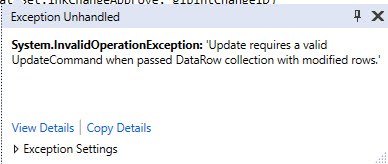
When running the code below I get the error seen below at the Update() line. What I get out of the message is that the Update() is not valid and having something to do with the row that was modified. I am unable to see why my Update() is not valid. There are other places in my code that I use this same methodology with no problems, which tells me that the problem might well be upstream in the code. However, I have looked at everything I can think of and cannot figure out why this is occurring. Can someone explain to me what constitutes a valid Update() and why mine is not?
This code is run from a double-click event from a datagridview and is supposed to change some values in columns in the row selected in the event, then redisplay the DGV without the row that was changed.
Additionally, I am using SQL as the database and am aware that the problem could be around using True instead of 1, which I have tested and there is no change in the issue.
Can anyone explain to me where I went wrong and how I might be misreading the error?
Code:
                    'Remove Approver from list
                    'LnkChangeApproveTableAdapter.FillByChangeID(Me._MasterBase_1_0DataSet.lnkChangeApprove, glbintChangeID)
                    CType(frmSignList.lnkChangeApproveBindingSource.Current, DataRowView).Item("chrSignature") = CStr("Removed by Change Admin, " & glbstrAdmin & " " & CStr(DateAndTime.Now))
                    CType(frmSignList.lnkChangeApproveBindingSource.Current, DataRowView).Item("blnRemove") = 1
                    frmSignList.Validate()
                    frmSignList.lnkChangeApproveBindingSource.EndEdit()
                    frmSignList.LnkChangeApproveTableAdapter.Update(frmSignList._MasterBase_1_0DataSet)
                    frmSignList.LnkChangeApproveTableAdapter.FillByChangeID(frmSignList._MasterBase_1_0DataSet.lnkChangeApprove, glbintChangeID) 'refresh DGV
                    Dim LoadAdminList As New nspSignList.SignOperation
                    LoadAdminList.ChangeAdminOperation()
-
Apr 9th, 2018, 11:41 AM
#2
Re: SystemInvalidOperationException
The rest of the error message is the issue, but it doesn't help explain WHY it is happening. If you look at the TableAdapter in question, you will find that it doesn't have an Update Command associated with it. TableAdapters should have SELECT, INSERT, UPDATE, and DELETE commands. You can create them with just the SELECT command. I don't know whether you can create them with just two or three of the four, and generally, you don't have to do any of that. For a TableAdapter, the datasource wizard usually takes care of creating those adapters. For some reason, in this case, it didn't.
So, that's the source of the error, it just doesn't really identify why the update command wasn't created for that specific TableAdapter. However, it may point you in the right direction.
My usual boring signature: Nothing
 
-
Apr 9th, 2018, 11:54 AM
#3
Thread Starter
Fanatic Member
Re: SystemInvalidOperationException
I looked as you suggested and you are absolutely right. There is no Update command in the table adapter. I have never had this happen before and do not know what I did to cause that. Now I need to go into the guts of the table adapter and find out what needs to go into the update. I will let you know how it turns out after I clean myself up. Thanks.
-
Apr 9th, 2018, 12:21 PM
#4
Thread Starter
Fanatic Member
Re: SystemInvalidOperationException
Yet another fine mess I have gotten myself into. I went under the hood and tried to setup the update for the table. I made some progress but have an even bigger mess than I had before. My first question is why was there no update in the table adapter before, since I have never seen this before? Would I be better off just making a new table adapter or should I just try to figure out what actually goes into the commandLineText in the Update properties of the table adapter?
-
Apr 9th, 2018, 12:27 PM
#5
Re: SystemInvalidOperationException
I would just delete the existing tableadapter and create a new one. The only reason I can think of that there is no Update command would be if you don't have a Primary Key setup in the database table.
-
Apr 9th, 2018, 12:48 PM
#6
Thread Starter
Fanatic Member
Re: SystemInvalidOperationException
Wes, you think right. I saw no need for a primary key in this particular table and did not create one. It is a table that holds signatures (approvals) for a change request and really has no need for a primary key. However, if having a primary key will fix the problem, without my continued mucking about under the hood of the table adapter and making things worse than they already are, I am quite willing to add a auto number field and make it a primary key.
-
Apr 9th, 2018, 12:55 PM
#7
Re: SystemInvalidOperationException
Either that or write your own Command queries.
-
Apr 9th, 2018, 01:08 PM
#8
Thread Starter
Fanatic Member
Re: SystemInvalidOperationException
Writing my own is what I have been doing, with poor results so far. I remember having similar problems when I used to roll my own.
-
Apr 9th, 2018, 02:42 PM
#9
Re: SystemInvalidOperationException
I'd say that setting a primary key is certainly the easiest solution. If you really don't need it, and you don't already have a suitable field in the table, then an identity column is cheap and easy.
My usual boring signature: Nothing
-
Apr 9th, 2018, 03:16 PM
#10
Thread Starter
Fanatic Member
Re: SystemInvalidOperationException
Yeah, that is what I am going to do. But before I can get it done, I need to either find or remember how to setup an auto-increment field in SQL. I did this once a long time ago and am unable to find the reference material for doing it again. I do remember setting up a query and running it for a table that I once had. Sometimes I cannot believe the crap I get myself into.
-
Apr 9th, 2018, 03:48 PM
#11
Re: SystemInvalidOperationException
Set up a field with a numeric data type, then set both of the Identity properties (1 and 1 is good).
Some info about it:
https://docs.microsoft.com/en-us/sql...ntity-property
-
Apr 9th, 2018, 11:04 PM
#12
Thread Starter
Fanatic Member
Re: SystemInvalidOperationException
Thanks Geek. That got the job done. However, I had quite a mess to clean up back in the database to get all of this fixed.
Tags for this Thread
 Posting Permissions
- You may not post new threads
- You may not post replies
- You may not post attachments
- You may not edit your posts
-
Forum Rules
|
Click Here to Expand Forum to Full Width
|



 Reply With Quote


