|

-
Aug 21st, 2017, 08:30 AM
#1
 [RESOLVED] MS Sans Serif --> Microsoft Sans Serif, RTB, some brainstorming [RESOLVED] MS Sans Serif --> Microsoft Sans Serif, RTB, some brainstorming
Okay, for the most part, things are going fine with me swapping out MS Sans Serif with Microsoft Sans Serif during runtime (allowing me to avoid a huge source code editing job).
However, I've run across one glitch. Just as an FYI, I'm talking about 100s of forms, so source code editing isn't a good choice.
Here's the problem. I've got these two UserControls I've used for decades (and wrote a LONG time ago). They're named RtfButton and RtfLabel. As you might guess, they're just controls that allow RTF text on a button or label caption. When in design mode, there's a little editor that can pop up (when "Edit" is clicked on the context menu of the control) which allows you to type (or Copy-Paste from WordPad) text that's "rich".
Okay, to the problem. This control has always defaulted to the MS Sans Serif font. (Ok ok, my bad back in 1999.) And now, this font is scattered throughout where these controls are used (which is extensive).
I've examined things, and the RTF caption text is just stored in the TextRTF property of the RTB that's part of the UserControl. Within the UserControl, this text is actually managed in a module variable named m_RTFCode (a string), and it's stored as a property named RTFCode. I've looked, and this property is stored in the .FRX file of a form with this UserControl. Here's a hex-editor's snooping of an "asdfasdfasd" caption for the RtfLabel control I used for testing:
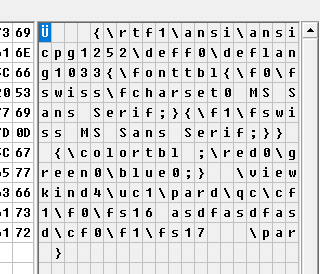
The above is just in a file named Test.frx.
Okay, here's what I need. I need a procedure that runs in Form_Load that searches for these two controls (RtfButton and RtfLabel), finds their text, examines whether or not it contains MS Sans Serif, and, if it does, swap it out for Microsoft Sans Serif.
Maybe, by writing it out here, I've outlined the solution. But I'm still certainly willing to listen to ideas. I'll continue working though.
Best Regards,
Elroy
EDIT1: Just for an example, here's a way that I use that RtfLabel control. On the following, except for the two buttons, that's all one RtfLabel. It truly allows me great flexibility in placing formatted text on a VB6 form:
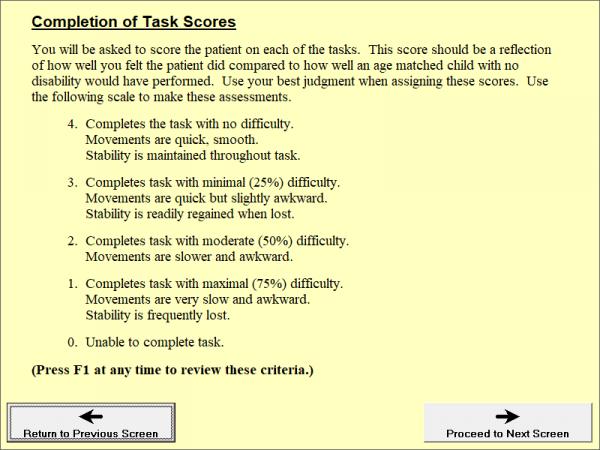
EDIT2: Also, I placed these controls in the codebank (with example) about a year ago. If you're further interested in how they work, here's the link to the codebank.
Last edited by Elroy; Aug 21st, 2017 at 09:03 AM.
Any software I post in these forums written by me is provided "AS IS" without warranty of any kind, expressed or implied, and permission is hereby granted, free of charge and without restriction, to any person obtaining a copy. To all, peace and happiness.
-
Aug 21st, 2017, 09:36 AM
#2
Re: MS Sans Serif --> Microsoft Sans Serif, RTB, some brainstorming
Hmmm, well, I got it sorted. It wasn't nearly as bad as I thought it was going to be.
You can see my solution under the comment "And now deal with the RtfButton and RtfLabel", inside the loop.
I guess I just needed to talk it through with myself.
Code:
Public Sub ReplaceMsFonFont(frm As Form)
    ' This replaces "MS Sans Serif" with "Microsoft Sans Serif" wherever it's found on the form.
    '
    Dim ctl As Control
    '
    Select Case frm.Font.Name
    Case "MS Sans Serif"
        frm.Font.Name = "Microsoft Sans Serif"  ' From all I can tell, this is VERY close to the same width characters (per font size).
    Case "MS Serif"
        frm.Font.Name = "Times New Roman"       ' Times New Roman is a bit narrower, but there is no Microsoft Serif, and I don't use Serif fonts much.
    End Select
    '
    On Error Resume Next        ' Not all controls have a font property.
        For Each ctl In frm.Controls
            Select Case ctl.Font.Name
            Case "MS Sans Serif"
                ctl.Font.Name = "Microsoft Sans Serif"
            Case "MS Serif"
                ctl.Font.Name = "Times New Roman"
            End Select
            '
            ' And now deal with the RtfButton and RtfLabel.
            If TypeName(ctl) = "RtfButton" Or TypeName(ctl) = "RtfLabel" Then
                If InStr(ctl.RTFCode, "MS Sans Serif") Then
                    ctl.RTFCode = Replace$(ctl.RTFCode, "MS Sans Serif", "Microsoft Sans Serif")
                End If
            End If
        Next ctl
    On Error GoTo 0
End Sub
Y'all take care,
Elroy
Any software I post in these forums written by me is provided "AS IS" without warranty of any kind, expressed or implied, and permission is hereby granted, free of charge and without restriction, to any person obtaining a copy. To all, peace and happiness.
-
Aug 21st, 2017, 09:42 AM
#3
Re: [RESOLVED] MS Sans Serif --> Microsoft Sans Serif, RTB, some brainstorming
Not sure what you are asking? I may not be reading the thread correctly.
Can't you just open the project, select the control(s) one at a time, get the text and paste it to Notepad. Then do a search & replace and paste the text back to the control's property? If this is a one-time fix for the project, I'm not a big fan of adding code to the startup just to change properties that can be changed manually. Once changed, it's changed, even if it takes a few hours or a day to do.
Of course you should modify your usercontrol's source to change the RTF control's font so future use of the control uses that new default.
Edited: I see you found a solution. You must have had that reply open for a bit before you submitted -- didn't see it when I added this reply
-
Aug 21st, 2017, 10:22 AM
#4
Re: [RESOLVED] MS Sans Serif --> Microsoft Sans Serif, RTB, some brainstorming
Hi LaVolpe,
Yes, I hear you. And yeah, I just finished going through all my UserControls and purging them of MS Sans Serif, replacing it with Microsoft Sans Serif.
However, this doesn't take care of all the places that RtfLabel and RtfButton are currently being used. In these places, the RtfText is already in the .FRX file. And, I just did a search, and there are 331 forms using RtfLabel (and that's not counting the RtfLabels on the forms). Only 15 using RtfButton, so I might go through those.
It was just the volume of work I was trying to avoid, at least for a while. I certainly agree that getting rid of MS Sans Serif at design-time rather than run-time would be better.
Best Regards,
Elroy
Any software I post in these forums written by me is provided "AS IS" without warranty of any kind, expressed or implied, and permission is hereby granted, free of charge and without restriction, to any person obtaining a copy. To all, peace and happiness.
-
Aug 21st, 2017, 10:31 AM
#5
Re: [RESOLVED] MS Sans Serif --> Microsoft Sans Serif, RTB, some brainstorming
You can make a routine to edit all .frm files (just like editing in notepad) and change the font property?
-
Aug 21st, 2017, 10:41 AM
#6
Re: [RESOLVED] MS Sans Serif --> Microsoft Sans Serif, RTB, some brainstorming
 Originally Posted by Krool

You can make a routine to edit all .frm files (just like editing in notepad) and change the font property?
From what I gathered, part of his problem was that the font name was embedded in RTF tags of string properties that are stored within his frx, ctx files.
-
Aug 21st, 2017, 12:41 PM
#7
Re: [RESOLVED] MS Sans Serif --> Microsoft Sans Serif, RTB, some brainstorming
Ok, this is a two-part problem. The first part was addressed in an earlier thread, and was the start of the code shown in post #2.
For the first part, the problem is that we're talking about hundreds of forms. And, in many cases, no font name is specified at all (defaulting to MS Sans Serif). Therefore, it's not a simple search-and-replace. I'd have to insert a LOT of "Font.Name = Microsoft Sans Serif" (or something similar) into my FRM files. I'll eventually do that, but I worked out a run-time solution.
And yes, as LaVolpe states, the reason for this second thread was to work out a solution for the RTBs and pre-defined RTF text that's in these RTBs. This text winds up in the FRX (not FRM) files. These FRX files are much more difficult to edit than the FRM files, as the FRM files have offsets in them into the FRX files. And, I had over 330 forms that had RTF text embedded in these FRX files. Not an easy thing to fix.
I'll eventually write a program to patch-up these FRX files (and also patch up the offsets in the FRM files). However, I think I've managed to work out an interim run-time solution. From my testing, it seems to work fine.
This makes me think of something else that might help me. Does anyone know if the default font can be changed in the compiler?
(EDIT: I'm going to retract this question. I know the answer. It's basically "yes", so long as the font name is less than 13 characters. It's done with a VB6.EXE patch. But that doesn't really help me because I really want to substitute with "Microsoft Sans Serif".)
Thank You,
Elroy
Last edited by Elroy; Aug 21st, 2017 at 01:03 PM.
Any software I post in these forums written by me is provided "AS IS" without warranty of any kind, expressed or implied, and permission is hereby granted, free of charge and without restriction, to any person obtaining a copy. To all, peace and happiness.
-
Aug 21st, 2017, 01:57 PM
#8
Re: [RESOLVED] MS Sans Serif --> Microsoft Sans Serif, RTB, some brainstorming
Yes, you answered your own question, though it isn't the compiler, it is vb6.exe. Once the form is created, the default font is set. So knowing that, the easy solution is to change one's initial habits...
1. When starting new project or adding a new form to an existing project. Stop... don't add a single control to the form yet
2. Change the form's Font to whatever you want
3. Now add your controls. Most controls assume/inherit the container's font, which you just changed to what you wanted.
Do note that is may not apply to many custom UCs people created in the wild. Not many UC authors are that forward-thinking I fear and may not even offer an option to change its font. In those cases, the controls' fonts within the UC are kinda locked.
-
Aug 21st, 2017, 02:07 PM
#9
Re: [RESOLVED] MS Sans Serif --> Microsoft Sans Serif, RTB, some brainstorming
Hi LaVolpe,
Well, regarding all of that, I'm quite safe. All my UserControls are of my own creation. In fact, I don't typically even make OCX files for them. I just include them in my project.
Also, regarding adding a new form, I haven't done that in years, other than for sample projects for these forums. Rather, when I need a new form in one of my projects, I always start with some existing form, doing a "save as" (and then re-load the original form). Therefore, once I get this stuff fixed, it'll tend to stay fixed.
Thanks for pointing stuff out though.
Elroy
Any software I post in these forums written by me is provided "AS IS" without warranty of any kind, expressed or implied, and permission is hereby granted, free of charge and without restriction, to any person obtaining a copy. To all, peace and happiness.
-
Aug 21st, 2017, 02:13 PM
#10
Re: [RESOLVED] MS Sans Serif --> Microsoft Sans Serif, RTB, some brainstorming
Originally Posted by LaVolpe
Once the form is created, the default font is set.
Yes, but as far as I can determine the default... defaults. It is not "set" or assigned.
It looks as if OleCreateFontIndirect() is hard-wired to create an MS Sans Serif 8 pt Ifont/StdFont object when passed an uninitialized (zeroed) FONTDESC argument.
For example try: Set SomeStdFont = New StdFont
This doesn't seem to do anything but call OleCreateFontIndirect() with such a zeroed FONTDESC.
-
Aug 21st, 2017, 02:16 PM
#11
Re: [RESOLVED] MS Sans Serif --> Microsoft Sans Serif, RTB, some brainstorming
I'd start from scratch with this effort too.
For over a decade the default system UI font has been Segoe UI 9 pt.
-
Aug 21st, 2017, 02:17 PM
#12
Re: [RESOLVED] MS Sans Serif --> Microsoft Sans Serif, RTB, some brainstorming
@dilettante. Not necessarily. I rewrote the 13 byte font name within my copy of vb6.exe to default to another font (true type). MS Sans Serif is in the exe, twice as a matter of fact, and apparently where the font name comes from, regarding newly created forms. New forms now default to the font I wrote into vb6.exe
I was not able to locate where 8.25 point size was set, but I'm guessing that's what is returned for that font if the passed LOGFONT does not supply a lfHeight member value. Just a guess. Per MSDN, when that value is zero, the font's default height is used.
This option is a failure after further testing. See post #16 for more
Last edited by LaVolpe; Aug 21st, 2017 at 09:28 PM.
Reason: clarification
-
Aug 21st, 2017, 04:20 PM
#13
Re: [RESOLVED] MS Sans Serif --> Microsoft Sans Serif, RTB, some brainstorming
I bow to your knowledge based on your empirical experience. Too bad in a way, that is far less likely to ever be fixed than if it happened within one of the OLE libraries.
In a sense though it doesn't matter. It simply isn't legit to compile in specific fonts for user interface elements anyway aside from special purposes. Not only does it break the UI Guidelines from Microsoft, it puts your code in violation of the Americans with Disabilities Act and other such legislation in the U.S. and abroad. I would think this is an even bigger deal in places like the EU.
But... yeah, we all do it most of the time. Some will go even further to place their clients in violation of the law by ignoring High DPI issues and trying to actually dictate against it ("96 DPI or the highway!"). Good way to lose contracts or your job.
-
Aug 21st, 2017, 04:30 PM
#14
Re: [RESOLVED] MS Sans Serif --> Microsoft Sans Serif, RTB, some brainstorming
This isn't really the place but I wanted to warn you guys about the VB6.exe patch for changing the font. I tried it and everything seemed to work well until I came to needing to slightly modify a form in my main programme today.
I didn't notice anything during the edit, created a new exe and ran it. All the forms and their contents were fine except the form I modified. It had 8 CodeJock textboxes on it and they, all the labels, and a standard combobox all became MS Sans Serif 8. I loaded VB6 and checked, apart from the form which was still Tahoma everything else had changed. I didn't mess about and went straight back to my original VB6, changed the font names in the controls on the form, tested and I am good to go. If it matters, I do run my VB6.exe with an internal manifest.
-
Aug 21st, 2017, 04:46 PM
#15
Re: [RESOLVED] MS Sans Serif --> Microsoft Sans Serif, RTB, some brainstorming
Hmmmm, well, yet another problem. The Microsoft Sans Serif font doesn't "word break" precisely like the MS Sans Serif font does. I'm not sure if the character widths are jiggled a bit, or maybe the space is a slightly different width.
This fact just makes me need to check much more than I had planned to.
I'm just putting this here in cases someone else goes down the same path I'm going down.
To all, as has been suggested above, this fix is much better done in the IDE with the Font property. However, because of the volume of forms and controls I have, that's just not a practical solution at this time. Therefore, I'm resorting to a run-time solution. But even this must be double-checked if you absolutely depend on certain word-break (i.e., wrapping) spots.
Best Regards,
Elroy
Any software I post in these forums written by me is provided "AS IS" without warranty of any kind, expressed or implied, and permission is hereby granted, free of charge and without restriction, to any person obtaining a copy. To all, peace and happiness.
-
Aug 21st, 2017, 09:12 PM
#16
Re: [RESOLVED] MS Sans Serif --> Microsoft Sans Serif, RTB, some brainstorming
Originally Posted by Steve Grant
I didn't notice anything during the edit, created a new exe and ran it. All the forms and their contents were fine except the form I modified. It had 8 CodeJock textboxes on it and they, all the labels, and a standard combobox all became MS Sans Serif 8.
Hmmm... I can replicate this unfortunately and will be restoring vb6.exe from my backup.
Steps to replicate it (only affects those that have modified vb6.exe to use a different default font)
1. Start new project
2. Add a label on the form with code: Label1.Caption = Label1.Font.Name
3. Run the test project in IDE and note the caption. It is correct
4. Compile the test project and run. Font returned to MS Sans Serif
When tweaking vb6.exe for a different font and one does not change the font in the form or its controls, then the "default" font will be used. There are no entries in your frm file like: BeginProperty Font, unless you manually changed the font. This means that the default font is used. Now, when compiling, that's when the font is replaced with MS Sans Serif even though that font name isn't in the vb6.exe any longer. Wonder if that font name is also hardcoded in one of the DLLs or other exe files used for compiling and linking? Probably hardcoded in the vb runtime & if that's the case, change fonts like noted in post #8.
@Steve. However, this didn't rewrite the test form so that the font name, in design, read MS Sans Serif.
Kind of a small bummer. Would've been nice not to have to manually adjust form & control fonts for better DPI-related font rendering provided by Win10.
Last edited by LaVolpe; Aug 21st, 2017 at 09:31 PM.
-
Aug 22nd, 2017, 02:56 AM
#17
Re: [RESOLVED] MS Sans Serif --> Microsoft Sans Serif, RTB, some brainstorming
Be careful when using 8.25 as font size (or whatever with a decimal separator).
Because, if you open the project in an environment where the decimal separator is the ',' then you'll have ton's of errors
NB : I use since a few years, also the "Segoe UI", and a font size of 8 by default to avoid the decimal problem
-
Aug 22nd, 2017, 03:19 AM
#18
Re: [RESOLVED] MS Sans Serif --> Microsoft Sans Serif, RTB, some brainstorming
Slightly off-topic ...
When I add a new form to a project then I first change the font (Segoe 8pt) of the form.
All controls added to the Form will inherit the font properties of the form.
So not such a big deal.
-
Aug 22nd, 2017, 06:14 AM
#19
Re: [RESOLVED] MS Sans Serif --> Microsoft Sans Serif, RTB, some brainstorming
Originally Posted by Arnoutdv
When I add a new form to a project then I first change the font (Segoe 8pt) of the form.
All controls added to the Form will inherit the font properties of the form.
So not such a big deal.
I prefer Segoe 9pt. It is the Windows default font (since Vista). And, imo, Segoe UI 8pt looks small compared to MS Sans Serif 8pt.
Setting the font of the form works fine, and you can take this further by creating a form with your preferred font and saving this into the \Template\Forms folder. You can also save a Project (and its form) into the \Template\Projects folder. Then just select this project/form when starting a new VB6 project.
Existing applications are a bigger issue. Whether you change the fonts on each form manually in the IDE, or by Find and Replace in the .frm files, or by Elroy's run time fix, you do need to check that the text fits and looks OK in all controls in each form.
It may be easier to use Microsoft Sans Serif 8pt as the nearest equivalent to MS Sans Serif 8pt, but even this isn't an exact equivalent.
-
Aug 22nd, 2017, 07:15 AM
#20
Re: [RESOLVED] MS Sans Serif --> Microsoft Sans Serif, RTB, some brainstorming
Originally Posted by VB6 Programming
Existing applications are a bigger issue. Whether you change the fonts on each form manually in the IDE, or by Find and Replace in the .frm files, or by Elroy's run time fix, you do need to check that the text fits and looks OK in all controls in each form.
It may be easier to use Microsoft Sans Serif 8pt as the nearest equivalent to MS Sans Serif 8pt, but even this isn't an exact equivalent.
Thank you for recognizing my problem. In the end, I'm using a combination of "manually in the IDE" and "run time fix". Basically, I'm leaving the run-time fix in everywhere, while still slowly purging the application of MS Sans Serif in the IDE. Also, you are absolutely correct that Microsoft Sans Serif "isn't an exact equivalent", as I've found out. Whatever approach people take to fix existing applications, they must still double-check and make sure their forms look as they wish.
Best Regards,
Elroy
Any software I post in these forums written by me is provided "AS IS" without warranty of any kind, expressed or implied, and permission is hereby granted, free of charge and without restriction, to any person obtaining a copy. To all, peace and happiness.
-
Aug 22nd, 2017, 07:42 AM
#21
Re: [RESOLVED] MS Sans Serif --> Microsoft Sans Serif, RTB, some brainstorming
Originally Posted by LaVolpe
If this is a one-time fix for the project, I'm not a big fan of adding code to the startup just to change properties that can be changed manually. Once changed, it's changed, even if it takes a few hours or a day to do.
FWIW, I'm the exact opposite. I much prefer a run-time fix, especially in projects as large as Elroy's.
Even if you are painfully meticulous in the IDE, the likelihood of forgetting to change the font for future form/control additions is high. Similarly, Microsoft is bound to change their mind on font settings in the future, and with a run-time solution, a fix is as simple as changing the font string in your master sub (the one called by all Form_Load events).
If you're doing things like supporting Unicode UI languages, or striving for "perfect" high-DPI support, you will be handling many settings at run-time anyway.
Basically, I'm saying that I've used run-time fixes for years now. It has saved me many headaches, and it frees me from needing to worry about IDE settings every time I add new forms or controls to a project. It is also the *only* solution for certain VB weakpoints (e.g. Unicode text in places like Form captions).
Is there an empirical reason to avoid run-time settings?
@Elroy: quick question. You are totally right, I think, to suggest:
Whatever approach people take to fix existing applications, they must still double-check and make sure their forms look as they wish.
If you're doing this, is there any reason *not* to just bite the bullet and use Segoe UI as your UI font? Besides matching the system font (including things like MsgBox text), if you're gonna manually review font settings throughout your project, it seems to me that this might be as good a time as any to get everything 100% up-to-date. (I do sympathize that this is a massive undertaking either way. Sorry this has been such a hassle.)
-
Aug 22nd, 2017, 08:28 AM
#22
Re: [RESOLVED] MS Sans Serif --> Microsoft Sans Serif, RTB, some brainstorming
Tanner
Just curious .. why Segoe UI?
Spoo
-
Aug 22nd, 2017, 08:54 AM
#23
Re: [RESOLVED] MS Sans Serif --> Microsoft Sans Serif, RTB, some brainstorming
Originally Posted by Tanner_H
@Elroy: quick question. You are totally right, I think, to suggest:
Whatever approach people take to fix existing applications, they must still double-check and make sure their forms look as they wish.
If you're doing this, is there any reason *not* to just bite the bullet and use Segoe UI as your UI font? Besides matching the system font (including things like MsgBox text), if you're gonna manually review font settings throughout your project, it seems to me that this might be as good a time as any to get everything 100% up-to-date. (I do sympathize that this is a massive undertaking either way. Sorry this has been such a hassle.)
Hi Tanner,
Well, by double-check, I didn't mean that I'd pull up every form in the IDE and take a look at it. Rather, I meant that I'd quickly scan them over in runtime (or while executing the compiled program). Also, there are quite a few cases where I depend on the font to do a word-wrap in a specific spot. Switching to Segoe UI would dramatically change where words wrap, so that's why I went with Microsoft Sans Serif. Also, according to this Microsoft page, the Microsoft Sans Serif font should be distributed with every version of Windows that I'd care about. It's very close to MS Sans Serif (although not exact), whereas Segoe UI is substantially different from MS Sans Serif.
I just did a search of all the FRM files in my source code (including all DLLs), and there are 883. That's too many for me to individually inspect them.
Here are a few examples of what I'm talking about:
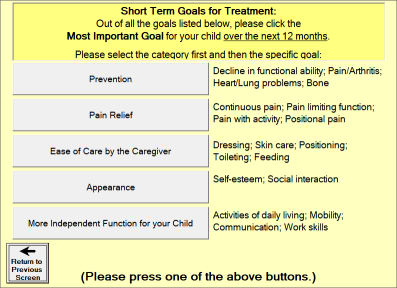
... or ...
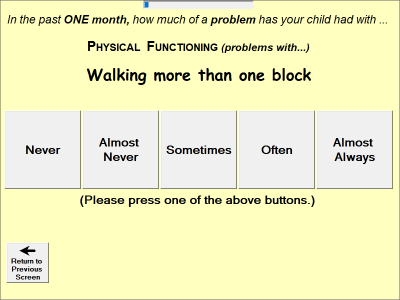
And, see those buttons with two lines of text? I depend on them to wrap and make two lines. That form worked okay, but there were certain subtle differences in the way MS Sans Serif wrapped and the way Microsoft Sans Serif wrapped. If I forced Segoe UI, I think I would have many more problems like that as Segoe UI is about 20% narrower even for the same point size.
Tanner, and all, I do truly appreciate your help.
Best Regards,
Elroy
EDIT1: Also, in that first picture, at the top, you can see my RtfLabel in action.
EDIT2: Just as a p.s., as of this morning, I'm satisfied that my run-time fix is now fully implemented. Everything seems good. There were a few "got'cha" areas, but I've hopefully worked them all out. One "got'cha" that was strange was that the underscore character in Microsoft Sans Serif behaves quite differently than the one in MS Sans Serif. In a few places, I had used that to make a horizontal line, and had to patch those places up manually.
Last edited by Elroy; Aug 22nd, 2017 at 09:05 AM.
Any software I post in these forums written by me is provided "AS IS" without warranty of any kind, expressed or implied, and permission is hereby granted, free of charge and without restriction, to any person obtaining a copy. To all, peace and happiness.
-
Aug 22nd, 2017, 09:05 AM
#24
Re: [RESOLVED] MS Sans Serif --> Microsoft Sans Serif, RTB, some brainstorming
Originally Posted by Spooman
Just curious .. why Segoe UI?
Hi Spoo. From MSDN:
Segoe UI (pronounced "SEE-go") is the Windows system font.
Segoe UI is the Windows font intended for user interface text strings.
Segoe UI is an approachable, open, and friendly typeface, and as a result has better readability than Tahoma, Microsoft Sans Serif, and Arial.
@Elroy: thank you for the detailed reply. I did indeed misunderstand what you meant by "double-check". 883 forms is a *huge* undertaking, and the screenshots clarify the wordwrap trouble.
-
Aug 22nd, 2017, 10:13 AM
#25
Re: [RESOLVED] MS Sans Serif --> Microsoft Sans Serif, RTB, some brainstorming
Tanner
Interesting. Thnx
Spoo
-
Aug 22nd, 2017, 06:33 PM
#26
Addicted Member

Re: [RESOLVED] MS Sans Serif --> Microsoft Sans Serif, RTB, some brainstorming
Originally Posted by Steve Grant
This isn't really the place but I wanted to warn you guys about the VB6.exe patch for changing the font. I tried it and everything seemed to work well until I came to needing to slightly modify a form in my main programme today.
I didn't notice anything during the edit, created a new exe and ran it. All the forms and their contents were fine except the form I modified. It had 8 CodeJock textboxes on it and they, all the labels, and a standard combobox all became MS Sans Serif 8. I loaded VB6 and checked, apart from the form which was still Tahoma everything else had changed. I didn't mess about and went straight back to my original VB6, changed the font names in the controls on the form, tested and I am good to go. If it matters, I do run my VB6.exe with an internal manifest.
Thanks for reporting (thanks to Lavolpe too)
I have put a BIG note on the project until I investigate. Lavolpe: I confirm it is not coming from the compiler... I'll try to find a way to fix it and I'll keep you all informed. big disapointment. 
-
Aug 22nd, 2017, 06:38 PM
#27
Re: [RESOLVED] MS Sans Serif --> Microsoft Sans Serif, RTB, some brainstorming
Originally Posted by VbNetMatrix
Thanks for reporting (thanks to Lavolpe too)
I have put a BIG note on the project until I investigate. Lavolpe: I confirm it is not coming from the compiler... I'll try to find a way to fix it and I'll keep you all informed. big disapointment.
It might be from the VB Runtime DLL installed with Windows. And if that's true, I'd consider that idea dead in the water...
-
Aug 22nd, 2017, 06:39 PM
#28
Addicted Member
Re: [RESOLVED] MS Sans Serif --> Microsoft Sans Serif, RTB, some brainstorming
Hi there,
There is a program that already does that... It's a programist tool, you enter the extention of the file you're searching for like *.CPP (or let's say *.frm)
then the search and replace parameter.
I used it in past, work well.. changed thousand of program source code with it. Just can't find it right now, try look for it... "Search and Replace Text"
Edit: addressed to Elroy in regard to fixing bunch of frm, file.
Last edited by VbNetMatrix; Aug 22nd, 2017 at 07:00 PM.
-
Aug 22nd, 2017, 06:58 PM
#29
Addicted Member
Re: [RESOLVED] MS Sans Serif --> Microsoft Sans Serif, RTB, some brainstorming
Originally Posted by LaVolpe
It might be from the VB Runtime DLL installed with Windows. And if that's true, I'd consider that idea dead in the water...
hahahah... the runtime... that would be a joke Microsoft played on us!!!
I'll check for this... would be so... unfixable...
in a way, it could make sense though. I don't know if Vb6 was sold in Arabic language or Chineese or something like that... but if so, the default font would need to be something they got on their machine. So for English/French, it revert to Ms Serif... maybe for other language it's something else...
EDIT: I found an arrays of font in MSVBM60.dll (helvetica, Time New Romans, Ms Serif, Ms Sans Serif)
This file is distributed by the OS but I thought It was only for the Vb6 Installer, not for compiled program...
 Posting Permissions
- You may not post new threads
- You may not post replies
- You may not post attachments
- You may not edit your posts
-
Forum Rules
|
Click Here to Expand Forum to Full Width
|



 Reply With Quote


