|

-
Jul 15th, 2017, 10:13 AM
#1
Thread Starter
PowerPoster

How to get a pathway from a filename?
Hi there folks. If I was searching for pathway, I don't really need the filename, but the pathway would be very useful to me, would anyone have any recommendations on how to search for it? Like if I was looking for an mp3 file called. Howdy.mp3 for example, and I typed that into a textbox, what would be best and efficient to look for the path. Maybe I could have another textbox with the pathway showing up without a filename.
Thank you so much for you ideas!
-
Jul 15th, 2017, 12:03 PM
#2
Thread Starter
PowerPoster
Re: How to get a pathway from a filename?
Another idea I just though of, is I don't actually need the full path, as I can use app.path for that. But the trick is the mp3 file in question could be in 1 of 68 sub folders in the app.path.
Is there a function that takes a filename and just gives you in a msgbox what folder it is in? That would work in this case! : )
-
Jul 15th, 2017, 12:54 PM
#3
Re: How to get a pathway from a filename?
Windows Search was re-done after Windows XP. It has a "high level" SQL-like API and a "low level" API for querying. Of course it only covers parts of the filesystem that you have allowed it to index.
Aside from that all you can do is trawl through the directories yourself each time you want to search. That isn't too bad as long as you are just looking for files by name, but it falls apart if you need to search by content because you'd have to read and decode the format of various kinds of content within each file.
You seem to be asking for something very simple though, something the Dir$() function already does for you. Just use that to walk the directory tree of interest until you find your match.
-
Jul 15th, 2017, 01:03 PM
#4
Fanatic Member
Re: How to get a pathway from a filename?
I know of no simple approach. You might want to check out the code at the following link
http://www.developerfusion.com/code/...ile-searching/
I'm not saying this is what you want to get into it is just one of several hits I found and I just picked it mainly at random. Maybe it's an over kill, I don't know and I didn't study it to see if it is even workable. I did a Google search on "Find File VB6"
Last edited by Code Dummy; Jul 15th, 2017 at 01:08 PM.
-
Jul 15th, 2017, 01:15 PM
#5
Re: How to get a pathway from a filename?
What about multiple hits?
There might be 2, 4, 100 different files with the same name within the directory tree of interest.
-
Jul 15th, 2017, 02:32 PM
#6
Thread Starter
PowerPoster
Re: How to get a pathway from a filename?
Speaking of finding a match, I'm wondering if this will help. The sub folders that are randomly used are in a listbox, so I know the pathway up until I get to the subfolder for the specific mp3 file. Is there something DIR$ can do to loop through a listbox of subfolders to find a match, and then once it finds a match, to use that sub folder listbox item?
-
Jul 15th, 2017, 03:13 PM
#7
Re: How to get a pathway from a filename?
So are you looking to find a file just by knowing the file name or are you looking to extract the path from the full filename as the title suggests?
One way to extract the path portion of the full file pathname is to use InstrRev() and look for the last \ in the name, everything before that is your path.
If you are looking and have only the filename then you have to scan for it using either DIR$() API or other methods.
-
Jul 15th, 2017, 03:30 PM
#8
Thread Starter
PowerPoster
Re: How to get a pathway from a filename?
My apologies if I sound like I'm going back and forth  Yes, I have the filename, but what I am looking for is the pathway that goes before the filename. If I were to enter a filename in a textbox, InstrRev() would be able to give me the full path way in a second textbox? Do you know any google searches I could find a code snippet? Yes, I have the filename, but what I am looking for is the pathway that goes before the filename. If I were to enter a filename in a textbox, InstrRev() would be able to give me the full path way in a second textbox? Do you know any google searches I could find a code snippet?
-
Jul 15th, 2017, 05:00 PM
#9
Re: How to get a pathway from a filename?
No, he was saying if you have the full path of the file you can "back up over" the name at the end to get the folder's path.
There is no magic: if you want to search you have to search.
-
Jul 15th, 2017, 05:55 PM
#10
Fanatic Member
Re: How to get a pathway from a filename?
Did you look at the code from the link in post #4
-
Jul 15th, 2017, 06:12 PM
#11
Re: How to get a pathway from a filename?
No need to direct somebody to another site when we have so many examples posted here.
-
Jul 15th, 2017, 06:54 PM
#12
Fanatic Member
Re: How to get a pathway from a filename?
Last edited by Code Dummy; Jul 15th, 2017 at 09:39 PM.
-
Jul 16th, 2017, 10:55 AM
#13
Re: How to get a pathway from a filename?
Last edited by dilettante; Jul 16th, 2017 at 11:05 AM.
-
Aug 7th, 2017, 10:57 PM
#14
Addicted Member
Re: How to get a pathway from a filename?
I wonder how many programs will we get if each of us place all our data/programs (which we written ourselves) on one computer...
Last edited by Inside; Aug 7th, 2017 at 11:04 PM.
-
Aug 7th, 2017, 11:33 PM
#15
Addicted Member
Re: How to get a pathway from a filename?
 Originally Posted by dilettante

Example using a hacked version of DirLister from the CodeBank:
Very good. Had a bit of a problem to add the flexgrid and got this from the original form to set (for others with a similar problem):
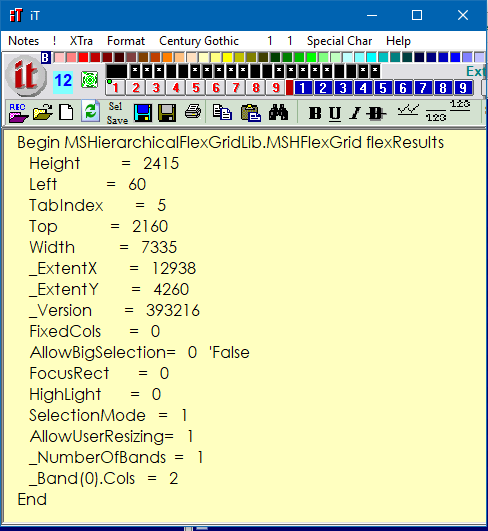
It works a lot faster than the original (I think, as I have it - but not mine. Found in Planet Source).
 Posting Permissions
- You may not post new threads
- You may not post replies
- You may not post attachments
- You may not edit your posts
-
Forum Rules
|
Click Here to Expand Forum to Full Width
|



 Reply With Quote
