|

-
Jul 11th, 2017, 09:46 AM
#1
Thread Starter
New Member

How to I check if a date is valid then reformat it?
I simply want to check if my strings are valid dates and then have them formatted. But "datecheck2 = IsDate(Month)" always returns as false.
Code:
                Dim datecheck As Boolean
                Dim yearMonth As String = yearandmonth ' currently looks like yyyy-MM
                Dim allowedFormat() As String = {"yyyy-MM"}
                Dim dd As DateTime
                datecheck = IsDate(yearMonth) ' returns true or false if date is valid. EX: 2017-13 = false because "13" is over 12


                If datecheck = True Then ' if the date is valid I want it to be reformatted to "yyyy-MM"

                    DateTime.TryParseExact(yearMonth, allowedFormat, Globalization.CultureInfo.InvariantCulture, Globalization.DateTimeStyles.None, dd)
                    Dim yearMonthFormat As String = dd.ToString("yyyy-MM")


                Else

                    MsgBox("Invalid year/month")

                End If


                Dim datecheck2 As Boolean
                Dim Month As String = filemonth ' string looks like this: "MM"
                Dim allowedFormat2() As String = {"MM - MMMM"}
                Dim dt As DateTime


                datecheck2 = IsDate(Month) ' THIS RETURNS FALSE FOR MONTH. Example: If Month = "05" then it returns false. Even though it is a valid month
                MsgBox(datecheck2)

                If datecheck2 = True Then
'this reformats it to "MM - MMMM"

                    DateTime.TryParseExact(Month, allowedFormat2, Globalization.CultureInfo.InvariantCulture, Globalization.DateTimeStyles.None, dt)
                    Dim monthFormat As String = dt.ToString("MM - MMMM")
                    MsgBox(monthFormat)
                Else

                    MsgBox("Invalid Month") ' change to log


                End If
edit: added comments to make code clear
Last edited by monkey288195; Jul 11th, 2017 at 09:47 AM.
Reason: Added comments
-
Jul 11th, 2017, 09:52 AM
#2
Re: How to I check if a date is valid then reformat it?
A year and month string is never a valid date. It must have a day too. You should use tryparseexact to check it...
- Coding Examples:
- Features:
- Online Games:
- Compiled Games:
-
Jul 11th, 2017, 09:59 AM
#3
Thread Starter
New Member
Re: How to I check if a date is valid then reformat it?
Doesn't tryparseeexact simply reformat the string? Sorry I'm a bit confused
-
Jul 11th, 2017, 10:12 AM
#4
Re: How to I check if a date is valid then reformat it?
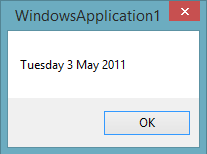
this is how it works:
Code:
Dim d As Date
Date.TryParseExact("03052011", "ddMMyyyy", Nothing, Nothing, d)
MsgBox(d.ToString("dddd d MMMM yyyy"))
- Coding Examples:
- Features:
- Online Games:
- Compiled Games:
-
Jul 11th, 2017, 10:46 AM
#5
Re: How to I check if a date is valid then reformat it?
 Originally Posted by monkey288195

Doesn't tryparseeexact simply reformat the string? Sorry I'm a bit confused
No, it tries to convert the String to a DateTime, but only if the String matches the exact format specified.
To convert the DateTime to a String in a particular format, use .ToString with the appropriate format (as .paul. showed).
Note that as TryParseExact returns a Boolean, you can use that in the If statement instead of datecheck = True
-
Jul 11th, 2017, 10:47 AM
#6
Thread Starter
New Member
Re: How to I check if a date is valid then reformat it?
Ok that makes sense.
But it returns a value regardless of invalid date
Code:
                Dim dd As Date
                Date.TryParseExact("32", "MM", Nothing, Nothing, dd) ' if "32" is entered as a month it still returns a value.
                MsgBox(dd.ToString("MM - MMMM")) ' returns "01 - January"
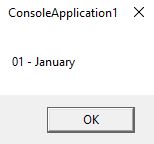
How can I make it so that the entered date if invalid it will do something?
-
Jul 11th, 2017, 11:27 AM
#7
Re: How to I check if a date is valid then reformat it?
You MUST check the return from TryParseExact for this to work. You aren't really seeing a value returned, you are seeing an artifact of the date being a value type. Since it's a value type, it can't have no value. Before you even call TryParseExact, dd has a value, which is a valid date of 1/1/1900 (or something like that, there are other default values, and I don't quite remember the default value used in .NET). In this case, TryParseExact is probably returning False, because it is not a valid date. If TryParseExact returns false, then no conversion was done and dd holds the same default value that it had to start with.
So, you can only use dd if TryParseExact returned True. Otherwise, the value in dd will be the default value for a date.
My usual boring signature: Nothing
 
-
Jul 11th, 2017, 11:30 AM
#8
Re: How to I check if a date is valid then reformat it?
Code:
Dim d As Date
If Date.TryParseExact("32", "MM", Nothing, Nothing, d) Then
    MsgBox(d.ToString("dddd d MMMM yyyy"))
Else
    MsgBox("32 is not a month")
End If
- Coding Examples:
- Features:
- Online Games:
- Compiled Games:
Tags for this Thread
 Posting Permissions
- You may not post new threads
- You may not post replies
- You may not post attachments
- You may not edit your posts
-
Forum Rules
|
Click Here to Expand Forum to Full Width
|



 Reply With Quote


