Re: Aggregate Column Values from Multiple Rows into a Single Column using Flexgrid
You don't tell us the data source, but even if this is coming from a database few people ever need this. So this isn't a commonly supported form of aggregation. Depending on the DBMS though, there might be some SQL syntax for doing so with a little effort. If not in SQL then perhaps in one of the stored procedure languages supported.
But let's set that aside. Just assume you have a flexgrid built up already and now you want to aggregate into a second one.
Ideally you'd use fabricated ADO Recordsets for this, since they can be a powerful "multi-column collection" class for this sort of thing. They offer sorting and filtering as well and these can be optimized for large data sets. But I'll push that alternative aside as well.
Here I have used a VB6 Collection to hold "rows" of data. Each such "row" Item will contain a Variant array with two elements: a Column1 value and another "rowdata" Collection where each Item is a Column2 value corresponding to that Column1 value.
Once this has been built (using care to sort in sequence as we go even though you didn't request this) it is a simple matter to "dump it out" into the second flexgrid, aggregating the "rowdata" values by concatentation.
I scrambled the source data a little more to be sure the "sorting" works properly:
Perhaps this gives you some ideas if it isn't exactly what you were after.
Re: Aggregate Column Values from Multiple Rows into a Single Column using Flexgrid
Several DB-Engines support this directly with the Group_Concat-
Aggregate-Function (MySQL and SQLite for example)...
In case your Data is hosted in SQLite (or was temporarily put into an
SQLite InMemory-DB) you can do the following:
(Into an empty VB-Form with an MSHFlexGrid1 - and a reference to vbRichClient5)
Code:
Option Explicit

Private Sub Form_Load()
  With New_c.Connection(, DBCreateInMemory)
    .Execute "Create Table T(Col1 Text, Col2 Integer)"

    .Execute "Insert Into T Values('Danny', 1)"
    .Execute "Insert Into T Values('Danny', 2)"
    .Execute "Insert Into T Values('Danny', 3)"
    .Execute "Insert Into T Values('Eric',  7)"
    .Execute "Insert Into T Values('Eric', 14)"
    .Execute "Insert Into T Values('Danny',20)"

    Dim SQL As String
        SQL = "Select Col1, Group_Concat(Col2) As Col2 From T Group By Col1"
    Set MSHFlexGrid1.DataSource = .OpenRecordset(SQL).DataSource
  End With
End Sub
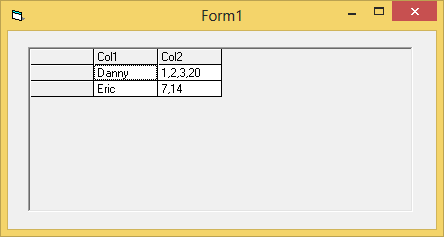
Producing this:
Group_Concat has a second (optional) argument, where you can place a String
which is then used as the delimiter for the concat besides the comma) -
e.g. for a SemiColon followed by a SpaceChar:
Group_Concat(Col2, '; ')
Re: Aggregate Column Values from Multiple Rows into a Single Column using Flexgrid
Thanks dilettante .. It worked .. being a newbie, i m just trying to understand the code.. (The data source i m using is from Ms-access 2007. I was importing the data to Flexgrid1 then trying to concatentate to Flexgrid2. Could you give some idea on using fabricated ADO Recordsets?)
Re: Aggregate Column Values from Multiple Rows into a Single Column using Flexgrid
You can Google the topic but good tutorials are scarce. Most of the solid introductory material on fabricated Recordsets was in VB6 books that are now mostly out of print.
The basic idea is to make use of the Cursor Service in ADO, the thing that makes client-side ADO cursors work. Instead of connecting to a data provider though, this is used by itself relying on data that only exists within the Recordset in memory. Extending this, ADO Persistence can be used to load and store such Recordsets to disk. This can also be further combined with the Shaping Service for even more capabilities, but that's a more advanced topic.



 [RESOLVED] Aggregate Column Values from Multiple Rows into a Single Column using Flexgrid


 Reply With Quote

 It worked .. being a newbie, i m just trying to understand the code.. (The data source i m using is from Ms-access 2007. I was importing the data to Flexgrid1 then trying to concatentate to Flexgrid2. Could you give some idea on using fabricated ADO Recordsets?)

