|

-
Jul 4th, 2015, 08:06 PM
#1
Thread Starter
Lively Member

How to create form with border like the tray menu or volume control
I have a borderless form. How do I give it a border like that of the volume control or tray menu, like below?
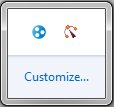
Thanks.
-
Jul 4th, 2015, 08:51 PM
#2
Re: How to create form with border like the tray menu or volume control
Set the following form's properties
ControlBox = False
MaximizeBox = False
MinimizeBox = False
Text = ""
-
Jul 5th, 2015, 01:04 AM
#3
Re: How to create form with border like the tray menu or volume control
To add to 4x2y's comment, that's not a borderless form... It's fixed3d
- Coding Examples:
- Features:
- Online Games:
- Compiled Games:
-
Jul 5th, 2015, 01:27 AM
#4
Thread Starter
Lively Member
Re: How to create form with border like the tray menu or volume control
Thank you! Also, I didn't know what else to call it, I guess technically it does have a border haha.
Tags for this Thread
 Posting Permissions
- You may not post new threads
- You may not post replies
- You may not post attachments
- You may not edit your posts
-
Forum Rules
|
Click Here to Expand Forum to Full Width
|



 Reply With Quote


