|

-
Jun 19th, 2015, 07:09 AM
#1
 [RESOLVED] Creating blocks with relative formulas [RESOLVED] Creating blocks with relative formulas
i am trying to create a summary sheet for payroll and want to use formulas to get data from other sheets
each sheet has column A (a5:a68) containing weekly dates, with empty row between months and quarterly totals
i want to transcribe 3 columns (J,L and M) for each quarter and annual total, to summary sheet, sheet names are employee names + date
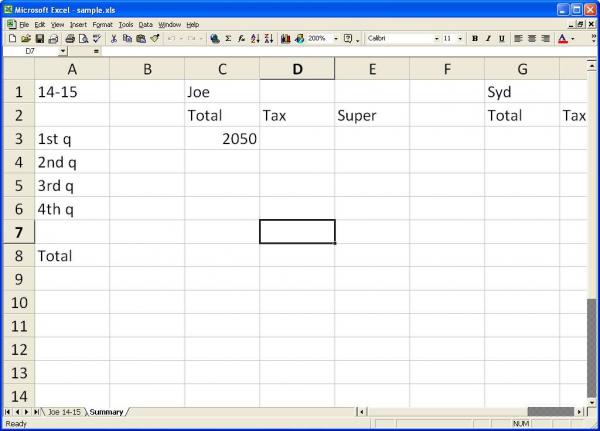
i can use a formula, =VLOOKUP("Total1",INDIRECT(CONCATENATE("'",C1," ",A1,"'!a5:n70")),10,FALSE) (thnx tntinmn), in C3 to reference the values from other sheets, but i would like to make all references relative to employees, so for rows 3 - 8 columns d,e, and f will look at C1, g,h and i will look at G1 etc, i can merge the cells in row 1 if that would help, also the column index for the vlook up can be somehow be matched to each required columns (10, 11 and 13)
the reason for doing this is so i can copy and paste the blocks as required, without have to edit all the formulas each time
i am attaching a sample workbook, i have, now, modified the total for each quarter to Total1 etc, to make the vlookup easier
sample.zip
new sheets are created automatically each period, or when required, so i would like to make as few changes as possible to the main sheets, but now is the best time to do it, before new sheets next month
Last edited by westconn1; Jun 19th, 2015 at 07:20 AM.
i do my best to test code works before i post it, but sometimes am unable to do so for some reason, and usually say so if this is the case.
Note code snippets posted are just that and do not include error handling that is required in real world applications, but avoid On Error Resume Next
dim all variables as required as often i have done so elsewhere in my code but only posted the relevant part
come back and mark your original post as resolved if your problem is fixed 
pete
-
Jun 19th, 2015, 09:50 AM
#2
Re: Creating blocks with relative formulas
Pete,
Take a look at this "Pete's sample.zip" and see its works for you.
The new formula is shown on the "Summary - derivation" tab.
-
Jun 21st, 2015, 03:43 AM
#3
Re: Creating blocks with relative formulas
thank you so much
testing so far is totally positive
while i pretty much understand all the functions, i would not have been able to put it together like that
i changed the worksheets so the values in column A match the lookups in column A
i do my best to test code works before i post it, but sometimes am unable to do so for some reason, and usually say so if this is the case.
Note code snippets posted are just that and do not include error handling that is required in real world applications, but avoid On Error Resume Next
dim all variables as required as often i have done so elsewhere in my code but only posted the relevant part
come back and mark your original post as resolved if your problem is fixed
pete
-
Jun 21st, 2015, 11:35 AM
#4
Re: Creating blocks with relative formulas
 Originally Posted by westconn1

thank you so much
You are welcome.
Originally Posted by westconn1
i changed the worksheets so the values in column A match the lookups in column A
I forgot that I was going to suggest that you use Named Range Array to store the ranges for the different quarters, then that name could be incorporated into the formula. But whatever works for you. 
 Posting Permissions
- You may not post new threads
- You may not post replies
- You may not post attachments
- You may not edit your posts
-
Forum Rules
|
Click Here to Expand Forum to Full Width
|



 Reply With Quote