|

-
Jan 23rd, 2015, 01:52 PM
#1
Thread Starter
Fanatic Member

-
Jan 23rd, 2015, 02:07 PM
#2
Re: Unknown Overload Exception
Your module "modDrawing" method "OpenPicture" is working with the default instance of "frmViewer". Move OpenPicture to the code page for "frmViewer" and replace all occurrences of "frmViewer" with "Me". Alternatively, you could change then first line of the method to be:
Code:
Public Sub Open Picture(frmViewer as frmViewer)
and then change code where you call this method to pass the proper instance of "frmViewer".
-
Jan 23rd, 2015, 04:29 PM
#3
Thread Starter
Fanatic Member
Re: Unknown Overload Exception
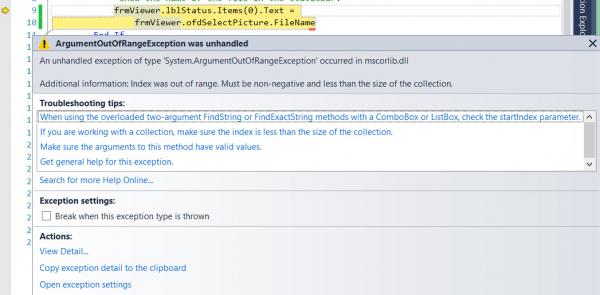
I attempted what you suggested and obtained the same error. Upon doing a little poking and checking what I found was that I had not added a text to the collection. Once this was done everything did indeed worked as desired. Below the picture box it now displays the file path and name of the picture opened in the picture box.
Thanks for the suggestion though. Now that I have the properties set right I am going to try and see what you suggested will do.
GW
Tags for this Thread
 Posting Permissions
- You may not post new threads
- You may not post replies
- You may not post attachments
- You may not edit your posts
-
Forum Rules
|
Click Here to Expand Forum to Full Width
|



 [RESOLVED] Unknown Overload Exception

 Reply With Quote
