|

-
Jun 25th, 2014, 03:40 AM
#1
 [RESOLVED] Msflexgrid metrics [RESOLVED] Msflexgrid metrics
I'm using a msflexgrid to input and edit a square data matrix. It can have 4 different selectable dimensions as in the attached figure: N x N where N is any number from (3, 5, 7, 9). There are no fixed rows or columns.
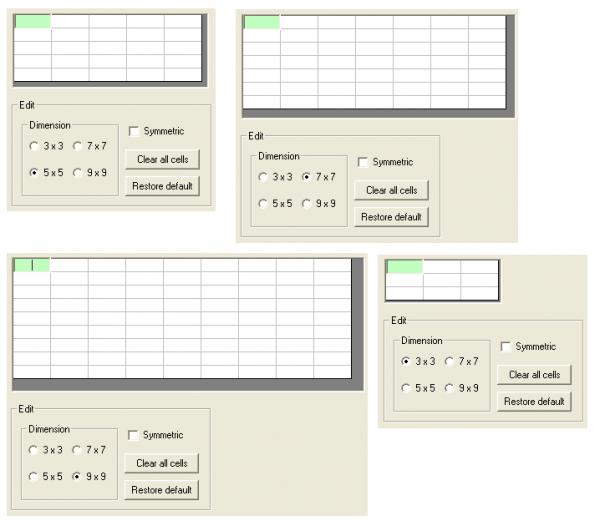
I'm confused about how to correctly calculate the overall grid width and height from the individual row height and column width.
So far I've tried:
.Width = n * (.ColWidth(0) + (.GridLineWidth + 1) * Tx) + 2 * .BorderStyle * Tx
.Height = n * (.RowHeight(0) + (.GridLineWidth + 1) * Ty) + 2 * .BorderStyle * Ty
where n is the number of rows (or columns) and Tx and Ty are variables representing TwipsPerPixelX and TwipsPerPixelY.
As it is obvious, this is wrong, but I just don't know what I'm missing.
Lottery is a tax on people who are bad at maths
If only mosquitoes sucked fat instead of blood...
To do is to be (Descartes). To be is to do (Sartre). To be do be do (Sinatra)
-
Jun 25th, 2014, 04:54 AM
#2
Re: Msflexgrid metrics
According to me, you don't need to take into account the width of the gridlines.
Code:
Private Sub Command1_Click()
  With MSFlexGrid1
    .Cols = 5
    .Rows = 4
    .BorderStyle = flexBorderNone
    .ScrollBars = flexScrollBarNone
    .Width = .Cols * .ColWidth(0)
    .Height = .Rows * .RowHeight(0)
    '.ScrollBars = flexScrollBarBoth
    '.Width = .Cols * .ColWidth(0) + Screen.TwipsPerPixelX
    '.Height = .Rows * .RowHeight(0) + Screen.TwipsPerPixelY
  End With
End Sub
And if you need a border, then place the MSFlexGrid control inside a picturebox
Last edited by Arnoutdv; Jun 25th, 2014 at 04:58 AM.
-
Jun 25th, 2014, 10:43 AM
#3
Re: Msflexgrid metrics
As each column width may be change (unlike your picture), you might try this as well.
Code:
Private Sub Form_Load()
Dim widthOfAllColumns As Double
Dim heightOfAllRows As Double
g1.BorderStyle = flexBorderNone
g1.ScrollBars = flexScrollBarNone
Dim x As Integer
For x = 0 To g1.Cols - 1
    widthOfAllColumns = widthOfAllColumns + g1.ColWidth(x) + g1.GridLineWidth
Next x
g1.Width = widthOfAllColumns + g1.GridLineWidth 'take into account the first left vertical line
For x = 0 To g1.Rows - 1
    heightOfAllRows = heightOfAllRows + g1.RowHeight(x) + g1.GridLineWidth
Next x
g1.Height = heightOfAllRows + g1.GridLineWidth
End Sub
-
Jun 26th, 2014, 05:22 AM
#4
Re: Msflexgrid metrics
Thanks to Arnoutdv & SamOscarBrown for your 2 different working solutions!
One thing I completely forgot about was the flexScrollBarNone ScrollBar setting.
Lottery is a tax on people who are bad at maths
If only mosquitoes sucked fat instead of blood...
To do is to be (Descartes). To be is to do (Sartre). To be do be do (Sinatra)
 Posting Permissions
- You may not post new threads
- You may not post replies
- You may not post attachments
- You may not edit your posts
-
Forum Rules
|
Click Here to Expand Forum to Full Width
|



 Reply With Quote

