[RESOLVED] WinForms, making a Hotkey TextBox (capturing Ctrl + Alt + Letter)
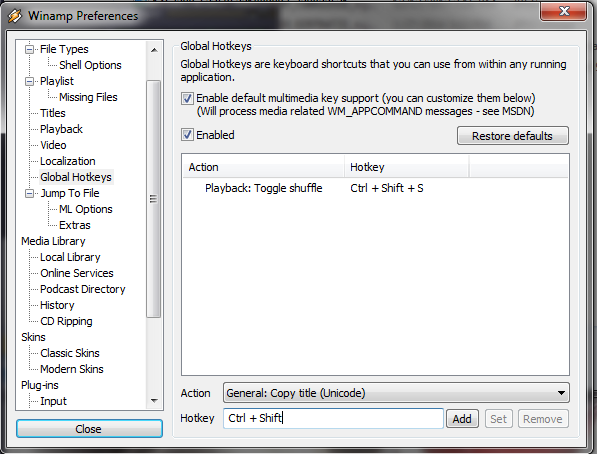
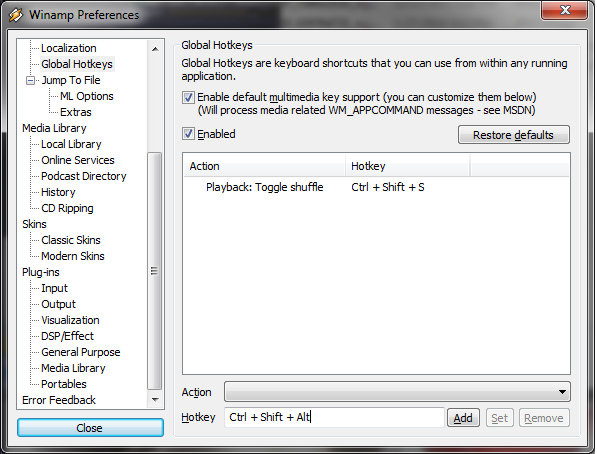
I've got an application where I would like to add some global hotkey functionality to it, but I would like to allow the user change what the hotkey(s) are & Winamp has a global hotkey configuration where the user presses the optional keys (control, alt, shift) and the letter in a textbox and the textbox displays all of it, I would like to create a textbox that does the same thing, but I'm a little stuck.
First off, here's a couple of screenshots showing what I'm aiming to do:
Here's what I have so far:
vb Code:
Option Explicit On
Option Strict On
Option Infer Off
 Public Class HotKeyTextBox
    Inherits System.Windows.Forms.TextBox
 #Region " Variables "
     Private m_IsCtrl, m_IsAlt, m_IsShift As Boolean
    Private m_Char As Char = CChar(String.Empty)
 #End Region
#Region " Sub: New "
     Public Sub New()
        MyBase.New()
        Me.ReadOnly = True
        Me.ForeColor = SystemColors.Window
         m_IsCtrl = False
        m_IsAlt = False
        m_IsShift = False
    End Sub
 #End Region
#Region " Overrides Subs: OnKeyDown, OnKeyUp "
     Protected Overrides Sub OnKeyDown(e As System.Windows.Forms.KeyEventArgs)
        MyBase.OnKeyDown(e)
         If e.Alt Then m_IsAlt = True
        If e.Control Then m_IsCtrl = True
        If e.Shift Then m_IsShift = True
         Call UpdateText()
    End Sub
     Protected Overrides Sub OnKeyPress(e As System.Windows.Forms.KeyPressEventArgs)
        MyBase.OnKeyPress(e)
         If Char.IsLetterOrDigit(e.KeyChar) Then
            m_Char = CChar(e.KeyChar.ToString.ToUpper)
            Call UpdateText()
        End If
    End Sub
     Protected Overrides Sub OnKeyUp(e As System.Windows.Forms.KeyEventArgs)
        MyBase.OnKeyDown(e)
        If m_Char <> CChar(String.Empty) Then
            If e.Alt Then m_IsAlt = False
            If e.Control Then m_IsCtrl = False
            If e.Shift Then m_IsShift = False
             Call UpdateText()
        Else
            m_IsAlt = False
            m_IsCtrl = False
            m_IsShift = False
        End If
    End Sub
     Private Sub UpdateText()
        If (m_IsCtrl OrElse m_IsAlt OrElse m_IsShift) Then
            Dim str As String = String.Empty
            If m_IsCtrl Then str = "Ctrl"
            If m_IsShift Then
                If m_IsCtrl Then str &= " + Shift" Else str = "Shift"
            End If
            If m_IsAlt Then
                If (m_IsCtrl OrElse m_IsShift) Then str &= " + Alt" Else str = "Alt"
            End If
             If m_Char <> CChar(String.Empty) Then str &= " + " & m_Char
             Me.Text = str
        Else
            Me.Text = String.Empty
            m_Char = CChar(String.Empty)
        End If
    End Sub
 #End Region
 End Class
It's displaying the Ctrl + Alt + Shift combinations as I press them just fine, but when I press a letter (or number, I want to allow a single digit to be used too) it's not displaying it with the character at the end, I've got to be missing something simple and obvious, but right now it alludes me.
Currently using VS 2015 Enterprise on Win10 Enterprise x64.
Re: WinForms, making a Hotkey TextBox (capturing Ctrl + Alt + Letter)
Thanks for your perspective jmc, it was a nudge in the right direction.
I still had to use the KeyUp event to check if a modifier key had been released before a digit/letter key was pressed, want to visually show that to the user as it's happening.
This seems to work the way that I would like it to:
vb Code:
Public Class HotKeyTextBox
Inherits System.Windows.Forms.TextBox
#Region " Variables "
Private m_IsCtrl, m_IsAlt, m_IsShift As Boolean
Private m_Char As Char = CChar(String.Empty)
Private m_HasChar As Boolean
#End Region
#Region " Sub: New "
Public Sub New()
MyBase.New()
m_IsCtrl = False
m_IsAlt = False
m_IsShift = False
m_HasChar = False
End Sub
#End Region
#Region " Overrides Subs: OnKeyDown, OnKeyUp "
Protected Overrides Sub OnKeyDown(e As System.Windows.Forms.KeyEventArgs)
e.SuppressKeyPress = True
m_IsAlt = e.Alt
m_IsCtrl = e.Control
m_IsShift = e.Shift
Select Case e.KeyCode
Case Keys.ControlKey, Keys.ShiftKey, Keys.Menu
'Ignore modifier keys alone.
Case Else
Dim ch As Char = Convert.ToChar(e.KeyCode)
If Char.IsLetterOrDigit(ch) Then
m_Char = Char.ToUpper(ch)
m_HasChar = True
End If
End Select
Call UpdateText()
MyBase.OnKeyDown(e)
End Sub
Protected Overrides Sub OnKeyUp(e As System.Windows.Forms.KeyEventArgs)
If Not m_HasChar Then
m_IsAlt = e.Alt
m_IsCtrl = e.Control
m_IsShift = e.Shift
End If
Call UpdateText()
If Not e.Alt AndAlso Not e.Control AndAlso Not e.Shift Then
m_Char = CChar(String.Empty)
m_HasChar = False
End If
MyBase.OnKeyDown(e)
End Sub
Private Sub UpdateText()
Dim parts As New List(Of String)
If m_IsCtrl Then parts.Add("Ctrl")
If m_IsShift Then parts.Add("Shift")
If m_IsAlt Then parts.Add("Alt")
If m_HasChar Then parts.Add(m_Char.ToString)
Me.Text = String.Join(" + ", parts)
End Sub
#End Region
End Class
Currently using VS 2015 Enterprise on Win10 Enterprise x64.



 [RESOLVED] WinForms, making a Hotkey TextBox (capturing Ctrl + Alt + Letter)


 Reply With Quote
