|

-
Dec 7th, 2013, 08:25 AM
#1
Thread Starter
Junior Member

 Mysql query for getting result !! Mysql query for getting result !!
Can anyone help me on this please??
I am trying to make a stock exchange system based on mysql database using vb...
So i am stuck on :
my sql table : inProduct, OutProduct and Stock...
inProduct cells > id,prodName, quantity, units, date
OutProcust cells > id,prodName, quantity, units, date
Stock cells > prodName, quantity,units
So i want query to show on listview... with this i have 3 listview of this tables to show data...
now i want query to show Stock in Stock listview that will result like > Quantity of inProduct - Quantity of OutProduct = Stock quantity...
100 - 50 = 50...
So when i add inProduct it will add with Stock,,, and when i add OutProduct it will minus from stock... then show listview...
Please i need this mysql query for vb.net
And please let me if you cannot understand what i am asking for then i will give you codes for the problem...
It will be great pleasure to me if anyone help me on this purpose... Thanks in advance....
-
Dec 7th, 2013, 12:17 PM
#2
Re: Mysql query for getting result !!
I'm not really sure what you are stuck on.
Are you able to query the mySQL database at all? If not take a look at this
Is there a particular reason you are using listview's rather than a datagrid view? With a datagrid view you simply query the mySQL database using ExecuteReader, move the rows from the reader into a datatable and set the dataTable as the datagridview's datasource.
If you need more help, please post concise question and relevant code.
kevin
Process control doesn't give you good quality, it gives you consistent quality.
Good quality comes from consistently doing the right things.
Vague general questions have vague general answers. A $100 donation is required for me to help you if you PM me asking for help. Instructions for donating to one of our local charities will be provided.
______________________________ Last edited by kebo : Now. Reason: superfluous typo's
-
Dec 7th, 2013, 12:34 PM
#3
Re: Mysql query for getting result !!
If your concern is how to perform computations through queries, have a look here:
http://dev.mysql.com/doc/refman/5.0/...operators.html
-
Dec 7th, 2013, 12:57 PM
#4
Thread Starter
Junior Member
Re: Mysql query for getting result !!
 Originally Posted by kebo

I'm not really sure what you are stuck on.
Are you able to query the mySQL database at all? If not take a look at this
Is there a particular reason you are using listview's rather than a datagrid view? With a datagrid view you simply query the mySQL database using ExecuteReader, move the rows from the reader into a datatable and set the dataTable as the datagridview's datasource.
If you need more help, please post concise question and relevant code.
kevin
Let me clear this problem....
Mysql Database :
Database :
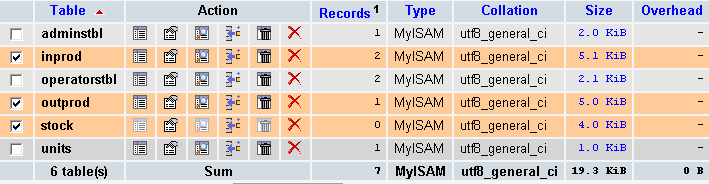
inprod Table :

outprod Table:

stock Table:

Okay now i have 3 listview named lvDisplayIn, lvDisplayOut & lvDisplayTot in different tabControls named Total, In & Out ...
So now i want to show how i am showing data in listviews :
lvDisplayIn :
Code:
'Data In Showing
Public Sub showDataIn()
        conn.Close()
        conn.Open()
        ds = New DataSet
        da = New MySqlDataAdapter("SELECT * FROM inprod", conn)
        da.Fill(ds, "inprod")


        lvDisplayIn.Items.Clear()
        If ds.Tables("inprod").Rows.Count > 0 Then
            For i As Integer = 0 To ds.Tables("inprod").Rows.Count - 1
                With lvDisplayIn.Items.Add(ds.Tables("inprod").Rows(i).Item(0).ToString)
                    .SubItems.Add(ds.Tables("inprod").Rows(i).Item(1).ToString)
                    .SubItems.Add(ds.Tables("inprod").Rows(i).Item(2).ToString + ds.Tables("inprod").Rows(i).Item(3).ToString)
                    .SubItems.Add(ds.Tables("inprod").Rows(i).Item(4).ToString)
                    .SubItems.Add(ds.Tables("inprod").Rows(i).Item(5).ToString)
                End With
            Next
        End If


        tbxProdname.Text = ""
        tbxQuantity.Text = ""
        tbxFromdis.Text = ""
        tbxDate.Value = Now
End Sub
lvDisplayOut :
Code:
'Data Out Showing
Public Sub showDataOut()


        ds = New DataSet
        da = New MySqlDataAdapter("SELECT * FROM outprod", conn)
        da.Fill(ds, "outprod")


        lvDisplayOut.Items.Clear()
        If ds.Tables("outprod").Rows.Count > 0 Then
            For i As Integer = 0 To ds.Tables("outprod").Rows.Count - 1
                With lvDisplayOut.Items.Add(ds.Tables("outprod").Rows(i).Item(0).ToString)
                    .SubItems.Add(ds.Tables("outprod").Rows(i).Item(1).ToString)
                    .SubItems.Add(ds.Tables("outprod").Rows(i).Item(2).ToString + ds.Tables("outprod").Rows(i).Item(3).ToString)
                    .SubItems.Add(ds.Tables("outprod").Rows(i).Item(4).ToString)
                    .SubItems.Add(ds.Tables("outprod").Rows(i).Item(5).ToString)
                End With
            Next
        End If


        tbxProdname.Text = ""
        tbxQuantity.Text = ""
        tbxFromdis.Text = ""
        tbxDate.Value = Now
End Sub
lvDisplayTot :
Code:
Now here i want to show results of total products remains in my stock...
I am mentioning that i have 3 columns in lvDisplayTot named Product Name, Quanity & Stock
So now i need these mysql queries:
1. When I add any product into my inprod table it will add also in stock table where product name is same ( by adding method +)
As a example : I am adding prodName: pipes & quantity: 100 ... then next time i am adding prodName: pipes & quantity: 100
Then in stock table it should be added like prodName: pipes & quantity: 200 (100+100=200)
2. When i add any product into my outprod table it will deduct from stock table (by deducting method -)
As a example : I am adding prodName: pipes & quantity: 50 ...then it will deduct from stock where prodName: pipes & quantity : 100
So stock will be like prodName: pipes & quanity: 50 (100-50=50)
3. Then i want to show this table data in my lvDisplayTot
Thats it what i want....
I am using these codes to add a product into inprod Table :
Code:
'Adding System @In Stock
Private Sub btnIn_Click(ByVal sender As System.Object, ByVal e As System.EventArgs) Handles btnIn.Click
        If tbxProdname.Text = Nothing Or tbxQuantity.Text = Nothing Or tbxFromdis.Text = Nothing Or cmbUnits.Text = Nothing Then
            MsgBox("Please Fill Up All The Details Correctly !!", MsgBoxStyle.Information, "Information")
        Else
            Try
                ds = New DataSet
                da = New MySqlDataAdapter("INSERT INTO inprod (prodName, quantity, units, dfrom, date) VALUES('" & tbxProdname.Text & "', '" & tbxQuantity.Text & "','" & cmbUnits.Text & "','" & tbxFromdis.Text & "','" & tbxDate.Value & "')", conn)
                da.Fill(ds, "inprod")
                tmrStatus.Start()
                Me.Cursor = Cursors.WaitCursor


            Catch ex As Exception
                MsgBox(ex.Message)
                Me.Refresh()
            End Try
        End If
End Sub
And adding method into outprod Table:
Code:
'Adding System @Out Stock
Private Sub btnOut_Click(ByVal sender As System.Object, ByVal e As System.EventArgs) Handles btnOut.Click
        If tbxProdname.Text = Nothing Or tbxQuantity.Text = Nothing Or tbxFromdis.Text = Nothing Or cmbUnits.Text = Nothing Then
            MsgBox("Please Fill Up All The Details Correctly !!", MsgBoxStyle.Information, "Information")
        Else
            Try
                ds = New DataSet
                da = New MySqlDataAdapter("INSERT INTO outprod (prodName, quantity,units, dispatchedto, date) VALUES('" & tbxProdname.Text & "', '" & tbxQuantity.Text & "','" & cmbUnits.Text & "','" & tbxFromdis.Text & "','" & tbxDate.Value & "')", conn)
                da.Fill(ds, "outprod")
                tmrStatus.Start()
                Me.Cursor = Cursors.WaitCursor


            Catch ex As Exception
                MsgBox("Productname already exists !!", MsgBoxStyle.Information, "Duplicate Instances Found")
                Me.Refresh()
            End Try
        End If
End Sub
My Listview Preview:
Total:
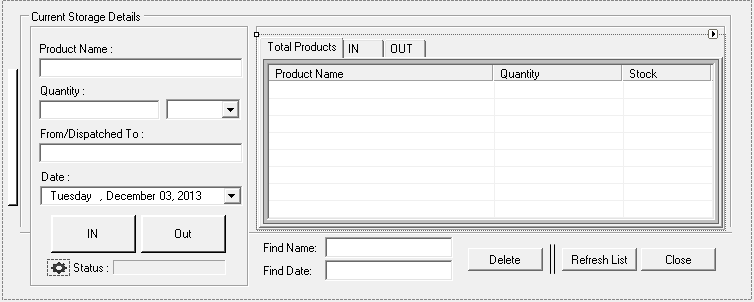
So please help me on this problem... I am searching for this problem for a long time... please help me...
Thanks in advance....
-
Dec 7th, 2013, 12:58 PM
#5
Thread Starter
Junior Member
Re: Mysql query for getting result !!
In :
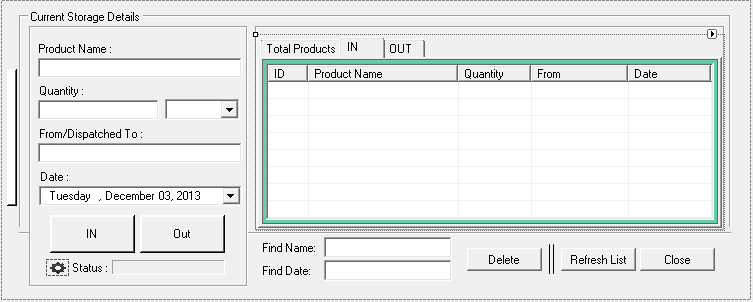
Out:
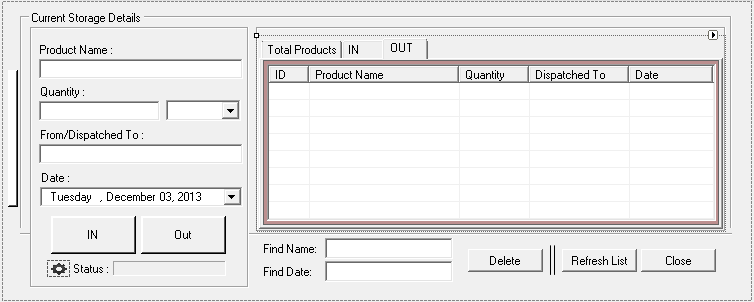
Tags for this Thread
 Posting Permissions
- You may not post new threads
- You may not post replies
- You may not post attachments
- You may not edit your posts
-
Forum Rules
|
Click Here to Expand Forum to Full Width
|



 Reply With Quote


 is a way of saying Thanks...
