|

-
May 21st, 2013, 07:05 PM
#1
Thread Starter
Junior Member

Working with percentages
So i got the "read from file" code correct but im wondering how exactly i can get everything I need to be written to the file. More info in the last comment i have posted at the bottom.
Here is the visual design.

Code:
Public Class GradeCalculator

    Private Sub calculateButton_Click(sender As System.Object, e As System.EventArgs) Handles calculateButton.Click
        'declare variables and constants
        Const EXAM1WV As Double = 0.2
        Const EXAM2WV As Double = 0.3
        Const LAB2WV As Double = 0.05
        Const LAB3WV As Double = 0.1
        Const LAB4WV As Double = 0.1
        Const LAB5WV As Double = 0.1
        Const FINALWV As Double = 0.15
        Dim lab2 As Double
        Dim lab3 As Double
        Dim lab4 As Double
        Dim lab5 As Double
        Dim exam1 As Double
        Dim exam2 As Double
        Dim finalProject As Double
        Dim total As Double
        Dim totalWv As Double
        Dim endTotal As Double


        If lab2CheckBox.Checked = True Then
            lab2 = Val(lab2TextBox.Text) / 100 * LAB2WV
            total += lab2
            totalWv += LAB2WV
        End If

        If lab3CheckBox.Checked = True Then
            lab3 = Val(lab3TextBox.Text) / 100 * LAB3WV
            total += lab3
            totalWv += LAB3WV
        End If

        If lab4CheckBox.Checked = True Then
            lab4 = Val(lab4TextBox.Text) / 100 * LAB4WV
            total += lab4
            totalWv += LAB4WV
        End If

        If lab5CheckBox.Checked = True Then
            lab5 = Val(lab5TextBox.Text) / 100 * LAB5WV
            total += lab5
            totalWv += LAB5WV
        End If

        If exam1CheckBox.Checked = True Then
            exam1 = Val(exam1TextBox.Text) / 100 * EXAM1WV
            total += exam1
            totalWv += EXAM1WV
        End If

        If exam2CheckBox.Checked = True Then
            exam2 = Val(exam2TextBox.Text) / 100 * EXAM2WV
            total += exam2
            totalWv += EXAM2WV
        End If

        If finalCheckBox.Checked = True Then
            finalProject = Val(finalTextBox.Text) / 100 * FINALWV
            total += finalProject
            totalWv += FINALWV
        End If

        endTotal = total / totalWv
        percentageLabel.Text = String.Format("{0:P}", endTotal)


    End Sub
 Private fileName As String = "test3.txt"
    Private Sub writeButton_Click(ByVal sender As System.Object, ByVal e As System.EventArgs) Handles writeButton.Click

            If percentageLabel.Text = String.Empty Then
                MessageBox.Show("Please enter the Grades to write.", "Enter Grade", MessageBoxButtons.OK, MessageBoxIcon.Exclamation)

            Else
                'create the StreamWriter object

                Dim output = New StreamWriter(fileName, True)

                'write to file the grade
            output.WriteLine("For the following graded items:" & ControlChars.NewLine)

                'close the file
                output.Close()

            'tell user that the information was written to file
                MessageBox.Show("The grades have been succesfully written to file", "Success!", MessageBoxButtons.OK, MessageBoxIcon.Information)

                'make it possible to read
                readButton.Visible = True
                displayTextBox.Visible = True

            End If

    End Sub

    Private Sub readButton_Click(ByVal sender As System.Object, ByVal e As System.EventArgs) Handles readButton.Click
        Try

            'variable to store info read from file
            Dim line As String = ""

            'create the StreamReader object
            Dim input = New StreamReader(fileName)


            'make do while loop
            Do While (input.EndOfStream() = False)
                line &= input.ReadLine()
                line &= ControlChars.NewLine
            Loop

            'close the file that has been read
            input.Close()

            'display what is stored in line variable in the read text box
            displayTextBox.Text = line

            'if file does not exist, inform user to first write to file
        Catch ex As Exception
            MessageBox.Show("File does not exist...please first write to file.", "File does not exist", MessageBoxButtons.OK, MessageBoxIcon.Error)
        End Try
        clearButton.Visible = True
    End Sub

    Private Sub clearButton_Click(ByVal sender As System.Object, ByVal e As System.EventArgs) Handles clearButton.Click
        displayTextBox.Text = String.Empty
    End Sub
End Class
End Class
Last edited by newvbusernoob; May 22nd, 2013 at 09:25 PM.
-
May 21st, 2013, 07:29 PM
#2
Re: Working with percentages
My main question as of right now is how do i get a number that is input into a text box to be read by the program as a percentage or even just a decimal?
Divide by 100! Per Cent(ury)!
it is using all of the check box text boxes so my percentages are all off
Yes, that's because your conditionals don't actually work conditionally. Eg.
If lab2CheckBox.Checked = True Then _
lab2 = Val(lab2TextBox.Text) * LAB2WV
total += lab2
The total is incremented by whatever value is in the textbox irrespective of whether the box is checked or not. It should be ..
If lab2CheckBox.Checked = True Then
lab2 = Val(lab2TextBox.Text) * LAB2WV
total += lab2
End If
Also ... totalWv = LAB2WV + LAB3WV + LAB4WV + LAB5WV + EXAM1WV + EXAM2WV + FINALWV ... clearly can't be the right way to do this. You should increment totalWv on the same basis as total, ie. per checked category.
As the 6-dimensional mathematics professor said to the brain surgeon, "It ain't Rocket Science!"
Reviews: "dunfiddlin likes his DataTables" - jmcilhinney
Please be aware that whilst I will read private messages (one day!) I am unlikely to reply to anything that does not contain offers of cash, fame or marriage!
-
May 21st, 2013, 07:37 PM
#3
Thread Starter
Junior Member
Re: Working with percentages
For some reason it wont let me put End If for example
If lab2CheckBox.Checked = True Then _
lab2 = Val(lab2TextBox.Text) * LAB2WV
total += lab2
totalWv += LAB2WV
End If
It gives me blue squigleys under the End If saying "End If must be preceded by a matching "If"
While i was waiting ive updated my code here it is
Code:
Public Class GradeCalculator

    Private Sub calculateButton_Click(sender As System.Object, e As System.EventArgs) Handles calculateButton.Click
        'declare variables and constants
        Const EXAM1WV As Double = 0.2
        Const EXAM2WV As Double = 0.3
        Const LAB2WV As Double = 0.05
        Const LAB3WV As Double = 0.1
        Const LAB4WV As Double = 0.1
        Const LAB5WV As Double = 0.1
        Const FINALWV As Double = 0.15
        Dim lab2 As Double
        Dim lab3 As Double
        Dim lab4 As Double
        Dim lab5 As Double
        Dim exam1 As Double
        Dim exam2 As Double
        Dim finalProject As Double
        Dim total As Double
        Dim totalWv As Double
        Dim endTotal As Double


        If lab2CheckBox.Checked = True Then _
            lab2 = Val(lab2TextBox.Text) * LAB2WV
        total += lab2
        totalWv += LAB2WV


        If lab3CheckBox.Checked = True Then _
            lab3 = Val(lab3TextBox.Text) * LAB3WV
        total += lab3
        totalWv += LAB3WV


        If lab4CheckBox.Checked = True Then _
            lab4 = Val(lab4TextBox.Text) * LAB4WV
        total += lab4
        totalWv += LAB4WV


        If lab5CheckBox.Checked = True Then _
            lab5 = Val(lab5TextBox.Text) * LAB5WV
        total += lab5
        totalWv += LAB5WV


        If exam1CheckBox.Checked = True Then _
            exam1 = Val(exam1TextBox.Text) * EXAM1WV
        total += exam1
        totalWv += EXAM1WV


        If exam2CheckBox.Checked = True Then _
            exam2 = Val(exam2TextBox.Text) * EXAM2WV
        total += exam2
        totalWv += EXAM2WV


        If finalCheckBox.Checked = True Then _
            finalProject = Val(finalTextBox.Text) * FINALWV
        total += finalProject
        totalWv += FINALWV


        endTotal = total / totalWv
        percentageLabel.Text = String.Format("{0:P}", endTotal)


    End Sub
End Class
-
May 21st, 2013, 07:39 PM
#4
Thread Starter
Junior Member
Re: Working with percentages
Wait nevermind i got that part to work. Just hade to take away the _ at the end of Then
-
May 21st, 2013, 07:42 PM
#5
Thread Starter
Junior Member
Re: Working with percentages
So heres my updated code that works now!!! Thanks for that
Code:
Public Class GradeCalculator

    Private Sub calculateButton_Click(sender As System.Object, e As System.EventArgs) Handles calculateButton.Click
        'declare variables and constants
        Const EXAM1WV As Double = 0.2
        Const EXAM2WV As Double = 0.3
        Const LAB2WV As Double = 0.05
        Const LAB3WV As Double = 0.1
        Const LAB4WV As Double = 0.1
        Const LAB5WV As Double = 0.1
        Const FINALWV As Double = 0.15
        Dim lab2 As Double
        Dim lab3 As Double
        Dim lab4 As Double
        Dim lab5 As Double
        Dim exam1 As Double
        Dim exam2 As Double
        Dim finalProject As Double
        Dim total As Double
        Dim totalWv As Double
        Dim endTotal As Double


        If lab2CheckBox.Checked = True Then
            lab2 = Val(lab2TextBox.Text) * LAB2WV
            total += lab2
            totalWv += LAB2WV
        End If

        If lab3CheckBox.Checked = True Then
            lab3 = Val(lab3TextBox.Text) * LAB3WV
            total += lab3
            totalWv += LAB3WV
        End If

        If lab4CheckBox.Checked = True Then
            lab4 = Val(lab4TextBox.Text) * LAB4WV
            total += lab4
            totalWv += LAB4WV
        End If

        If lab5CheckBox.Checked = True Then
            lab5 = Val(lab5TextBox.Text) * LAB5WV
            total += lab5
            totalWv += LAB5WV
        End If

        If exam1CheckBox.Checked = True Then
            exam1 = Val(exam1TextBox.Text) * EXAM1WV
            total += exam1
            totalWv += EXAM1WV
        End If

        If exam2CheckBox.Checked = True Then
            exam2 = Val(exam2TextBox.Text) * EXAM2WV
            total += exam2
            totalWv += EXAM2WV
        End If

        If finalCheckBox.Checked = True Then
            finalProject = Val(finalTextBox.Text) * FINALWV
            total += finalProject
            totalWv += FINALWV
        End If

        endTotal = total / totalWv
        percentageLabel.Text = String.Format("{0:P}", endTotal)


    End Sub
End Class
-
May 21st, 2013, 07:47 PM
#6
Thread Starter
Junior Member
Re: Working with percentages
 Originally Posted by dunfiddlin

Divide by 100! Per Cent(ury)
Where would I do that? I know that sounds silly but would it be in here? And would I have to do it per If...End If
[CODE]
If lab2CheckBox.Checked = True Then
lab2 = Val(lab2TextBox.Text) / 100 * LAB2WV
total += lab2
totalWv += LAB2WV
End If
-
May 21st, 2013, 07:50 PM
#7
Thread Starter
Junior Member
Re: Working with percentages
Yep that worked, there's probably an easier way than to have to do it every time but this works so far!
-
May 21st, 2013, 07:51 PM
#8
Re: Working with percentages
As the 6-dimensional mathematics professor said to the brain surgeon, "It ain't Rocket Science!"
Reviews: "dunfiddlin likes his DataTables" - jmcilhinney
Please be aware that whilst I will read private messages (one day!) I am unlikely to reply to anything that does not contain offers of cash, fame or marriage!
-
May 21st, 2013, 07:54 PM
#9
Thread Starter
Junior Member
Re: Working with percentages
Well here is my full working code for that aspect of my app thanks to some help from dunfiddlin!
Now I shall move on to the rest of it!
Code:
Public Class GradeCalculator

    Private Sub calculateButton_Click(sender As System.Object, e As System.EventArgs) Handles calculateButton.Click
        'declare variables and constants
        Const EXAM1WV As Double = 0.2
        Const EXAM2WV As Double = 0.3
        Const LAB2WV As Double = 0.05
        Const LAB3WV As Double = 0.1
        Const LAB4WV As Double = 0.1
        Const LAB5WV As Double = 0.1
        Const FINALWV As Double = 0.15
        Dim lab2 As Double
        Dim lab3 As Double
        Dim lab4 As Double
        Dim lab5 As Double
        Dim exam1 As Double
        Dim exam2 As Double
        Dim finalProject As Double
        Dim total As Double
        Dim totalWv As Double
        Dim endTotal As Double


        If lab2CheckBox.Checked = True Then
            lab2 = Val(lab2TextBox.Text) / 100 * LAB2WV
            total += lab2
            totalWv += LAB2WV
        End If

        If lab3CheckBox.Checked = True Then
            lab3 = Val(lab3TextBox.Text) / 100 * LAB3WV
            total += lab3
            totalWv += LAB3WV
        End If

        If lab4CheckBox.Checked = True Then
            lab4 = Val(lab4TextBox.Text) / 100 * LAB4WV
            total += lab4
            totalWv += LAB4WV
        End If

        If lab5CheckBox.Checked = True Then
            lab5 = Val(lab5TextBox.Text) / 100 * LAB5WV
            total += lab5
            totalWv += LAB5WV
        End If

        If exam1CheckBox.Checked = True Then
            exam1 = Val(exam1TextBox.Text) / 100 * EXAM1WV
            total += exam1
            totalWv += EXAM1WV
        End If

        If exam2CheckBox.Checked = True Then
            exam2 = Val(exam2TextBox.Text) / 100 * EXAM2WV
            total += exam2
            totalWv += EXAM2WV
        End If

        If finalCheckBox.Checked = True Then
            finalProject = Val(finalTextBox.Text) / 100 * FINALWV
            total += finalProject
            totalWv += FINALWV
        End If

        endTotal = total / totalWv
        percentageLabel.Text = String.Format("{0:P}", endTotal)


    End Sub
End Class
-
May 22nd, 2013, 04:51 PM
#10
Thread Starter
Junior Member
Re: Working with percentages
Now my new part im stuck on is how to use a function to make it so that the percentage that is output can be output as a letter grade in the letterGradeLabel under it
-
May 22nd, 2013, 05:11 PM
#11
Re: Working with percentages
vb.net Code:
' the joy of Select Case is that you can use ranges eg.
 Select Case Percentage
   Case 0 To 30
   Grade = "F"
   Case 31 To 50
   Grade = "E"
   'etc
End Select
As the 6-dimensional mathematics professor said to the brain surgeon, "It ain't Rocket Science!"
Reviews: "dunfiddlin likes his DataTables" - jmcilhinney
Please be aware that whilst I will read private messages (one day!) I am unlikely to reply to anything that does not contain offers of cash, fame or marriage!
-
May 22nd, 2013, 05:16 PM
#12
Thread Starter
Junior Member
Re: Working with percentages
Wow thats much simpler than I thought it was, I was doing all kinds of weird stuff.
-
May 22nd, 2013, 05:42 PM
#13
Thread Starter
Junior Member
Re: Working with percentages
It wont output it to my letterGradeLabel?
or I did something wrong somewhere?
Code:
 Select Case endTotal
            Case 0 To 59
                grade = "F"
            Case 60 To 62
                grade = "D-"
            Case 63 To 66
                grade = "D"
            Case 67 To 69
                grade = "D+"
            Case 70 To 72
                grade = "C-"
            Case 73 To 76
                grade = "C"
            Case 77 To 79
                grade = "C+"
            Case 80 To 82
                grade = "B-"
            Case 83 To 86
                grade = "B"
            Case 87 To 89
                grade = "B+"
            Case 90 To 93
                grade = "A-"
            Case 94 To 100
                grade = "A"

                letterGradeLabel.Text = grade
        End Select
-
May 22nd, 2013, 05:48 PM
#14
Re: Working with percentages
letterGradeLabel.Text = grade
End Select
Try swapping these two lines round. At the moment it only passes to the textbox if the Grade is A.
As the 6-dimensional mathematics professor said to the brain surgeon, "It ain't Rocket Science!"
Reviews: "dunfiddlin likes his DataTables" - jmcilhinney
Please be aware that whilst I will read private messages (one day!) I am unlikely to reply to anything that does not contain offers of cash, fame or marriage!
-
May 22nd, 2013, 05:56 PM
#15
Thread Starter
Junior Member
Re: Working with percentages
It works now except when its 70% or .70. for some reason it wont ouput that as C-
69, 71, 72 work just not 70
Code:
  Select Case endTotal
            Case 0.0 To 0.59
                grade = "F"
            Case 0.6 To 0.62
                grade = "D-"
            Case 0.63 To 0.66
                grade = "D"
            Case 0.67 To 0.69
                grade = "D+"
            Case 0.7 To 0.72
                grade = "C-"
            Case 0.73 To 0.76
                grade = "C"
            Case 0.77 To 0.79
                grade = "C+"
            Case 0.8 To 0.82
                grade = "B-"
            Case 0.83 To 0.86
                grade = "B"
            Case 0.87 To 0.89
                grade = "B+"
            Case 0.9 To 0.93
                grade = "A-"
            Case 0.94 To 1
                grade = "A"


        End Select
        letterGradeLabel.Text = grade
-
May 22nd, 2013, 06:13 PM
#16
Re: Working with percentages
That's possibly because you have all your number variables declared as double. Certain values, especially when they are calculated values, cannot be expressed with complete accuracy in double. So 0.7 may in fact be expressed as something like 0.699999999 in which case it falls into neither D+ nor C-. You would probably be better off using Decimal as the variable type in your calculations then converting to Integer (after multiplying by 100) for the Select Case as this will ensure that there are no marginal values.
So ...
Select Case CInt(endTotal * 100)
Case 0 To 50
... and so on.
As the 6-dimensional mathematics professor said to the brain surgeon, "It ain't Rocket Science!"
Reviews: "dunfiddlin likes his DataTables" - jmcilhinney
Please be aware that whilst I will read private messages (one day!) I am unlikely to reply to anything that does not contain offers of cash, fame or marriage!
-
May 22nd, 2013, 06:20 PM
#17
Thread Starter
Junior Member
Re: Working with percentages
Did that and it works much better
may I ask what the CInt() does? It works just want to know what it does
Code:
  Select Case CInt(endTotal * 100)
            Case 0 To 59
                grade = "F"
            Case 60 To 62
                grade = "D-"
            Case 63 To 66
                grade = "D"
            Case 67 To 69
                grade = "D+"
            Case 70 To 72
                grade = "C-"
            Case 73 To 76
                grade = "C"
            Case 77 To 79
                grade = "C+"
            Case 80 To 82
                grade = "B-"
            Case 83 To 86
                grade = "B"
            Case 87 To 89
                grade = "B+"
            Case 90 To 93
                grade = "A-"
            Case 94 To 100
                grade = "A"


        End Select
        letterGradeLabel.Text = grade
-
May 22nd, 2013, 06:38 PM
#18
Re: Working with percentages
ConvertToInteger ... function to turn fractional values into whole numbers (as they say in primary school!)
Likewise CDbl (creates Double from other numerical types), CStr (same as .ToString) et al.
As the 6-dimensional mathematics professor said to the brain surgeon, "It ain't Rocket Science!"
Reviews: "dunfiddlin likes his DataTables" - jmcilhinney
Please be aware that whilst I will read private messages (one day!) I am unlikely to reply to anything that does not contain offers of cash, fame or marriage!
-
May 22nd, 2013, 09:35 PM
#19
Thread Starter
Junior Member
Re: Working with percentages
So i got the "read from file" code correct
Code:
 Private Sub readButton_Click(ByVal sender As System.Object, ByVal e As System.EventArgs) Handles readButton.Click
        Try

            'variable to store info read from file
            Dim line As String = ""

            'create the StreamReader object
            Dim input = New StreamReader(fileName)


            'make do while loop
            Do While (input.EndOfStream() = False)
                line &= input.ReadLine()
                line &= ControlChars.NewLine
            Loop

            'close the file that has been read
            input.Close()

            'display what is stored in line variable in the read text box
            displayTextBox.Text = line

            'if file does not exist, inform user to first write to file
        Catch ex As Exception
            MessageBox.Show("File does not exist...please first write to file.", "File does not exist", MessageBoxButtons.OK, MessageBoxIcon.Error)
        End Try
        clearButton.Visible = True
    End Sub
But the write part im having trouble figuring out how to get everything i want, written to file.
Code:
 Private fileName As String = "test3.txt"
    Private Sub writeButton_Click(ByVal sender As System.Object, ByVal e As System.EventArgs) Handles writeButton.Click

            If percentageLabel.Text = String.Empty Then
                MessageBox.Show("Please enter the Grades to write.", "Enter Grade", MessageBoxButtons.OK, MessageBoxIcon.Exclamation)

            Else
                'create the StreamWriter object

                Dim output = New StreamWriter(fileName, True)

                'write to file the grade
            output.WriteLine("For the following graded items:" & ControlChars.NewLine)

                'close the file
                output.Close()

            'tell user that the information was written to file
                MessageBox.Show("The grades have been succesfully written to file", "Success!", MessageBoxButtons.OK, MessageBoxIcon.Information)

                'make it possible to read
                readButton.Visible = True
                displayTextBox.Visible = True

            End If

    End Sub
I know its where i made it red but im not sure how to get it to end up looking like this where it gets the percentage info from the checkboxes. But only the checkboxes that where checked
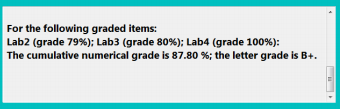
I know how to get the total numerical grade. its from percentageLabel. and i also now how to get the total letter grade, its from letterGradeLabel, so im not worried about those two.
Last edited by newvbusernoob; May 22nd, 2013 at 09:38 PM.
-
May 23rd, 2013, 01:44 PM
#20
Re: Working with percentages
I know how to get the total numerical grade. its from percentageLabel.
So, the individual results would come from the textboxes where they were originally entered, would they not?
As the 6-dimensional mathematics professor said to the brain surgeon, "It ain't Rocket Science!"
Reviews: "dunfiddlin likes his DataTables" - jmcilhinney
Please be aware that whilst I will read private messages (one day!) I am unlikely to reply to anything that does not contain offers of cash, fame or marriage!
 Posting Permissions
- You may not post new threads
- You may not post replies
- You may not post attachments
- You may not edit your posts
-
Forum Rules
|
Click Here to Expand Forum to Full Width
|



 Reply With Quote
