|

-
May 14th, 2013, 05:36 AM
#1
Thread Starter
New Member

Delete a file with a given extension
Hi All,
Wondering if anyone can help, I'm attempting to delete a .ost file from a users roaming profile, I'm using the following code:
Dim strComputer, oWSH, oWMI, oFSO, AppDataFolder
strComputer = "."
Set oWMI = GetObject("winmgmts:\\" & strComputer & "\root\cimv2")
Set oWSH = CreateObject("WScript.Shell")
Set oFSO = CreateObject("Scripting.FileSystemObject")
AppDataFolder = oWSH.ExpandEnvironmentStrings("%appdata%")
For Each file As String In IO.Directory.GetFiles(AppDataFolder & "\Thinstall\Microsoft Standard 2010 KMS\%Local AppData%\Microsoft\Outlook","*.ost")
IO.File.Delete(file)
Next
I keep getting "Expected In" error message on line 9 char 15. Any idea why? Sorry but I literally do no VB coding so am a bit lost.
Regards,
Ross
-
May 14th, 2013, 09:02 AM
#2
Re: Delete a file with a given extension
Here is one way to do what you want:
Code:
        Dim desired_ext As String = ".ost"
        Dim target_directory As New IO.DirectoryInfo("C:\Users\pc1\AppData\Roaming") 'My %appdata% folder
        Dim get_files As IO.FileInfo() = target_directory.GetFiles()

        'Loop through each file in our array
        For Each file As IO.FileInfo In get_files
            'Conditional statement to check if our file has the .ost
            If IO.Path.GetExtension(file.ToString) = desired_ext Then
                'Bye bye
                file.Delete()
            End If
        Next
-
May 14th, 2013, 09:41 AM
#3
Thread Starter
New Member
Re: Delete a file with a given extension
 Originally Posted by dday9

Here is one way to do what you want:
Code:
        Dim desired_ext As String = ".ost"
        Dim target_directory As New IO.DirectoryInfo("C:\Users\pc1\AppData\Roaming") 'My %appdata% folder
        Dim get_files As IO.FileInfo() = target_directory.GetFiles()

        'Loop through each file in our array
        For Each file As IO.FileInfo In get_files
            'Conditional statement to check if our file has the .ost
            If IO.Path.GetExtension(file.ToString) = desired_ext Then
                'Bye bye
                file.Delete()
            End If
        Next
Hi dday9,
Thanks a bunch for the reply but I'm still getting errors, it doesn't appear to like the As String part on line one, this is the exact problem I was having with my example, it's saying it expects end of statement, any idea why? Here is what I done below which is pretty much a copy of what you have provided:
Dim desired_ext As String = ".ost"
Dim target_directory As New IO.DirectoryInfo("V:\Users\rod\AppData\Roaming\Thinstall\Microsoft Standard 2010 KMS\%Local AppData%\Microsoft")
Dim get_files As IO.FileInfo() = target_directory.GetFiles()
For Each file As IO.FileInfo In get_files
If IO.Path.GetExtension(file.ToString) = desired_ext Then
file.Delete()
End If
Next
Thanks,
Ross
-
May 14th, 2013, 09:48 AM
#4
Re: Delete a file with a given extension
Post a picture, if you would, of a screen shot of the errors. Because I just tried the example in post #2 and it executed without errors.
-
May 14th, 2013, 09:56 AM
#5
Thread Starter
New Member
Re: Delete a file with a given extension
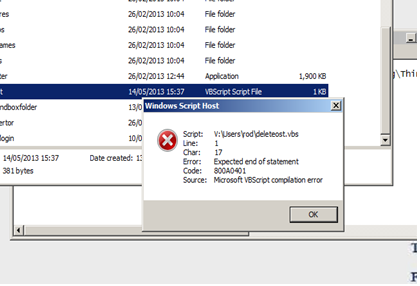
Please see attached image, very strange the error, I have other VB scripts which are running fine, I am executing them on Windows 7 if that matters.
-
May 14th, 2013, 09:59 AM
#6
Re: Delete a file with a given extension
Ahh, ok. This is not visual basic.net, that would've been nice to know. Let me message a mod for you.
-
May 14th, 2013, 10:07 AM
#7
Thread Starter
New Member
Re: Delete a file with a given extension
Sorry my mistake, doh, if a mod could please transfer this to the correct forum it would be appreciated.
Sorry for wasting your time.
-
May 14th, 2013, 11:25 AM
#8
Re: Delete a file with a given extension
Moved to the VBScript forum.
-
May 14th, 2013, 11:32 AM
#9
Re: Delete a file with a given extension
You're mixing VBScript and VB.Net code. Remove the For Each loop and replace it with code similar to this:
Code:
oFSO.DeleteFile AppDataFolder & "\*.ost", True
When the second argument is set to True the FileSystemObject will try to delete the file even if the read-only attribute is set on the file. Note that this does not do a recursive search through any sub directories.
 Posting Permissions
- You may not post new threads
- You may not post replies
- You may not post attachments
- You may not edit your posts
-
Forum Rules
|
Click Here to Expand Forum to Full Width
|



 Reply With Quote

