|

-
Apr 29th, 2013, 07:48 PM
#1
Thread Starter
Junior Member

listbox posting "argument exception..."
This may seem like a simple or dum questions but in my list box, I want it to always display a couple messages. Under those, I want it to diplay results from a datasource. My code is:
Dim invquery = From inv In _MICROLAND_1_DataSet2.Inventory
Join orders In _MICROLAND_1_DataSet.Orders
On inv.itemID Equals orders.itemID
Select inv.itemID & " " & (inv.quantity - orders.quantity) & " " & inv.description
lstBox.Items.Add(CStr("Here are the items that are out of inventory or must be reordered."))
lstBox.Items.Add(CStr("The numbers shown give the minimum reorder quantity required."))
lstBox.Items.Add(" ")
lstBox.DataSource = invquery.ToList
lstBox.SelectedItem = Nothing
But the results I get are the datasource and it states my messages are "argument exception unhandled." How do I fix this and why is it claiming this?
-
Apr 29th, 2013, 08:08 PM
#2
Re: listbox posting "argument exception..."
Firstly, why use CStr on a literal String? What exactly are you expecting that to do?
Secondly, you can't bind data and add items manually. You have to choose one or the other. If you have extra items to add then you must add them to the list you intend to bind. That said, that descriptive information definitely does not belong in the ListBox. In a Label above the ListBox maybe, but not in the ListBox.
Finally, with regards to your ArgumentException, where exactly does that get thrown? You say that you see the bound list in the control so I don't see that it could be on the line that sets the DataSource.
-
Apr 29th, 2013, 08:17 PM
#3
Re: listbox posting "argument exception..."
The results you get are the datasource because the datasource is the datasource. Anything previously in the listbox is not in the datasource and is therefore not in the listbox. The error could have any number of sources. If you indicate which line the error appears on we might be able to pin it down. In the meantime I'm particularly interested in why you feel the need to convert a string to a string ...
CStr("Here are the items that are out of inventory or must be reordered.")
As the 6-dimensional mathematics professor said to the brain surgeon, "It ain't Rocket Science!"
Reviews: "dunfiddlin likes his DataTables" - jmcilhinney
Please be aware that whilst I will read private messages (one day!) I am unlikely to reply to anything that does not contain offers of cash, fame or marriage!
-
Apr 29th, 2013, 08:40 PM
#4
Thread Starter
Junior Member
Re: listbox posting "argument exception..."
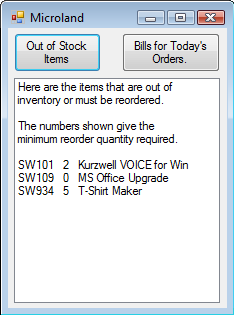
I'm mostly new to visual basic and don't have most of it down. I put Cstr in front of the strong because there have been other times with doubles and strings where when I didn't put it infront of an obvious string or double what not, visual basic gets angry at me so I put it in as a precaution. I get the message of the "argument exception unhandled." on my "lstBox.Items.Add(CStr("Here are the items that are out of inventory or must be reordered.")) lstBox.Items.Add(CStr("The numbers shown give the minimum reorder quantity required."))". I'm putting these messages in the list box because in the example given to me, they are in the listbox.
Here's the pic:
-
Apr 29th, 2013, 09:33 PM
#5
Re: listbox posting "argument exception..."
CStr is used to cast or convert a value to a String. You will never, ever need to use CStr if you already have a String reference. If you have an Object reference that refers to a String, e.g.
Code:
Dom obj As Object = "Hello World"
and you have Option Strict On then you must use CStr or the like to cast the Object reference as type String in order to use it where a String is expected, e.g.
Code:
MessageBox.Show(CStr(obj))
A literal String is already a String though, so you will never have to use CStr with a literal. You can use it to convert Integers, Doubles and the like and will need to if Option Strict is On in order to use the values in places where a String is expected, e.g. to display a number in a Label, although it's preferable to call ToString in those cases:
Code:
Dim n As Integer = 100

Label1.Text = n.ToString()
As for the issue, I'm not quite sure why you get an ArgumentException under those circumstances. Regardless, you first need to decide whether you're going to bind data or add items directly because you can't do both. Also, ListBox items can't extend over multiple lines by default. Each line in that ListBox would have to be a separate item, so two items containing text, then an empty item, then two more items containing text, then another empty item, then three items containing data. That's really rather horrible but if that's the example you have to follow then so be it. If you're going to add the items manually then you must add all the items manually, which means looping through your query result. Otherwise, you will have to concatenate a list containing your header items with the list containing your data items.
Tags for this Thread
 Posting Permissions
- You may not post new threads
- You may not post replies
- You may not post attachments
- You may not edit your posts
-
Forum Rules
|
Click Here to Expand Forum to Full Width
|



 Reply With Quote


