|

-
Apr 23rd, 2013, 01:48 PM
#1
Thread Starter
New Member

Sorting Arrays
I have these 4 arrays I need to sort them numerically and alphabetically
Dim StudentNames() As String = {"Dave", "Brian", "Richard", "Phil", "Vlad"}
Dim ClassTestScore() As String = {"0", "0", "0", "0", "0"}
Dim ConicalBasketMark() As String = {"0", "0", "0", "0", "0"}
Dim FinalGrade() As String = {"0", "0", "0", "0", "0"}
I have looked at the bubble sort concept already and just can't seem to get it
I already have the arrays displayed like this but without the names sorted...
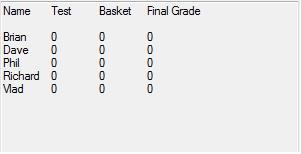
but when the user clicks the sort alphabetically button I need them to sort.
plus i need the same to sort the numbers form highest to smallest on the final grade array.
-
Apr 23rd, 2013, 02:14 PM
#2
Re: Sorting Arrays
What should prob be done is a class should be made to store those values, something like this:
Code:
Option Strict On
Option Explicit On
Public Class Student

    Private student_name As String
    Public Property Name() As String
        Get
            Return student_name
        End Get
        Set(ByVal value As String)
            student_name = value
        End Set
    End Property

    Private tst As Integer
    Public Property Test() As Integer
        Get
            Return tst
        End Get
        Set(ByVal value As Integer)
            tst = value
        End Set
    End Property

    Private bask As Integer
    Public Property Basket() As Integer
        Get
            Return bask
        End Get
        Set(ByVal value As Integer)
            bask = value
        End Set
    End Property

    Private fin As Integer
    Public Property Final() As Integer
        Get
            Return fin
        End Get
        Set(ByVal value As Integer)
            fin = value
        End Set
    End Property

End Class
Then create a list(of students):
Code:
        Dim student_list As New List(Of Student)

        Dim student1, student2, student3 As New Student
        With student1
            .Name = "Zulu"
            .Test = 0
            .Basket = 0
            .Final = 0
        End With

        With student2
            .Name = "Charlie"
            .Test = 0
            .Basket = 0
            .Final = 0
        End With

        With student3
            .Name = "Dean"
            .Test = 0
            .Basket = 0
            .Final = 0
        End With

        student_list.AddRange({student1, student2, student3})
Then finally sort the appropriate property.
Edit - Here's how to sort the students:
Code:
        Dim sorted_list As Student() = student_list.OrderBy(Function(x) x.Name).ToArray

        For Each name As Student In sorted_list
            Console.WriteLine(name.Name)
        Next

        Console.ReadLine()
        'Result:
        'Charlie
        'Dean
        'Zulu
Last edited by dday9; Apr 23rd, 2013 at 02:32 PM.
-
Apr 23rd, 2013, 02:36 PM
#3
Thread Starter
New Member
Re: Sorting Arrays
Thank you so much for your help but this isn't quite what I am looking for help with, I need a simple bubble sort code because I need to program a button that the user can click to automatically sort the names, and also another but that sorts the final grades array from highest to lowest
-
Apr 23rd, 2013, 02:43 PM
#4
Re: Sorting Arrays
Ahh, ok. Well I'm no expert in bubble sorting(as in I just had to wiki it). However, do you understand the concept of putting those into a class and then sorting the desired class property?
-
Apr 23rd, 2013, 02:58 PM
#5
Re: Sorting Arrays
try this:
Code:
Public Class Form1

    Dim StudentNames() As String = {"Dave", "Brian", "Richard", "Phil", "Vlad"}
    Dim ClassTestScore() As String = {"0", "0", "0", "0", "0"}
    Dim ConicalBasketMark() As String = {"0", "0", "0", "0", "0"}
    Dim FinalGrade() As String = {"3", "4", "2", "1", "5"}

    Private Sub Form1_Load(sender As Object, e As EventArgs) Handles MyBase.Load
        fillDGV()
    End Sub

    Private Sub fillDGV()
        DataGridView1.Rows.Clear()
        Array.ForEach(Enumerable.Range(0, StudentNames.Length).ToArray, Sub(x) DataGridView1.Rows.Add(StudentNames(x), ClassTestScore(x), ConicalBasketMark(x), FinalGrade(x)))
    End Sub

    Private Sub Button1_Click(sender As Object, e As EventArgs) Handles Button1.Click
        'bubble sort
        For outer As Integer = StudentNames.GetUpperBound(0) To 0 Step -1
            For inner As Integer = 0 To outer - 1
                If StudentNames(inner).CompareTo(StudentNames(inner + 1)) > 0 Then
                    Dim temp() As String = {StudentNames(inner), ClassTestScore(inner), ConicalBasketMark(inner), FinalGrade(inner)}
                    StudentNames(inner) = StudentNames(inner + 1)
                    ClassTestScore(inner) = ClassTestScore(inner + 1)
                    ConicalBasketMark(inner) = ConicalBasketMark(inner + 1)
                    FinalGrade(inner) = FinalGrade(inner + 1)
                    StudentNames(inner + 1) = temp(0)
                    ClassTestScore(inner + 1) = temp(1)
                    ConicalBasketMark(inner + 1) = temp(2)
                    FinalGrade(inner + 1) = temp(3)
                End If
            Next
        Next
        fillDGV()
    End Sub

    Private Sub Button2_Click(sender As Object, e As EventArgs) Handles Button2.Click
        'bubble sort
        For outer As Integer = StudentNames.GetUpperBound(0) To 0 Step -1
            For inner As Integer = 0 To outer - 1
                If CInt(FinalGrade(inner)).CompareTo(CInt(FinalGrade(inner + 1))) < 0 Then
                    Dim temp() As String = {StudentNames(inner), ClassTestScore(inner), ConicalBasketMark(inner), FinalGrade(inner)}
                    StudentNames(inner) = StudentNames(inner + 1)
                    ClassTestScore(inner) = ClassTestScore(inner + 1)
                    ConicalBasketMark(inner) = ConicalBasketMark(inner + 1)
                    FinalGrade(inner) = FinalGrade(inner + 1)
                    StudentNames(inner + 1) = temp(0)
                    ClassTestScore(inner + 1) = temp(1)
                    ConicalBasketMark(inner + 1) = temp(2)
                    FinalGrade(inner + 1) = temp(3)
                End If
            Next
        Next
        fillDGV()
    End Sub

End Class
- Coding Examples:
- Features:
- Online Games:
- Compiled Games:
-
Apr 23rd, 2013, 03:23 PM
#6
Thread Starter
New Member
Re: Sorting Arrays
I finally figured out how to sort them with the highest and lowest scores but they are being displayed from bottom to top does anyone have any idea how I can display the result in the output textbox from the highest to the lowest (top to bottom)?
Const NUM_NAMES As Integer = 4
Dim tempName As String
Dim tempTestScore As String
Dim tempBasketScore As String
Dim tempFinalScore As String
Dim swap As Boolean
For outloop = 0 To NUM_NAMES - 1
swap = False
For inloop = NUM_NAMES - 1 To outloop Step -1
If FinalGrade(inloop) > FinalGrade(inloop + 1) Then
tempFinalScore = FinalGrade(inloop)
FinalGrade(inloop) = FinalGrade(inloop + 1)
FinalGrade(inloop + 1) = tempFinalScore
tempName = StudentNames(inloop)
StudentNames(inloop) = StudentNames(inloop + 1)
StudentNames(inloop + 1) = tempName
tempTestScore = ClassTestScore(inloop)
ClassTestScore(inloop) = ClassTestScore(inloop + 1)
ClassTestScore(inloop + 1) = tempTestScore
tempBasketScore = ConicalBasketMark(inloop)
ConicalBasketMark(inloop) = ConicalBasketMark(inloop + 1)
ConicalBasketMark(inloop + 1) = tempBasketScore
swap = True
End If
Next
If Not swap Then
Exit For
End If
Next
-
Apr 23rd, 2013, 03:34 PM
#7
Re: Sorting Arrays
I need a simple bubble sort code because I need to program a button that the user can click to automatically sort the names
That's a complete non sequitur. Nobody writes their own sorting methods in this day and age. Bubble sorts are ancient history.
any idea how I can display the result in the output textbox from the highest to the lowest (top to bottom)?
Seriously? You can do a bubble sort but only in one direction? You have an array of values and you can only count forwards?
As the 6-dimensional mathematics professor said to the brain surgeon, "It ain't Rocket Science!"
Reviews: "dunfiddlin likes his DataTables" - jmcilhinney
Please be aware that whilst I will read private messages (one day!) I am unlikely to reply to anything that does not contain offers of cash, fame or marriage!
-
Apr 23rd, 2013, 03:39 PM
#8
Re: Sorting Arrays
That's a complete non sequitur. Nobody writes their own sorting methods in this day and age. Bubble sorts are ancient history.
Students do 
Process control doesn't give you good quality, it gives you consistent quality.
Good quality comes from consistently doing the right things.
Vague general questions have vague general answers. A $100 donation is required for me to help you if you PM me asking for help. Instructions for donating to one of our local charities will be provided.
______________________________ Last edited by kebo : Now. Reason: superfluous typo's
-
Apr 23rd, 2013, 03:50 PM
#9
Thread Starter
New Member
Re: Sorting Arrays
Yeah I'm still pretty crappy at programming so can someone help me?
-
Apr 23rd, 2013, 03:52 PM
#10
Re: Sorting Arrays
Can you post the bubble routine you are currently working on? I'd be glad to help if I can
Process control doesn't give you good quality, it gives you consistent quality.
Good quality comes from consistently doing the right things.
Vague general questions have vague general answers. A $100 donation is required for me to help you if you PM me asking for help. Instructions for donating to one of our local charities will be provided.
______________________________ Last edited by kebo : Now. Reason: superfluous typo's
-
Apr 23rd, 2013, 03:56 PM
#11
Re: Sorting Arrays
 Originally Posted by kebo

Can you post the bubble routine you are currently working on? I'd be glad to help if I can
post #6
- Coding Examples:
- Features:
- Online Games:
- Compiled Games:
-
Apr 24th, 2013, 09:34 AM
#12
Fanatic Member
Re: Sorting Arrays
you can just sort the array and run a loop backwards
for I = 10 to 0 step -1
next I
that will give you the results in reverse if im not mistaken 
or since someone was taking about experimenting like back in college
for I = 0 to 10
array(maths.abs(I - 10))
next I
Yes!!!
Working from home is so much better than working in an office...
Nothing can beat the combined stress of getting your work done on time whilst
1. one toddler keeps pressing your AVR's power button
2. one baby keeps crying for milk
3. one child keeps running in and out of the house screaming and shouting
4. one wife keeps nagging you to stop playing on the pc and do some real work.. house chores
5. working at 1 O'clock in the morning because nobody is awake at that time
6. being grossly underpaid for all your hard work

-
Apr 24th, 2013, 10:08 AM
#13
Re: Sorting Arrays
If you have to keep many arrays in order based on the values in one array try it like this
Code:
        Dim StudentNames() As String = {"Dave", "Brian", "Richard", "Phil", "Vlad"}
        Dim ClassTestScore() As String = {"a", "b", "c", "d", "e"}
        Dim ConicalBasketMark() As String = {"a", "b", "c", "d", "e"}
        Dim FinalGrade() As Decimal = {3.5D, 4D, 2.1D, 3, 1.9D}
        Dim swap As Boolean = False
        'define the order
        Dim sortOrder() As Integer = Enumerable.Range(0, StudentNames.Length).ToArray
        Dim sortby() As Decimal = FinalGrade.ToArray 'temp for actual sort
        Dim endidx As Integer = StudentNames.Length - 2
        'sort by FinalGrade
        Do
            swap = False
            For idx As Integer = 0 To endidx
                Dim tempso As Integer
                Dim tempg As Decimal
                If sortby(idx) > sortby(idx + 1) Then
                    swap = True

                    tempso = sortOrder(idx)
                    sortOrder(idx) = sortOrder(idx + 1)
                    sortOrder(idx + 1) = tempso

                    tempg = sortby(idx)
                    sortby(idx) = sortby(idx + 1)
                    sortby(idx + 1) = tempg
                End If
            Next
            endidx -= 1
        Loop While swap

        'show the values in reverse order
        For x As Integer = StudentNames.Length - 1 To 0 Step -1
            Dim idx As Integer = sortOrder(x)
            Debug.WriteLine(String.Format("{0} {1} {2} {3}", _
                                          StudentNames(idx), ClassTestScore(idx), ConicalBasketMark(idx), FinalGrade(idx)))
        Next
-
Apr 24th, 2013, 03:12 PM
#14
Re: Sorting Arrays
Tom
It strikes me that instead of 4 1-D arrays, you might be better of with just 1 2-D array.
Spoo
Tags for this Thread
 Posting Permissions
- You may not post new threads
- You may not post replies
- You may not post attachments
- You may not edit your posts
-
Forum Rules
|
Click Here to Expand Forum to Full Width
|



 Reply With Quote


