|

-
Dec 1st, 2012, 10:13 PM
#1
Thread Starter
Junior Member

VB Keeps Loosing the Bluetooth Port
I am trying to replace a serial cable with a bluetooth "connection". I am only sending characters from the desktop to a device.
I and running XP and VB5.0.
I can get it to work sometimes but things always fall apart.
(1) When I plug the dongle into a USB port I can use the Windows Device manager to see two new comm ports show up. The bluetooth icon also appears in the task bar. If I click on it I see two commports, one for incoming and one for outgoing. Sometimes they are com3 and com4 respectively, other times they are com4 and com3. If I unplug the dongle and plug it back, I might get com4 and com9.
(2) When I run my VB program I put in a combobox that when clicked attempts to open all commports from 1 to 9.
Private Sub cmbCommPorts_GotFocus()
'When focused, get a list of existing commport numbers
cmbCommPorts.Clear
For I = 1 To 9
On Error Resume Next
MSComm1.CommPort = I
On Error Resume Next
MSComm1.PortOpen = True
On Error Resume Next
MSComm1.PortOpen = False
If Err.Number = 0 Then
cmbCommPorts.AddItem ("com"+Str(I)))
End If
Next I
End Sub
(3) It lists the ones it finds and lets the user select the "right one". But the VB program can't tell which is the incoming and which is the outgoing. I can tell that when I used the bluetooth icon (step 1) so I select the "right one".
Things will be fine then, suddenly the transmissions stop. I check the bluetooth icon and see that the outgoing port is not listed. It still is in the Device Manager though. I can then do some playing around with "add a Bluetooth device" (like step 1 all over again) and I'll get the outgoing port to show again. But perhaps it was com4 before and now it might be com8.
Then if I go to the combobox, the outgoing port won't list (as in step 2). Only com1 (my old RS232 port) and com3, the incoming bluetooth port. I can restart the program and still it won't find the outgoing port. I have to reboot the computer for step 2 to find the outgoing port.
So, why does the outgoing port disappear?
So, how can I tell which of the ports is the outgoing and incoming?
So, how can I get VB to find the port that went away and then I got back?
Thanks in advance,
Pete
-
Dec 2nd, 2012, 09:15 AM
#2
Re: VB Keeps Loosing the Bluetooth Port
It is odd that it would use 2 different ports for send and receive. I have did very little with blue tooth but in each case it has always used a sinlge port for both send and receive.
If I were to guess I would say the dongle may be the problem.
-
Dec 2nd, 2012, 09:37 AM
#3
Re: VB Keeps Loosing the Bluetooth Port
I doubt they are for send vs. receive. If there is any difference at all it might be that one is set up as a DTE (terminal, probably the "outgoing") and the other as a DCE (modem, or host). The main difference for a soft port like a BlueTooth emulated serial port is probably how the virtual control signal lines are used. But I don't know enough to say more about it.
I agree this probably isn't a VB6 or MSComm issue at all.
Until a BlueTooth device supporting Serial Port Profile (SPP) is paired with the PC I wouldn't expect these to be usable though.
-
Dec 2nd, 2012, 11:37 AM
#4
Thread Starter
Junior Member
Re: VB Keeps Loosing the Bluetooth Port
I found some more info about the two ports:
"First, there are two COM ports created typically when the wireless device is capable of generating data to be recieved by a remote connection. Put simply, the "Outgoing" port is the one owned and controlled by the computer and the "Incoming" port is
owned and controlled by the device."
I tried sending on the "Incoming" and nothing happens.
One thing that could help me is if I could tell which of the ports is "outgoing" and which "incoming". I saw that with VB.NET there is way to do that but I haven't found a way with VB5 (or VB6). I tried updating the program to VB.NET and the whole world came crumbling down. There was something like 35 "problems" and I don't have the time to understand the differences. I just need to replace the cable with the bluetooth connection.
Pete
-
Dec 2nd, 2012, 12:43 PM
#5
Re: VB Keeps Loosing the Bluetooth Port
Like I said before I have worked with a few blue tooth adapters and they always used a single port. No idea why your device would set up 2 ports as this is totally unnessacary any comport should have the ability to send and receive data as this is what they are designed to do.
You may be able to tell which is which based on which signals are present but without know more about the USB device in question I would not know what to tell you to look for.
-
Dec 2nd, 2012, 01:08 PM
#6
Re: VB Keeps Loosing the Bluetooth Port
My USB_Test project use system notify and retrieve info about USB port
While the port change (depend of how many device are attached) you can get the unique Serial Number (which doesn't change) to retrieve yours device.
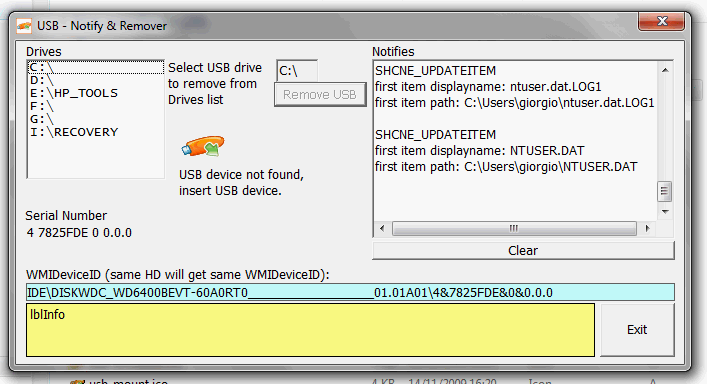
Download source code for free on my web site at page:
http://nuke.vbcorner.net/Progetti/VB...T/Default.aspx
and click to USB Notifica & Rimozione link.
-
Dec 3rd, 2012, 01:40 PM
#7
Thread Starter
Junior Member
Re: VB Keeps Loosing the Bluetooth Port
Sorry, I don't understand Spanish so I can't guess at how to register to download this.
-
Dec 4th, 2012, 02:52 AM
#8
New Member
Re: VB Keeps Loosing the Bluetooth Port
 Originally Posted by petecal

Sorry, I don't understand Spanish so I can't guess at how to register to download this.
You can use an online translator. That would be easy
-
Dec 9th, 2012, 03:31 AM
#9
Re: VB Keeps Loosing the Bluetooth Port
Originally Posted by petecal
Sorry, I don't understand Spanish so I can't guess at how to register to download this.
Spanish ??? What...
-
Dec 9th, 2012, 10:18 AM
#10
Thread Starter
Junior Member
Re: VB Keeps Loosing the Bluetooth Port
Originally Posted by gibra
Spanish ??? What...
The link:
Download source code for free on my web site at page:
http://nuke.vbcorner.net/Progetti/VB...T/Default.aspx
is not English.
-
Dec 9th, 2012, 10:50 AM
#11
Re: VB Keeps Loosing the Bluetooth Port
Originally Posted by petecal
and not is Spanish, is Italian, then???
Do you expect the whole world to speak English? 
However, I written:
click to USB Notifica & Rimozione link.
-
Dec 9th, 2012, 11:05 AM
#12
Thread Starter
Junior Member
Re: VB Keeps Loosing the Bluetooth Port
No. And it saddens me that Americans can get by in this world with just English.
But the fact that they can enables us to not learn another language.
I have tried a few times over my 65 years to learn other languages but with no one to talk to it is tough.
Now I can't even remember English words, how can I learn another language? 
-
Dec 12th, 2012, 11:38 AM
#13
Thread Starter
Junior Member
Re: VB Keeps Loosing the Bluetooth Port
I am still banging my head against this problem.
I have found that if the computer (XP, VB6, Bluetooth Dongle, Virtual Comport) starts from a cold boot it seems to always find an "Outgoing" comport and my VB program can find it and use it flawlessly. But if something goes wrong (and I don't know what that is or how many different things it might be), the port is gone and I can't get it back.
Some Details.
(1) When working correctly, Windows Device manager shows Bluetooth Radios and two Comports. Sometimes COM5 and COM6 or COM15 and COM16.
(2) When working correctly, Bluetooth Devices shows the device (TinyOS) and the COM Ports tab will show at least two COM ports with one or more designated input and one designated Output. I can note the Outgoing COM#.
(3) When working correctly, I start my VB program it sequences through COM1 through COM20 trying to Open then Close each port in turn. It presents me a list box with all listed and if I select the COM# I noted in step 2, all works great.
Then, something goes wrong. Sometimes it is as simple as me exiting the VB program and trying to restart it. Note, I have MSComm1.Open=False every where I can put it in my code hoping to always close the port before I exit.
At this point I have spent hours trying to find a reliable method of my program getting the Outgoing port back. I can see it in the Device Manager, I can sometimes see it in Bluetooth Devices. I can sometimes get Bluetooth Devices to find an Outgoing port but my program can't find that port number. I have other programs that use the com ports (e.g. Termix) and they show that the port is "in use" when in this state.
Sometimes removing the dongle and reinstalling it might allow my program to get the port back. Sometimes I can use the Bluetooth Devices Remove button to remove it then remove and reinsert the dongle. And I have tried every sequence and step in every order I can think of and just can't find a reliable way to get the Outgoing port back.
Sometimes I can "logoff" the user and log back in again and then my program can get the Outgoing port. Other times I have to shutdown the computer to get it.
Other times, even shutting down the computer won't get the Outgoing port back. I can then do all kinds of removing deleting in Device Manager, removing the dongle, deleting the device in Bluetooth Devices etc, etc, etc. Then I may get it back.
I have this gut feeling that Windows thinks the port is in use and won't let my program open it. But you would think that after a shutdown and restart, that should free up the port.
One more thing. When it is in this state, when my program tries to open the Outgoing port (as shown in the Bluetooth Devices list) I will get the error 8012, "Port not Open" where as non-existent ports will throw the error 8002 Port doesn't exist. So, does this give a hint that something knows the port is there but won't let me open it?
Call me Confused and Frustrated,
Pete
-
Dec 12th, 2012, 08:22 PM
#14
Re: VB Keeps Loosing the Bluetooth Port
Have you tried updating the drivers for your device? Sounds like it is not a vb related issue but related to hardware/drivers
-
Dec 13th, 2012, 11:15 AM
#15
Thread Starter
Junior Member
Re: VB Keeps Loosing the Bluetooth Port
The drivers are up to date.
I did a lot more experimenting. Is seems like the comports are not getting closed or made free. I found that the XP device manager gives me an "advanced" option to change the com number. When I click that list box I see a whole host of com numbers are all "in use".
Ths computer I am doing this with has one old fashion RS232 comport named COM1. The list box will show
COM1
COM2(in use)
COM3 (in use)
etc. through
COM14 (in use)
I don't have those comports. But over the hours I have spent working this problem, the Bluetooth adapter has shown up with those com numbers at one time or another.
It is like "someone" is remembering that those numbers were used and makes them unavailable to my VB program and to other programs that use serial ports. I don't know if it was because my VB program opened the port but hung and exited without closing the port or if XP still thinks the ports are still being used or if the Bluetooth Dongle "remembers" past port numbers.
But this "remembering" survives through power shutdowns.
I need some way to get XP to forget that those ports exost because they don't.
Pete
-
Dec 13th, 2012, 10:28 PM
#16
Re: VB Keeps Loosing the Bluetooth Port
hmm.. I have alwasy been a bit skeptical of USB to serial adapters I have saw int he past that some work and some not so well. Now that I think about it the last blue tooth adapter I used actually connected to the RS232 port and as one would expect it was a single port to send and receive. Did not have any issues. I also code on mobile devices that have bluetooth but to my program it is just a serial port and again only 1 port which handles bidirectional communication as a serial port should.
I have no idea why your adapter would need or want to use a different port for sending from that for receiveing but I suppose there is a reason. Have you tried the dongle under Windows 7? On a different PC, different USB port, different hardware dongle?
Does not seem like the problem is related to VB nor the Comm control
-
Dec 14th, 2012, 11:18 AM
#17
Thread Starter
Junior Member
Re: VB Keeps Loosing the Bluetooth Port
Originally Posted by DataMiser
I have no idea why your adapter would need or want to use a different port for sending from that for receiveing but I suppose there is a reason. Have you tried the dongle under Windows 7? On a different PC, different USB port, different hardware dongle?
Does not seem like the problem is related to VB nor the Comm control
Actually I have done a lot if searching and the two ports are both bidirectional. The "Outgoing" is used when the Desktop is the Master. The "Incoming" is used when the the Desktop is the Slave. But I am not sure what Master and Slave mean. I think it means who initiates the transfer. In my case the Desktop controls everything.
The Desktop sends out a string of characters and, as a check, the other device sends back the count of how many characters it received. When I get it working, it works flawlessly.
Up above I described how I found lots of my ports "in use". Well, I found out that happens often and here is what I did about it:
http://www.modemsite.com/56k/xptip.asp
Now, just yesterday I was really careful with what I did and caused a failure. I opened my program in the development program and plugged in the Bluetooth adapter. I saw in the Blutooth Devices that the device had Outgoing COM3 and Incoming COM4. I started in Debug mode and selected COM3 (My program allows me to select the port). It ran fine. I made some changes to the code and ran again. Ran fine. I repeated this a few times adjusting some parameters and trying them. When I was happy, I did a "Make .exe". Then I ran the exe and, COM3 was not available.
I went through the whole process I described in previous posts with no success. I could never get an Outgoing port back. I even powered down multiple times, removed and reinstalled the dongle, nothing worked.
It is time I started searching for more Bluetooth problems. I'll report back here if I have any success. I just hate it when I find a thread that is similar to my problem and it doesn't have an ending.
Pete
-
Dec 14th, 2012, 09:52 PM
#18
Thread Starter
Junior Member
Re: VB Keeps Loosing the Bluetooth Port
After some serious testing I think I have found a way to make this work reliably.
To summarize my configuration. I have an embedded device that I have controlled from a desktop computer using a VB program over an RS232 serial port. I want to replace that control path with a Bluetooth device. I found a module that connects to the embedded processor Rxd and TXD lines and "does" Bluetooth:
http://www.ebay.co.uk/itm/Serial-Blu...item4d03a0fc19
It uses a special module connected to the embedded processor and a Bluetooth dongle in the USB port of the desktop.
I can get it to work by specifying that my VB program use the "Outgoing" port.
Then I "do something wrong" and the Outgoing port is no longer available for me to select. That is, my VB program tries to open all comports sequentially (COM1,COM2,...COM20) and if no error code is received it assumes the port is available and puts it on a list for me to select. After I "do something wrong" that COM port number is no longer available to me. My program that tries to open the port gets the error 8012, "port not open".
I believe what happens when I "do something wrong" is somewhere in XP or the Bluetooth drivers, that Outgoing port is marked "in use" and so no other program can use it. Even if it is the same program that was using it. So, I think I found a way to purge all that information so the Outgoing port is available again.
So, when the problem hits, COMx, the Outgoing port can not be opened by my program. This is what I do to get it back.
(1) Open Bluetooth Devices from Control Panel (or the task bar). Find the device that I have been using, Click Comports and note the numbers of all the comports. Then back to the Devices window and Remove the embedded system device using the Remove button.
(2) Power down the embedded system. I think I have to do this so the dongle sees the embedded system "go away".
(3) In XP Device Manager (Right click My Computer, Manage, Device Manager), expand the Port (COM & LPT). Uninstall any COM ports that are associated with the embedded system as found in 1 above. The only comport I have left is the RS232 one.
(4) Restore power to the embedded system.
(5) Using the Bluetooth Devices window click Add. It should find the Bluetooth module for the Embedded system. Use the key 1234 and let it go through the association process. IGNORE the Outgoing and Incoming COM numbers reported on the last page of the wizard, they are frequently wrong....this caused me major "do something wrong"s.
(6) In Bluetooth Devices, click the comport tab and get the correct number for the Outgoing comport.
(7) Start my VB program and select the COM number found in 6.
I have done this 5 or 6 times and can get the Outgoing port back every time without rebooting or any other measures.
Hope this helps someone.
Pete
 Posting Permissions
- You may not post new threads
- You may not post replies
- You may not post attachments
- You may not edit your posts
-
Forum Rules
|
Click Here to Expand Forum to Full Width
|



 Reply With Quote
