|

-
Nov 22nd, 2012, 03:54 AM
#1
Thread Starter
Hyperactive Member

[VS 2012] MYSQL DataAdapter.Fill gives KeyNotFoundException
I have googled and tried to find an solution to this issue but I have had no luck. The code is meant to retrieve a list of tickets from a ticket database that have been created by a specific user.
Code:
Public Shared Function LoadTickets() As DataSet
        'dbhost, dbuser, dbpass are global variables that hold the server ip, username, and password rot the database
        Dim connstr As String = "server=" + dbHost + ";user=" + dbUser + ";database=tickets;port=3306;password=" + dbPass + ";"
        Dim conn As MySqlConnection = New MySqlConnection(connstr)

        'user is a public var that holds the current username
        Dim sql As String = "SELECT * FROM `ticket_index` WHERE username='" + User + "';"


        Dim daTicket As MySqlDataAdapter = New MySqlDataAdapter(sql, conn)


        Dim cb As MySqlCommandBuilder = New MySqlCommandBuilder(daTicket)
        cb.DataAdapter = daTicket

        Dim dsTicket As DataSet = New DataSet()

        'error is throw here
        daTicket.Fill(dsTicket, "ticket_index")


        Return dsTicket


    End Function
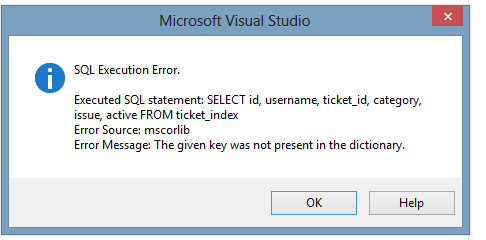
The image below is the error I get when I try to pull the data from the Retrieve Data function in the server explorer or run any query on the connected database. Don't know if that will help but its here now.
I am at a loss, I have tweaked this code for a while now and can't come up with a solution. I am also kind of new to working with mysql databases and mysqldataadapters so any tips or advice is acceptable too. Thanks you for your time and for looking at my code
Last edited by bagstoper; Nov 22nd, 2012 at 04:05 AM.
Reason: posted the image
-
Nov 22nd, 2012, 12:56 PM
#2
Re: [VS 2012] MYSQL DataAdapter.Fill gives KeyNotFoundException
You're quite certain that your database field/column names are indeed ...
id username ticket_id category issue active
... and that the tablename is ticket_id and that you're allowed to use the underscore in these names?
As the 6-dimensional mathematics professor said to the brain surgeon, "It ain't Rocket Science!"
Reviews: "dunfiddlin likes his DataTables" - jmcilhinney
Please be aware that whilst I will read private messages (one day!) I am unlikely to reply to anything that does not contain offers of cash, fame or marriage!
-
Nov 22nd, 2012, 05:10 PM
#3
Thread Starter
Hyperactive Member
Re: [VS 2012] MYSQL DataAdapter.Fill gives KeyNotFoundException
Yes I am certain that my tablename is "ticket_index". I tried removing the underscore in the table name and in the column name but it was to no avail.
Here is my table setup as viewed in myPHPadmin:

I have also played around with my query in the query design wizard. When I query just the id it works and returns the value. When I try to query anything else it gives me this error. 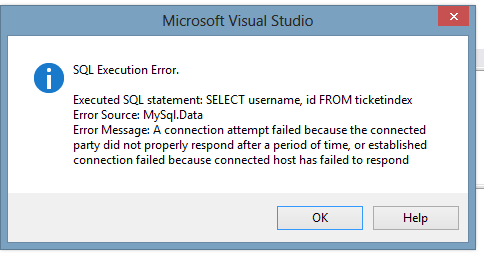
But when I try doing it with just id it works great.
-
Nov 23rd, 2012, 05:38 PM
#4
New Member
Re: [VS 2012] MYSQL DataAdapter.Fill gives KeyNotFoundException
I have an application which connects to a mysql db. I wrote a MySQL module which handles connection and return values. Here is the module:
Code:
Imports MySql.Data.MySqlClient

Module MySQL
    Private MySQLConn As MySqlConnection
    Private MySQLDBName As String
    Private MySQLDBHost As String
    Private MySQLDBUser As String
    Private MySQLDBPass As String

    Private Sub MySQLInit()
        MySQLDBName = "dbname"
        MySQLDBHost = "host"
        MySQLDBUser = "username"
        MySQLDBPass = "password"
    End Sub

    Private Function MySQLConnect() As Boolean
        MySQLConn = New MySqlConnection()

        'Create Connection String
        MySQLConn.ConnectionString = "server=" & MySQLDBHost & ";user id=" & MySQLDBUser & ";password=" & MySQLDBPass & ";database=" & MySQLDBName

        'Try to connect to the db
        Try
            MySQLConn.Open()

        Catch mysqlconnerror As MySqlException
            'Error occured, message user
            MsgBox("Could not connect to MySQL DB." & vbCrLf & "Error: " & mysqlconnerror.Message)
            Return False
        End Try

        Return True
    End Function

    Public Function MySQLQuery(ByVal sqlQuery As String, ByRef sqlGridView As DataGridView) As Boolean
        Dim MySQLCommand As MySqlCommandBuilder
        Dim MySQLDataAdapter As MySqlDataAdapter
        Dim MySQLDataTable As DataTable
        Dim MySQLBindingSource As BindingSource
        Dim blnSuccess As Boolean

        'Init DB info
        MySQLInit()

        blnSuccess = False

        'Connect to DB
        If MySQLConnect() = True Then
            Try
                MySQLDataTable = New DataTable

                MySQLDataAdapter = New MySqlDataAdapter(sqlQuery, MySQLConn)
                MySQLCommand = New MySqlCommandBuilder(MySQLDataAdapter)
                MySQLDataAdapter.Fill(MySQLDataTable)
                MySQLBindingSource = New BindingSource
                MySQLBindingSource.DataSource = MySQLDataTable
                sqlGridView.DataSource = MySQLBindingSource

                blnSuccess = True
            Catch mysqlqueryerror As MySqlException
                'Error occured, message user
                MsgBox("Could not execute query." & vbCrLf & "Error: " & mysqlqueryerror.Message & vbCrLf & "Query: " & sqlQuery)
                blnSuccess = False
            Finally
                If MySQLConn.State <> ConnectionState.Closed Then MySQLConn.Close()
            End Try
        End If

        Return blnSuccess

    End Function
End Module
then within my app I interact with my db like this:
Code:
If MySQLQuery("UPDATE account SET AccountBalance = '" & (AccBal - 2.99) & "' WHERE AccountID = " & AccountID, dgvStore) Then
This takes the return and puts the recordset into a datagridview (in my case its dgvStore). I can then flow through the datagridview rows to get what I want returned. I hope this will help!
-
Nov 24th, 2012, 04:44 AM
#5
Thread Starter
Hyperactive Member
Re: [VS 2012] MYSQL DataAdapter.Fill gives KeyNotFoundException
I'm going to try to play around with the module you posted. But I feel like my issue lies with the database itself. I'll let you know if I get it working though
-
Nov 24th, 2012, 10:04 AM
#6
New Member
Re: [VS 2012] MYSQL DataAdapter.Fill gives KeyNotFoundException
i notice you have an underscore in ticketid in your query you posted...
 Posting Permissions
- You may not post new threads
- You may not post replies
- You may not post attachments
- You may not edit your posts
-
Forum Rules
|
Click Here to Expand Forum to Full Width
|



 Reply With Quote
