|

-
Jan 9th, 2012, 02:30 PM
#1
Thread Starter
PowerPoster


 [RESOLVED] [VB6] - DIB's - Tiles an image [RESOLVED] [VB6] - DIB's - Tiles an image
i build these code for try Tiled an image with speed(using the DIB's way is the faster API way):
Code:
Public Sub TilesImageDIB(ByRef SrcPictureBox As Control, ByRef DstPictureBox As Control, ByVal Width As Long, ByVal Height)
    Dim ImageData() As Byte
    Dim x As Long, y As Long

    On Error Resume Next
    If SrcPictureBox <> DstPictureBox Then DstPictureBox.Picture = Nothing
    'Now we fill up the bmi (Bitmap information variable) with all of the appropriate data
    bmi.bmHeader.bmSize = 40 'Size, in bytes, of the header (always 40)
    bmi.bmHeader.bmPlanes = 1 'Number of planes (always one)
    bmi.bmHeader.bmBitCount = 24 'Bits per pixel (always 24 for image processing)
    bmi.bmHeader.bmCompression = 0 'Compression: none or RLE (always zero)

    'Calculate the size of the bitmap type (in bytes)

    bmLen = Len(bm)

    'Get the picture box information from SrcPictureBox and put it into our 'bm' variable
    GetObject SrcPictureBox.Image, bmLen, bm

    'Build a correctly sized array.
    ReDim ImageData(0 To Width - 1, 0 To Height - 1)

    'Finish building the 'bmi' variable we want to pass to the GetDIBits call (the same variable we used above)
    bmi.bmHeader.bmWidth = bm.bmWidth
    bmi.bmHeader.bmHeight = bm.bmHeight

    'Now that we've completely filled up the 'bmi' variable, we use GetDIBits to take the data from SrcPictureBox and put it into the ImageData() array using the settings we specified in 'bmi'
    GetDIBits SrcPictureBox.hDC, SrcPictureBox.Image, 0, bm.bmHeight, ImageData(0, 0), bmi, 0

    For x = 0 To Width Step bm.bmWidth - 1
        For y = 0 To Height Step bm.bmHeight - 1
           GetDIBits SrcPictureBox.hDC, SrcPictureBox.Image, 0, bm.bmHeight, ImageData(x, y), bmi, 0
        Next y
    Next x
    If SrcPictureBox = DstPictureBox Then SrcPictureBox.Picture = Nothing
    'Now that we've built the temporary header, we use StretchDIBits to take the data from the ImageData() array and put it into SrcPictureBox using the settings specified in 'bmi' (the StretchDIBits call should be on one continuous line)
    StretchDIBits DstPictureBox.hDC, 0, 0, Width, Height, 0, 0, Width, Height, ImageData(0, 0), bmi, 0, vbSrcCopy

    'Since this doesn't automatically initialize AutoRedraw, we have to do it manually
    'Note: always keep AutoRedraw as 'True' when using DIB sections. Otherwise, you WILL get unpredictable results.
    If DstPictureBox.AutoRedraw = True Then
        DstPictureBox.Picture = DstPictureBox.Image
        DstPictureBox.Refresh
    End If
End Sub
but the result isn't correct. can anyone advice me?
-
Jan 9th, 2012, 04:37 PM
#2
Re: [VB6] - DIB's - Tiles an image
There are several issues with your sample code. But first, have you tried using VB's PaintPicture? Unless you are tiling full screen images, PaintPicture, with an optimized routine, can be very fast for tiling
-
Jan 9th, 2012, 04:44 PM
#3
Thread Starter
PowerPoster
Re: [VB6] - DIB's - Tiles an image
 Originally Posted by LaVolpe

There are several issues with your sample code. But first, have you tried using VB's PaintPicture? Unless you are tiling full screen images, PaintPicture, with an optimized routine, can be very fast for tiling
what i need is speed, but i thot that PaintPicture was more slow than DIB's.
i update the code, but no results:
Code:
Public Sub TilesImageDIB(ByRef SrcPictureBox As Control, ByRef DstPictureBox As Control, ByVal Width As Long, ByVal Height)
    Dim ImageData() As Byte
    Dim x As Long, y As Long

    On Error Resume Next
    If SrcPictureBox <> DstPictureBox Then DstPictureBox.Picture = Nothing
    'Now we fill up the bmi (Bitmap information variable) with all of the appropriate data
    bmi.bmHeader.bmSize = 40 'Size, in bytes, of the header (always 40)
    bmi.bmHeader.bmPlanes = 1 'Number of planes (always one)
    bmi.bmHeader.bmBitCount = 24 'Bits per pixel (always 24 for image processing)
    bmi.bmHeader.bmCompression = 0 'Compression: none or RLE (always zero)

    'Calculate the size of the bitmap type (in bytes)

    bmLen = Len(bm)

    'Get the picture box information from SrcPictureBox and put it into our 'bm' variable
    GetObject SrcPictureBox.Image, bmLen, bm

    'Build a correctly sized array.
     ReDim ImageData(0 To ByteAlignOnWord(24, bm.bmWidth) - 1, 0 To bm.bmHeight - 1)

    'Finish building the 'bmi' variable we want to pass to the GetDIBits call (the same variable we used above)
    bmi.bmHeader.bmWidth = bm.bmWidth
    bmi.bmHeader.bmHeight = bm.bmHeight

    'Now that we've completely filled up the 'bmi' variable, we use GetDIBits to take the data from SrcPictureBox and put it into the ImageData() array using the settings we specified in 'bmi'
    GetDIBits SrcPictureBox.hDC, SrcPictureBox.Image, 0, bm.bmHeight, ImageData(0, 0), bmi, 0

    Static i As Long

    If SrcPictureBox = DstPictureBox Then SrcPictureBox.Picture = Nothing
    'Now that we've built the temporary header, we use StretchDIBits to take the data from the ImageData() array and put it into SrcPictureBox using the settings specified in 'bmi' (the StretchDIBits call should be on one continuous line)
    For x = 0 To Width Step bm.bmWidth - 1
        For y = 0 To Height Step bm.bmHeight - 1
           i = i + 1
           StretchDIBits DstPictureBox.hDC, x, y, Width, Height, 0, 0, Width, Height, ImageData(0, 0), bmi, 0, vbSrcCopy
           Debug.Print i
        Next y
    Next x


    'Since this doesn't automatically initialize AutoRedraw, we have to do it manually
    'Note: always keep AutoRedraw as 'True' when using DIB sections. Otherwise, you WILL get unpredictable results.
    If DstPictureBox.AutoRedraw = True Then
        DstPictureBox.Picture = DstPictureBox.Image
        DstPictureBox.Refresh
    End If
End Sub
why i need speed up these graphic effect? because my control needs time to show on 1st time(when you put an image on IDE) and i have several controls on form
-
Jan 9th, 2012, 07:11 PM
#4
Re: [VB6] - DIB's - Tiles an image
What do you mean no results? If DstPictureBox.AutoRedraw=False then whatever you draw to it while it is not yet visible on the screen will be erased when it becomes visible.
You may want to ensure DstPictureBox.AutoRedraw=True
-
Jan 10th, 2012, 01:07 AM
#5
Re: [VB6] - DIB's - Tiles an image
Back in 2004 I actually had something that was way faster than DIB's called Direct Memory Addressing using DirectX7 based on Andre Lamoths method off of Tricks of the 3D Game Programming gurus, only I converted the C++ code to VB. The thing though is that obtaining the surface pointer lpSurface was hidden by Microsoft in VB for some reason. Its there but doesn't show up in the object browser unless you set it to view hidden items. How its done is that I lock the surface pointer, obtain the memory pitch, and use a safearray to set the pixel like this:
Code:
Lock_Surface
Video_Buffer(X + Y * Memory_Pitch) = Color
Unlock_Surface
It was so fast that on a 640x480 screen flooding the entire thing using one color I got 60 FPS. Using random colors I got 30 FPS cause of the function call per pixel. Scanlining I got 60 FPS. Random lines I got 60 FPS. You can see for yourself here:
http://www.planetsourcecode.com/vb/s...55262&lngWId=1
-
Jan 10th, 2012, 09:54 AM
#6
Re: [VB6] - DIB's - Tiles an image
Using BitBlt, here is a well optimized routine that can tile an entire screen-sized DC in a few milliseconds.
Code:
Public Sub TilesImageDIB(ByRef SrcPictureBox As Control, ByRef DstPictureBox As Control, ByVal Width As Long, ByVal Height)


    Dim X As Long, Y As Long, tileCx As Long, tileCy As Long
    Dim unitsTiled As Long

    ' ensure all measurements are in pixels, regardless of pictureboxes' scalemode

    tileCx = SrcPictureBox.ScaleX(SrcPictureBox.Picture.Width, vbHimetric, vbPixels)
    tileCy = SrcPictureBox.ScaleY(SrcPictureBox.Picture.Height, vbHimetric, vbPixels)

    ' sanity checks

' If the DstPictureBox scalemode is always pixels, you can skip the next 6 lines
    X = DstPictureBox.ScaleX(DstPictureBox.ScaleWidth, DstPictureBox.ScaleMode, vbPixels)
    Y = DstPictureBox.ScaleY(DstPictureBox.ScaleHeight, DstPictureBox.ScaleMode, vbPixels)
    Width = DstPictureBox.ScaleX(Width, DstPictureBox.ScaleMode, vbPixels)
    Height = DstPictureBox.ScaleY(Height, DstPictureBox.ScaleMode, vbPixels)
    If Width > X Then Width = X
    If Height > Y Then Height = Y
' /////////////////////////////////////////////////////////////////////

' If the DstPictureBox scalemode is always pixels & you removed the above 6 lines,
' then un-rem these next 2 lines
    ' If Width > DstPictureBox.ScaleWidth Then Width = DstPictureBox.ScaleWidth
    ' If Height > DstPictureBox.ScaleHeight Then Height = DstPictureBox.ScaleHeight
' /////////////////////////////////////////////////////////////////////


    ' draw first tile. DstPictureBox.AutoRedraw must be true
    DstPictureBox.PaintPicture SrcPictureBox.Picture, 0, 0

    ' Blt horizontally incrementing pixels copied by power of 2 each iteration
    unitsTiled = tileCx
    Do Until unitsTiled + unitsTiled > Width
        BitBlt DstPictureBox.hDC, unitsTiled, 0, unitsTiled, tileCy, DstPictureBox.hDC, 0, 0, vbSrcCopy
        unitsTiled = unitsTiled + unitsTiled
    Loop
    If unitsTiled < Width Then
        BitBlt DstPictureBox.hDC, unitsTiled, 0, Width - unitsTiled, tileCy, DstPictureBox.hDC, 0, 0, vbSrcCopy
    End If

    ' Blt vertically incrementing pixels copied by power of 2 each iteration
    unitsTiled = tileCy
    Do Until unitsTiled + unitsTiled > Height
        BitBlt DstPictureBox.hDC, 0, unitsTiled, Width, unitsTiled, DstPictureBox.hDC, 0, 0, vbSrcCopy
        unitsTiled = unitsTiled + unitsTiled
    Loop
    If unitsTiled < Height Then
        BitBlt DstPictureBox.hDC, 0, unitsTiled, Width, Height - unitsTiled, DstPictureBox.hDC, 0, 0, vbSrcCopy
    End If

    ' refresh destination as needed

End Sub
Edited: For example, an area of 1920x1200 tiled with a 8x8 image will result in 36,000 tiles drawn. But this will all be done with just 16 BitBlt calls + 1 call to PaintPicture
Just FYI: Here is a simple routine that calculates the above numbers
Code:
    Dim tileCx As Long, tileCy As Long
    Dim areaCx As Long, areaCy As Long
    Dim nrIterations As Long
    Dim X As Long, P As Long

    areaCx = 1920: areaCy = 1200    ' max size of tiled area
    tileCx = 8: tileCy = 8          ' size of a single tile

    P = tileCx: For X = P To areaCx - 1
        P = P + P: X = P - 1
        nrIterations = nrIterations + 1
    Next
    P = tileCy: For X = P To areaCy - 1
        P = P + P: X = P - 1
        nrIterations = nrIterations + 1
    Next

    MsgBox "A " & CStr(tileCx) & "x" & CStr(tileCy) & " image tiled across a surface " & vbCrLf & _
        "of " & CStr(areaCx) & "x" & CStr(areaCy) & " will result in " & CStr(nrIterations) & " BitBlt calls." & vbCrLf & vbCrLf & _
        "Total tiles painted will be: " & (areaCx \ tileCx + Abs((areaCx Mod tileCx) > 0)) * (areaCy \ tileCy + Abs((areaCy Mod tileCy) > 0))
You'll see some code out there that will tile one entire row, 1 tile at a time, then copy that row 1 row at a time until the area is completely tiled. Using the same numbers 1920x1200 & 8x8 tiles, 389 BitBlt calls would be needed. You can see that my optimizations are a far improvement, needing only 16 BitBlt calls + 1 call to PaintPicture to do the same thing
Last edited by LaVolpe; Jan 10th, 2012 at 01:14 PM.
-
Jan 10th, 2012, 02:37 PM
#7
Thread Starter
PowerPoster
Re: [VB6] - DIB's - Tiles an image
i don't, yet put it to work, but i will
1 question: what is a diference between a normal bitblt sample and a otimizet sample?
-
Jan 10th, 2012, 02:49 PM
#8
Re: [VB6] - DIB's - Tiles an image
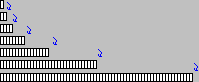
The optimized routine uses BitBlt, but just uses it less often and efficiency is gained by taking the time to calculate maximum number of pixels to copy in one BitBlt call. The easy, less efficient method is to simply BitBlt one tile at a time. Look at this for example:
Width of picturebox is 64 tiles wide.
1) Not optimized: Copy 1 tile, 64 times
2) Optimized: The BitBlt is copying from the destination DC, what has already been painted
Copy 1 tile, then 2 tiles, then 4 tiles, then 8 tiles, then 16 tiles & finally 32 tiles. Only 6 BitBlt calls made
Here's a visual of what I'm trying to explain regarding the 6 BitBlt calls
Last edited by LaVolpe; Jan 10th, 2012 at 03:07 PM.
-
Jan 10th, 2012, 03:06 PM
#9
Thread Starter
PowerPoster
Re: [VB6] - DIB's - Tiles an image
Originally Posted by LaVolpe
The optimized routine uses BitBlt, but just uses it less often and efficiency is gained by taking the time to calculate maximum number of pixels to copy in one BitBlt call. The easy, less efficient method is to simply BitBlt one tile at a time. Look at this for example:
Width of picturebox is 64 tiles wide.
1) Not optimized: Copy 1 tile, 64 times
2) Optimized: The BitBlt is copying from the destination DC, what has already been painted
Copy 1 tile, then 2 tiles, then 4 tiles, then 8 tiles, then 16 tiles & finally 32 tiles. Only 6 BitBlt calls made
i understand what you mean... thanks
-
Jan 10th, 2012, 03:48 PM
#10
Thread Starter
PowerPoster
Re: [VB6] - DIB's - Tiles an image
heres how i use your sub:
Code:
If blnTiles = True Then
        picGraphicsEffects.Width = UserControl.Width
        picGraphicsEffects.Height = UserControl.Height
        picGraphicsEffects.Picture = UserControl.Image
        TilesImageHDC picGraphicsEffects, picGraphicsEffects, picGraphicsEffects.Width, picGraphicsEffects.Height
        picGraphicsEffects.Picture = picGraphicsEffects.Image
        UserControl.Picture = picGraphicsEffects.Image
    End If
why i only see 1 image?
-
Jan 10th, 2012, 03:59 PM
#11
Re: [VB6] - DIB's - Tiles an image
Ensure picGraphicsEffects.AutoRedraw = True
Code:
If blnTiles = True Then
        picGraphicsEffects.Width = UserControl.Width
        picGraphicsEffects.Height = UserControl.Height
        picGraphicsEffects.Picture = UserControl.Image
        picGraphicsEffects.AutoRedraw = True
        TilesImageHDC picGraphicsEffects, picGraphicsEffects, picGraphicsEffects.Width, picGraphicsEffects.Height
        ' not needed: picGraphicsEffects.Picture = picGraphicsEffects.Image
        UserControl.Picture = picGraphicsEffects.Image
    End If
-
Jan 10th, 2012, 04:05 PM
#12
Re: [VB6] - DIB's - Tiles an image
Also, picGraphicsEffects.Width will be in twips. You should use picGraphicsEffects.ScaleWidth & ScaleHeight if picGraphicsEffects. ScaleMode=vbPixels
Code:
TilesImageHDC picGraphicsEffects, picGraphicsEffects, picGraphicsEffects.ScaleWidth, picGraphicsEffects.ScaleHeight
-
Jan 10th, 2012, 04:06 PM
#13
Thread Starter
PowerPoster
Re: [VB6] - DIB's - Tiles an image
Originally Posted by LaVolpe
Also, picGraphicsEffects.Width will be in twips. You should use picGraphicsEffects.ScaleWidth & ScaleHeight if picGraphicsEffects. ScaleMode=vbPixels
Code:
TilesImageHDC picGraphicsEffects, picGraphicsEffects, picGraphicsEffects.ScaleWidth, picGraphicsEffects.ScaleHeight
i normaly use pixels mode and the autotredraw true, but i can't understand why i only see 1 image
-
Jan 10th, 2012, 04:16 PM
#14
Re: [VB6] - DIB's - Tiles an image
Put a breakpoint in TilesImageHDC and walk the code. By testing the variable values in that routine, you should see why it is not giving you what you expect. I suspect it is because of one or both of these:
1) tileCx >= Width
2) tileCy >= Height
-
Jan 10th, 2012, 04:32 PM
#15
Thread Starter
PowerPoster
Re: [VB6] - DIB's - Tiles an image
i'm testing a new otimization code:
Code:
If blnTiles = True Then
        lngImageHeight = imgSize.Height - 1
        lngImageWidth = imgSize.Width - 1
        Dim i As Long
        Dim a As Long
        picGraphicsEffects.Cls
        picGraphicsEffects.Width = UserControl.Width
        picGraphicsEffects.Height = UserControl.Height
        picGraphicsEffects.Picture = UserControl.Image
        i = 0
        a = 0
        For y = 0 To UserControl.Height Step lngImageHeight
            For x = 0 To UserControl.Width + 10 Step lngImageWidth
                i = i + 1
                lngImageWidth = lngImageWidth * i
                BitBlt picGraphicsEffects.hDC, x, y, picGraphicsEffects.ScaleWidth, picGraphicsEffects.ScaleHeight, picGraphicsEffects.hDC, 0, 0, vbSrcCopy
                x = lngImageWidth
            Next
            a = a + 1
            lngImageHeight = lngImageHeight * a
            y = lngImageHeight
        Next
        picGraphicsEffects.Picture = picGraphicsEffects.Image
        UserControl.Picture = picGraphicsEffects.Image
    End If
the problem seem to be the X and Y coordenates, but it's almost complete.. i will test what you said.. thanks
-
Jan 10th, 2012, 04:34 PM
#16
Re: [VB6] - DIB's - Tiles an image
Well, what code you are showing is not what I wrote, so the issues you have is with your interpretation of my code? I see.
-
Jan 10th, 2012, 04:38 PM
#17
Thread Starter
PowerPoster
Re: [VB6] - DIB's - Tiles an image
-
Jan 10th, 2012, 05:59 PM
#18
Re: [VB6] - DIB's - Tiles an image
I'm sure you will figure it out in a short period of time
-
Jan 11th, 2012, 03:59 PM
#19
Thread Starter
PowerPoster
Re: [VB6] - DIB's - Tiles an image
Originally Posted by LaVolpe
I'm sure you will figure it out in a short period of time
heres the new code:
Code:
If blnTiles = True Then
        picGraphicsEffects.Width = UserControl.Width
        picGraphicsEffects.Height = UserControl.Height
        picGraphicsEffects.Picture = UserControl.Image
        For y = 0 To picGraphicsEffects.Width Step picGraphicsEffects.Picture.Height - 1
            For x = 0 To picGraphicsEffects.Height Step picGraphicsEffects.Picture.Width - 1
                Debug.Print BitBlt(picGraphicsEffects.hDC, x, y, picGraphicsEffects.Picture.Width, picGraphicsEffects.Picture.Height, picGraphicsEffects.hDC, 0, 0, vbSrcCopy)
                picGraphicsEffects.Picture = picGraphicsEffects.Image
            Next x
        Next y
        picGraphicsEffects.Picture = picGraphicsEffects.Image
        UserControl.Picture = picGraphicsEffects.Image
    End If
i have a question, why the image isn't copyed?
-
Jan 11th, 2012, 04:36 PM
#20
Re: [VB6] - DIB's - Tiles an image
Here's some problems with your code:
1 picGraphicsEffects.Picture.Height & Width measurements are in himetrics. All VB pictures are.
2 picGraphicsEffects.Width will be in Twips since you set it to UserControl.Width. Usercontrol's Width & Height are always in twips, just like a a form's: Me.Width or Me.Height
3 Use ScaleX & ScaleY to convert himetrics to pixels or twips as needed. See my code for example
4 Do not use picGraphicsEffects.Picture = picGraphicsEffects.Image inside your loop. You will slow it down considerably since a new bitmap is created each time.
Might want to reconsider using my tiling routine. I don't think you will get anything faster than that.
-
Jan 11th, 2012, 04:40 PM
#21
Thread Starter
PowerPoster
Re: [VB6] - DIB's - Tiles an image
Originally Posted by LaVolpe
Here's some problems with your code:
1 picGraphicsEffects.Picture.Height & Width measurements are in himetrics. All VB pictures are.
2 picGraphicsEffects.Width will be in Twips since you set it to UserControl.Width. Usercontrol's Width & Height are always in twips, just like a a form's: Me.Width or Me.Height
3 Use ScaleX & ScaleY to convert himetrics to pixels or twips as needed. See my code for example
4 Do not use picGraphicsEffects.Picture = picGraphicsEffects.Image inside your loop. You will slow it down considerably since a new bitmap is created each time.
Might want to reconsider using my tiling routine. I don't think you will get anything faster than that.
who said that!?!
finally i put it to work
Code:
 If blnTiles = True Then
        picGraphicsEffects.Width = UserControl.Width
        picGraphicsEffects.Height = UserControl.Height
        picGraphicsEffects.Picture = UserControl.Image
        lngImageWidth = imgSize.Width - 1
        lngImageHeight = imgSize.Height - 1
        For y = 0 To picGraphicsEffects.Height
            For x = 0 To picGraphicsEffects.Width
                If y = 0 Then x = lngImageWidth
                BitBlt picGraphicsEffects.hDC, x, y, picGraphicsEffects.ScaleWidth, picGraphicsEffects.ScaleHeight, picGraphicsEffects.hDC, 0, 0, vbSrcCopy
                If x >= lngImageWidth Then lngImageWidth = lngImageWidth + lngImageWidth
                x = lngImageWidth
            Next
            API_DoEvents
            x = 0
            lngImageWidth = imgSize.Width
            If y >= lngImageHeight Then lngImageHeight = lngImageHeight + lngImageHeight
            y = lngImageHeight
        Next

        picGraphicsEffects.Picture = picGraphicsEffects.Image
        UserControl.Picture = picGraphicsEffects.Image
    End If
with more 2 if's i can faster it
the last 2 bitblt() can be more small
-
Jan 11th, 2012, 06:13 PM
#22
Thread Starter
PowerPoster
Re: [VB6] - DIB's - Tiles an image
sorry
the last code isn't correct... heres the new code and tested:
Code:
If blnTiles = True Then
        Dim e As Long
        picGraphicsEffects.Width = UserControl.Width
        picGraphicsEffects.Height = UserControl.Height
        picGraphicsEffects.Picture = UserControl.Image
        lngImageWidth = imgSize.Width
        lngImageHeight = imgSize.Height
        x = lngImageWidth
        y = lngImageHeight
        Do
            BitBlt picGraphicsEffects.hDC, x, 0, picGraphicsEffects.ScaleWidth, picGraphicsEffects.ScaleHeight, picGraphicsEffects.hDC, 0, 0, vbSrcCopy
            x = x * 2
            e = e + 1
            If x >= picGraphicsEffects.Width Then Exit Do
        Loop
        API_DoEvents
        Do
            BitBlt picGraphicsEffects.hDC, 0, y, picGraphicsEffects.ScaleWidth, y, picGraphicsEffects.hDC, 0, 0, vbSrcCopy
            y = y * 2
            e = e + 1
            If y >= picGraphicsEffects.Height Then Exit Do
        Loop
        Debug.Print e
        picGraphicsEffects.Picture = picGraphicsEffects.Image
        UserControl.Picture = picGraphicsEffects.Image
    End If
thanks
-
Jan 11th, 2012, 06:35 PM
#23
Re: [VB6] - DIB's - Tiles an image
I think you should print out X & Y after the loop. You might be surprised at their values. I'm sure values will be much larger than picGraphicsEffects.ScaleWidth & picGraphicsEffects.ScaleHeight respectively; about 15x larger. And if I'm right, you are doing 15x more BitBlt calls than needed, fix it, then look at the value of e after the fixes.
nr = nr + nr can be about 3 times faster than nr = nr * 2 and both equations have same answer. This of course depends on the CPU and whether VB does any internal optimization on such calculations during compilation.
Consider removing the DoEvents; shouldn't be needed & will slow down the result.
Last edited by LaVolpe; Jan 11th, 2012 at 06:44 PM.
-
Jan 12th, 2012, 01:56 PM
#24
Thread Starter
PowerPoster
Re: [VB6] - DIB's - Tiles an image
Originally Posted by LaVolpe
I think you should print out X & Y after the loop. You might be surprised at their values. I'm sure values will be much larger than picGraphicsEffects.ScaleWidth & picGraphicsEffects.ScaleHeight respectively; about 15x larger. And if I'm right, you are doing 15x more BitBlt calls than needed, fix it, then look at the value of e after the fixes.
nr = nr + nr can be about 3 times faster than nr = nr * 2 and both equations have same answer. This of course depends on the CPU and whether VB does any internal optimization on such calculations during compilation.
Consider removing the DoEvents; shouldn't be needed & will slow down the result.
1st - i use picGraphicsEffects.ScaleWidth and for the actual image size. if is more big, then tell me how resolve these, because i don't know;
2nd - to be honest i have tested the time that bitblt is called and it's working fine
3rd - "nr = nr + nr can be about 3 times faster than nr = nr * 2" thanks for the tip
-
Jan 12th, 2012, 01:59 PM
#25
Re: [VB6] - DIB's - Tiles an image
Originally Posted by joaquim
1st - i use picGraphicsEffects.ScaleWidth and for the actual image size...
But you are not using it in your loop:
Not: If x >= picGraphicsEffects.Width Then Exit Do
But: If x >= picGraphicsEffects.ScaleWidth Then Exit Do
Same for .Height & .ScaleHeight. I think if you took the time to test what I suggested, you would have seen that:
X > picGraphicsEffects.ScaleWidth after your loop was done
-
Jan 12th, 2012, 02:04 PM
#26
Thread Starter
PowerPoster
Re: [VB6] - DIB's - Tiles an image
Originally Posted by LaVolpe
But you are not using it in your loop:
Not: If x >= picGraphicsEffects.Width Then Exit Do
But: If x >= picGraphicsEffects.ScaleWidth Then Exit Do
Same for .Height & .ScaleHeight. I think if you took the time to test what I suggested, you would have seen that:
X > picGraphicsEffects.ScaleWidth after your loop was done
i think that i catch what you mean. using the x and y variable i can see the image size
and i normaly use pixel, but i can change to scale
10X5=7 bitblt calls
heres the code updated:
Code:
If blnTiles = True Then
        Dim e As Long
        picGraphicsEffects.Width = UserControl.Width
        picGraphicsEffects.Height = UserControl.Height
        picGraphicsEffects.Picture = UserControl.Image
        lngImageWidth = imgSize.Width
        lngImageHeight = imgSize.Height
        x = lngImageWidth
        y = lngImageHeight
        Do
            BitBlt picGraphicsEffects.hDC, x, 0, x, y, picGraphicsEffects.hDC, 0, 0, vbSrcCopy
            x = x + x
            e = e + 1
            If x >= picGraphicsEffects.Width Then Exit Do
        Loop

        Do
            BitBlt picGraphicsEffects.hDC, 0, y, picGraphicsEffects.ScaleWidth, y, picGraphicsEffects.hDC, 0, 0, vbSrcCopy
            y = y + y
            e = e + 1
            If y >= picGraphicsEffects.Height Then Exit Do
        Loop
        Debug.Print e
        picGraphicsEffects.Picture = picGraphicsEffects.Image
        UserControl.Picture = picGraphicsEffects.Image
    End If
Last edited by joaquim; Jan 12th, 2012 at 02:07 PM.
-
Jan 12th, 2012, 02:10 PM
#27
Thread Starter
PowerPoster
Re: [VB6] - DIB's - Tiles an image
Code:
If blnTiles = True Then
        Dim e As Long
        picGraphicsEffects.Width = UserControl.Width
        picGraphicsEffects.Height = UserControl.Height
        picGraphicsEffects.Picture = UserControl.Image
        lngImageWidth = imgSize.Width
        lngImageHeight = imgSize.Height
        x = lngImageWidth
        y = lngImageHeight
        Do
            BitBlt picGraphicsEffects.hDC, x, 0, x, y, picGraphicsEffects.hDC, 0, 0, vbSrcCopy
            x = x + x
            e = e + 1
            If x >= picGraphicsEffects.ScaleWidth Then Exit Do
        Loop

        Do
            BitBlt picGraphicsEffects.hDC, 0, y, picGraphicsEffects.ScaleWidth, y, picGraphicsEffects.hDC, 0, 0, vbSrcCopy
            y = y + y
            e = e + 1
            If y >= picGraphicsEffects.ScaleHeight Then Exit Do
        Loop
        Debug.Print e
        picGraphicsEffects.Picture = picGraphicsEffects.Image
        UserControl.Picture = picGraphicsEffects.Image
    End If
but i think that these code still needs very cpu time
because the form still need time to show what is in it
-
Jan 12th, 2012, 02:36 PM
#28
Re: [VB6] - DIB's - Tiles an image
Two things:
1. Remove the 1st line below. Not needed to set the UserControl.Picture
Code:
        picGraphicsEffects.Picture = picGraphicsEffects.Image
        UserControl.Picture = picGraphicsEffects.Image
2. Add this at top of your routine to see how many times it is being run as your control is being created:
Code:
Static lEntrance As Long
lEntrance = lEntrance + 1
Debug.Print  ObjPtr(Me),"times entered: "; lEntrance
Maybe your routine is running several times
-
Jan 12th, 2012, 03:10 PM
#29
Thread Starter
PowerPoster
Re: [VB6] - DIB's - Tiles an image
Originally Posted by LaVolpe
Two things:
1. Remove the 1st line below. Not needed to set the UserControl.Picture
Code:
        picGraphicsEffects.Picture = picGraphicsEffects.Image
        UserControl.Picture = picGraphicsEffects.Image
2. Add this at top of your routine to see how many times it is being run as your control is being created:
Code:
Static lEntrance As Long
lEntrance = lEntrance + 1
Debug.Print  ObjPtr(Me),"times entered: "; lEntrance
Maybe your routine is running several times
the routine is only called 1 time by a control and in game that i'm testing i have 16 controls that call these routine(the tile routine). then what you advice me put on tile code?
-
Jan 12th, 2012, 03:13 PM
#30
Re: [VB6] - DIB's - Tiles an image
lEntrance was printed out as "times entered: 1" for each control?
If you didn't test it by adding that code, do not assume it is being called just once
If it is being called just once, maybe this isn't the routine that is slowing down your initial display?
The code in reply #6 above is extremely fast, even at full screen. Your code is very similar. I don't think you'll get much faster.
-
Jan 12th, 2012, 03:21 PM
#31
Thread Starter
PowerPoster
Re: [VB6] - DIB's - Tiles an image
Originally Posted by LaVolpe
lEntrance was printed out as "times entered: 1" for each control?
If you didn't test it by adding that code, do not assume it is being called just once
If it is being called just once, maybe this isn't the routine that is slowing down your initial display?
The code in reply #6 above is extremely fast, even at full screen. Your code is very similar. I don't think you'll get much faster.
i think, yesterday, i give you an image. what you think about that?
-
Jan 12th, 2012, 03:38 PM
#32
Re: [VB6] - DIB's - Tiles an image
Originally Posted by joaquim
i think, yesterday, i give you an image. what you think about that?
What I downloaded was an image of IDE code. Was that what you intended?
-
Jan 12th, 2012, 03:40 PM
#33
Thread Starter
PowerPoster
Re: [VB6] - DIB's - Tiles an image
Originally Posted by LaVolpe
What I downloaded was an image of IDE code. Was that what you intended?
yes my friend
is the problem that i see the form still in that way for some seconds and then shows everything
-
Jan 12th, 2012, 04:11 PM
#34
Re: [VB6] - DIB's - Tiles an image
All I can suggest is to put counters in some of your routines. I would bet that some or many may be running multiple times during the control's creation. In my alpha image control, I noticed that the paint routine would be called 2 or 3 times during startup. So, I used some flags I set in some events, like UserControl_Show and UserControl_Resize for example. And in my UserControl_Paint event, I would only paint if the flags were set properly. Now that control only paints 1 time during startup. If I had 20 controls painting 3 times each, it would take 3x longer for all 20 of them to completely display.
You may be able to do something similar. But it is important to first know how many times some of your routines are running during startup: use counters & play with just 1 control, not many, until you figure out where the slow downs are.
-
Jan 12th, 2012, 04:43 PM
#35
Thread Starter
PowerPoster
Re: [VB6] - DIB's - Tiles an image
Originally Posted by LaVolpe
All I can suggest is to put counters in some of your routines. I would bet that some or many may be running multiple times during the control's creation. In my alpha image control, I noticed that the paint routine would be called 2 or 3 times during startup. So, I used some flags I set in some events, like UserControl_Show and UserControl_Resize for example. And in my UserControl_Paint event, I would only paint if the flags were set properly. Now that control only paints 1 time during startup. If I had 20 controls painting 3 times each, it would take 3x longer for all 20 of them to completely display.
You may be able to do something similar. But it is important to first know how many times some of your routines are running during startup: use counters & play with just 1 control, not many, until you figure out where the slow downs are.
the showimage sub(where the image is showed and call the graphic effects) is called only when the control is showed(when is created), i have tested before with a static variable.. now the count is 1
the paint event is only for call the normal paint event, i don't put any code only for call the paint event. the resize event is activated several times, when the control is created, but using that boolean variable the sub is only called when the control is showed too.
the graphics properties only call that sub, when the control is showed. when the control is showed that sub is called too. i'm trying figureout what is "eat" my cpu, but seems dificulty. anotherthing the timer that i use is the api timer(1 timer that i build). for test, i can put the vb timers... and in these they are fine
-
Jan 12th, 2012, 04:46 PM
#36
Thread Starter
PowerPoster
Re: [VB6] - DIB's - Tiles an image
ok.. thinking in more things...
i know that every properties are read, when the control is created... then what you think, speaking on speed, about these property:
Code:
Public Property Let FileName(New_FileName As String)
    Dim i As Integer
    On Error Resume Next
    If strFileName = New_FileName Then
        If lngTotalSubImages > 1 Then
            Animation = AnimationPlay
            ChangeImageTime = lngChangeImageTime
        End If
        Exit Property
    End If
    If New_FileName Like "\*" Then New_FileName = Mid(New_FileName, 2, Len(New_FileName))
    strFileName = New_FileName
    aniAnimation = AnimationStopped
    Set UserControl.Picture = Nothing
    Set UserControl.MaskPicture = Nothing
    If strFileName = "" Or Transparent = TransparentAutomatic Or Transparent = TransparentManualy Then UserControl.MaskColor = UserControl.BackColor
    PicAnimation(0).Tag = 0
    If (Dir(strFileName) = "" Or ValidFile(UCase(strFileName)) = False) Then
        Exit Property
    End If
    If PicAnimation.Count > 1 Then
        For i = 1 To PicAnimation.Count - 1
            Unload PicAnimation(i)
            If shpSubImage.Count > 1 Then
                Unload shpSubImage(i)
            End If
        Next i
    End If
    PicAnimation(0).Tag = 0
    If (UCase(strFileName) Like "*.GIF") Then
        For i = 1 To PicAnimation.Count - 1
            Unload PicAnimation(i)
        Next i
        Set imgSize.Picture = Nothing
        AnimatedGif.Destroy
        AnimatedGif.LoadFromFile strFileName
        imgSize.Height = AnimatedGif.Height
        imgSize.Width = AnimatedGif.Width
        PicAnimation(0).Height = imgSize.Height
        PicAnimation(0).Width = imgSize.Width
        PicAnimation(0).Picture = AnimatedGif.Image
        For i = 2 To AnimatedGif.GIFFrames
            AnimatedGif.ChangeFrame i
            Load PicAnimation(i - 1)
            PicAnimation(i - 1).Height = imgSize.Height
            PicAnimation(i - 1).Width = imgSize.Width
            PicAnimation(i - 1).Picture = AnimatedGif.Image
        Next i
        PicAnimation(0).Tag = AnimatedGif.AnimationTime
        If PicAnimation(0).Tag = 0 Then PicAnimation(0).Tag = 100
        lngBackColor = PicAnimation(0).BackColor
    ElseIf (UCase(strFileName) Like "*.ANI") Or (UCase(strFileName) Like "*.CUR") Then
        AnimatedGif.Destroy
        Call AnimatedCursor(strFileName, PicAnimation)
        Set imgSize.Picture = Nothing
        Set imgSize.Picture = PicAnimation(0).Image
        imgSize.Width = BmpInfo.bmWidth
        imgSize.Height = BmpInfo.bmHeight
        lngBackColor = PicAnimation(0).BackColor
    ElseIf (UCase(strFileName) Like "*.PNG") Or (UCase(strFileName) Like "*.TIF") Or (UCase(strFileName) Like "*.TIFF") Then
        Dim Token As Long
        Token = InitGDIPlus
        PicAnimation(0).Picture = LoadPictureGDIPlus(strFileName, , , lngBackColor)
        Set imgSize.Picture = Nothing
        Set imgSize.Picture = LoadPictureGDIPlus(strFileName, , , lngBackColor)
        FreeGDIPlus Token
        lngBackColor = GetPixel(PicAnimation(0).hDC, PicAnimation(0).ScaleWidth, PicAnimation(0).ScaleHeight)
    Else
        Set imgSize.Picture = Nothing
        Set imgSize.Picture = LoadPicture(strFileName)
        PicAnimation(0).Picture = LoadPicture(strFileName)
        lngBackColor = GetPixel(PicAnimation(0).hDC, PicAnimation(0).ScaleWidth, PicAnimation(0).ScaleHeight)
    End If
    UserControl.BackColor = lngBackColor
    lngOldBackColor = UserControl.BackColor
    ChangeImageTime = IFF(PicAnimation(0).Tag > 0, PicAnimation(0).Tag, 500)
    lngActualSubImage = IFF(Strip.Activate = True, 1, 0)
    lngTotalSubImages = IFF(Strip.Activate = True, PicAnimation.Count - 1, PicAnimation.Count)
    If StripsActivate = True Then
        Call UpgradeSubimages
        lngBackColor = GetPixel(PicAnimation(1).hDC, PicAnimation(1).ScaleWidth, PicAnimation(1).ScaleHeight)
        Set imgSize.Picture = PicAnimation(lngActualSubImage).Image
    End If
    lngOldBackColor = lngBackColor
    If lngTotalSubImages > 1 Then
        Animation = AnimationPlay
        ChangeImageTime = lngChangeImageTime
    End If
    API_DoEvents
    If blnShowed = True Then Call ShowImage
    PropertyChanged "FileName"
End Property
do you belive that these speed can slow down the form?
-
Jan 12th, 2012, 04:53 PM
#37
Thread Starter
PowerPoster
Re: [VB6] - DIB's - Tiles an image
now i did 1 or 2 changes, and i wait more or less 3 seconds for the form show everything
-
Jan 13th, 2012, 03:52 PM
#38
Re: [VB6] - DIB's - Tiles an image
Suggestion: Rem out all of your API_DoEvents calls, that you can, and test speed again
To gain speed, you have no choice but to time how long some of your subs/routines take to complete and how many times they are entered. This is time consuming, but really the only way you are going to know which parts are the slowest.
-
Jan 13th, 2012, 04:17 PM
#39
Thread Starter
PowerPoster
Re: [VB6] - DIB's - Tiles an image
Originally Posted by LaVolpe
Suggestion: Rem out all of your API_DoEvents calls, that you can, and test speed again
To gain speed, you have no choice but to time how long some of your subs/routines take to complete and how many times they are entered. This is time consuming, but really the only way you are going to know which parts are the slowest.
but why these happens, only, when the form is showed?
(ok.. the controls don't need show their images again, because are static, only the player)
-
May 24th, 2013, 04:16 PM
#40
Thread Starter
PowerPoster
Re: [VB6] - DIB's - Tiles an image
Code:
If Draw = DrawWayTiles Then
        For lngTilesX = outWidth To lntTileLimitX
            BitBlt DoubleBuffer.handleDC, lngTilesX, 0, lngTilesX, outWidth, DoubleBuffer.handleDC, 0, 0, vbSrcCopy
            lngTilesX = lngTilesX * 2
        Next lngTilesX
    End If
i'm trying, again, do the tiles otimization without sucess
lngTilesX - is the position for put the next image;
outWidth - is the original image size;
lntTileLimitX - is the control size.
can anyone advice me what i did wrong?
 Posting Permissions
- You may not post new threads
- You may not post replies
- You may not post attachments
- You may not edit your posts
-
Forum Rules
|
Click Here to Expand Forum to Full Width
|



 Reply With Quote


 Mark Thread Resolved