I'm new around here and if I have posted in the wrong section the I am sorry.
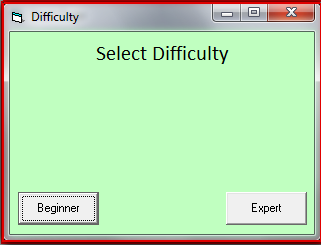
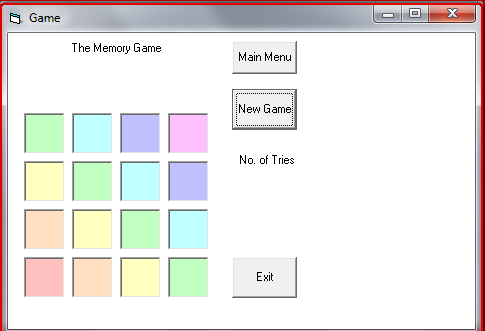
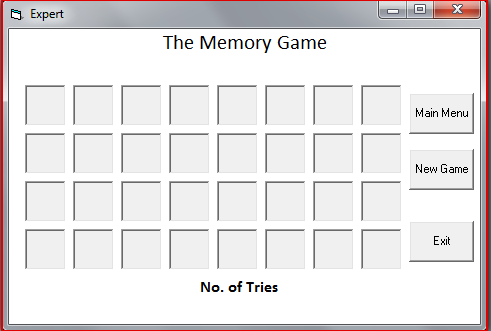
Anyway, I am having an issue with a game I am developing for my project. As the name states in the title its a Memory Game. (I will post pictures to show you what I mean)
The issue I am having is that I am creating two levels, one for beginner (less matches) and expert. Now the beginner code works perfectly, but where as the expert doesn't work. Now I used the beginner code however edited it because of the more squares, but now whenever I try to click "New Game" it just crashes VB6.
Any Ideas? I will provide a copy of my project and code so you guys can take a look for yourself.
Code:
Beginner:
Option Explicit
Dim lblPos(1 To 16) As Integer
Dim Tries As Integer
Dim Pairs As Integer

Sub WasteTime()
Dim W As Long
For W = 1 To 50000000
Next W
End Sub

Private Sub cmdExit_Click()
End
End Sub


Private Sub cmdMenu_Click()
frmGame.Hide
frmStart.Show
End Sub

Private Sub cmdNew_Click(Index As Integer)
Static occupied(1 To 16) As Integer
Dim I As Integer, GridPos As Integer
Dim Row As Integer, Column As Integer
Print "HighScore"
Randomize
For I = 1 To 16
occupied(I) = False
Next I
For I = 1 To 16
PicCover(I).Visible = True
Do
Row = Int(Rnd * 4) + 1
Column = Int(Rnd * 4) + 1
GridPos = (Row - 1) * 4 + Column
Loop While occupied(GridPos)
occupied(GridPos) = True
lblPos(GridPos) = I
lblNo(I).Top = 1200 + (Row - 1) * 720
lblNo(I).Left = 250 + (Column - 1) * 720
Next I
Tries = 0
Pairs = 0
lblTries.Caption = 0
End Sub


Private Sub Form_Load()
frmGame.Hide
frmDifficulty.Show
End Sub


Sub PicCover_Click(Index As Integer)
Static FirstCard As Integer, FirstCover As Integer
Static SecondCard As Integer, SecondCover As Integer
PicCover(Index).Visible = False
Tries = Tries + 1
DoEvents
If Tries Mod 2 = 1 Then
FirstCard = lblPos(Index)
FirstCover = Index
Else
lblTries.Caption = Tries \ 2
SecondCard = lblPos(Index)
SecondCover = Index
If FirstCard Mod 8 = SecondCard Mod 8 Then
Pairs = Pairs + 1
If Pairs = 8 Then
MsgBox "Puzzle Solved..... Good Work"
Print Tries / 2
End If
Else
WasteTime
PicCover(FirstCover).Visible = True
PicCover(SecondCover).Visible = True
End If
End If
End Sub

Expert
Option Explicit
Dim lblPos(1 To 32) As Integer
Dim Tries As Integer
Dim Pairs As Integer

Sub WasteTime()
Dim W As Long
For W = 1 To 50000000
Next W
End Sub

Private Sub cmdMenu_Click()
frmGame.Hide
frmStart.Show
End Sub

Private Sub cmdNew_Click(Index As Integer)
Static occupied(1 To 32) As Integer
Dim I As Integer, GridPos As Integer
Dim Row As Integer, Column As Integer
Print "HighScore"
Randomize
For I = 1 To 32
occupied(I) = False
Next I
For I = 1 To 32
PicCover(I).Visible = True
Do
Row = Int(Rnd * 4) + 1
Column = Int(Rnd * 4) + 1
GridPos = (Row - 1) * 4 + Column
Loop While occupied(GridPos)
occupied(GridPos) = True
lblPos(GridPos) = I
lblNo(I).Top = 1200 + (Row - 1) * 720
lblNo(I).Left = 250 + (Column - 1) * 720
Next I
Tries = 0
Pairs = 0
lblTries.Caption = 0
End Sub

Private Sub Form_Load()
frmGame.Hide
frmDifficulty.Show
End Sub

Private Sub PicCover_Click(Index As Integer)
Static FirstCard As Integer, FirstCover As Integer
Static SecondCard As Integer, SecondCover As Integer
PicCover(Index).Visible = False
Tries = Tries + 1
DoEvents
If Tries Mod 2 = 1 Then
FirstCard = lblPos(Index)
FirstCover = Index
Else
lblTries.Caption = Tries \ 2
SecondCard = lblPos(Index)
SecondCover = Index
If FirstCard Mod 8 = SecondCard Mod 8 Then
Pairs = Pairs + 1
If Pairs = 8 Then
MsgBox "Puzzle Solved..... Good Work"
Print Tries / 2
End If
Else
WasteTime
PicCover(FirstCover).Visible = True
PicCover(SecondCover).Visible = True
End If
End If
End Sub
I tried using this code and it seemed to work correctly.
vb Code:
Private Sub cmdNew_Click(Index As Integer)
Static occupied(1 To 32) As Integer
Dim I As Integer, GridPos As Integer
Dim Row As Integer, Column As Integer
Print "HighScore"
Randomize
For I = 1 To 16
occupied(I) = False
Next I
For I = 1 To 16
PicCover(I).Visible = True
Do
Row = Int(Rnd * 4) + 1
Column = Int(Rnd * 4) + 1
GridPos = (Row - 1) * 4 + Column
Loop While occupied(GridPos)
occupied(GridPos) = True
lblPos(GridPos) = I
lblNo(I).Top = 840 + (Row - 1) * 720
lblNo(I).Left = 250 + (Column - 1) * 720
Next I
Tries = 0
Pairs = 0
lblTries.Caption = 0
End Sub
when you quote a post could you please do it via the "Reply With Quote" button or if it multiple post click the "''+" button then "Reply With Quote" button.
If this thread is finished with please mark it "Resolved" by selecting "Mark thread resolved" from the "Thread tools" drop-down menu. https://get.cryptobrowser.site/30/4111672
Thanks for the post. I will try that. I will report back with the result.
Anyway I would like to ask another question. I have a "HighScore" come up on the form. Now when you complete the game it will print the score on the form. But, every time you click new game (Randomises) it keeps printing "HighScore". Is there any way for it to print the score into, lets say a MsgBox. But with the MsgBox I also want it to remember the score of previous tries. Any ideas? Anyway sorry for the addition, I want to try and make my project a bit better.
Edit: Works now but still has issues. For starters, the game isn't randomizing, and is getting the wrong letter together. Also, it is only working for half the game is working.
Last edited by Windows1; Aug 12th, 2010 at 01:27 AM.
Static FirstCard As Integer, FirstCover As Integer
Static SecondCard As Integer, SecondCover As Integer
PicCover(Index).Visible = False
Tries = Tries + 1
DoEvents
If Tries Mod 2 = 1 Then
FirstCard = lblPos(Index)
FirstCover = Index
Else
lblTries.Caption = Tries \ 2
SecondCard = lblPos(Index)
SecondCover = Index
If FirstCard Mod 8 = SecondCard Mod 8 Then
Pairs = Pairs + 1
If Pairs = 8 Then
MsgBox "Puzzle Solved..... Good Work"
highscore = Pairs
MsgBox (highscore)
End If
Else
WasteTime
PicCover(FirstCover).Visible = True
PicCover(SecondCover).Visible = True
End If
End If
End Sub
I have sorted out the "High Score" problem! However, you are going have to find a simpler method for the "New Game" randomization. In it's current state it will cause the system to freeze whenever, it tries to produce the random numbers. I also noticed that you hard coded the letters in to the labels it would be better to assign them to a label pragmatically if you want to randomize them.
when you quote a post could you please do it via the "Reply With Quote" button or if it multiple post click the "''+" button then "Reply With Quote" button.
If this thread is finished with please mark it "Resolved" by selecting "Mark thread resolved" from the "Thread tools" drop-down menu. https://get.cryptobrowser.site/30/4111672
Your WasteTime() sub seems to be not a good idea. It will freeze the program.
Try indenting your code statements. It will make it easier to read
In memory game, only 2 slots should be visible on click. After that, if they are a match, display it permanently, otherwise, hide the two. What you have coded will display all items that you click on.
Good luck...
If my post was helpful to you, then express your gratitude using Rate this Post.
And if your problem is SOLVED, then please Mark the Thread as RESOLVED (see it in action - video) My system: AMD FX 6100, Gigabyte Motherboard, 8 GB Crossair Vengance, Cooler Master 450W Thunder PSU, 1.4 TB HDD, 18.5" TFT(Wide), Antec V1 Cabinet Social Group:VBForums - Developers from India
The is the remodeled Beginner code taking in to account my changes and akhileshbc's suggestions.
vb Code:
Option Explicit
Dim lblPos(1 To 16) As Integer
Dim Tries As Integer
Dim Pairs As Integer
Dim highscore As Integer
Private Sub cmdExit_Click()
Unload Me
End Sub
Private Sub cmdMenu_Click()
frmGame.Hide
frmStart.Show
End Sub
Private Sub cmdNew_Click(Index As Integer)
Static occupied(1 To 16) As Integer
Dim I As Integer, GridPos As Integer
Dim Row As Integer, Column As Integer
Randomize
For I = 1 To 16
occupied(I) = False
Next I
For I = 1 To 16
PicCover(I).Visible = True
Do
Row = Int(Rnd * 4) + 1
Column = Int(Rnd * 4) + 1
GridPos = (Row - 1) * 4 + Column
Loop While occupied(GridPos)
occupied(GridPos) = True
lblPos(GridPos) = I
lblNo(I).Top = 1200 + (Row - 1) * 720
lblNo(I).Left = 250 + (Column - 1) * 720
Next I
Tries = 0
Pairs = 0
lblTries.Caption = 0
End Sub
Private Sub Form_Load()
frmGame.Hide
frmDifficulty.Show
highscore = 0
End Sub
Sub PicCover_Click(Index As Integer)
Static FirstCard As Integer, FirstCover As Integer
Static SecondCard As Integer, SecondCover As Integer
PicCover(Index).Visible = False
Tries = Tries + 1
DoEvents
If Tries Mod 2 = 1 Then
FirstCard = lblPos(Index)
FirstCover = Index
Else
lblTries.Caption = Tries \ 2
SecondCard = lblPos(Index)
SecondCover = Index
If FirstCard Mod 8 = SecondCard Mod 8 Then
Pairs = Pairs + 1
If Pairs = 8 Then
MsgBox "Puzzle Solved..... Good Work"
highscore = Pairs
MsgBox (highscore)
End If
Else
PicCover(FirstCover).Visible = True
PicCover(SecondCover).Visible = True
End If
End If
End Sub
when you quote a post could you please do it via the "Reply With Quote" button or if it multiple post click the "''+" button then "Reply With Quote" button.
If this thread is finished with please mark it "Resolved" by selecting "Mark thread resolved" from the "Thread tools" drop-down menu. https://get.cryptobrowser.site/30/4111672
Option Explicit

Dim strBoxContent(15)   As String
Dim intPrevious         As Integer
Dim intCurrent          As Integer
Dim blnIsDisplayed(15)  As Boolean
Dim isWaiting           As Boolean
Dim intTotal            As Integer
Dim intClicks           As Integer

'~~~ To shuffle the array
Private Function ShuffleArray(pvarArray As Variant)
    Dim i As Long
    Dim iMin As Long
    Dim iMax As Long
    Dim lngReplace As Long
    Dim varSwap As Variant

    iMin = LBound(pvarArray)
    iMax = UBound(pvarArray)
    For i = iMax To iMin + 1 Step -1
        lngReplace = Int((i - iMin + 1) * Rnd + iMin)
        varSwap = pvarArray(i)
        pvarArray(i) = pvarArray(lngReplace)
        pvarArray(lngReplace) = varSwap
    Next
End Function

Private Sub Form_Load()
    Dim i As Long

    '~~~ Loading the array with A to H. The array will contain 2 copies of each
    For i = 0 To 7
        strBoxContent(i) = Chr$(65 + i)
        strBoxContent(15 - i) = Chr$(65 + i)
    Next

    ShuffleArray strBoxContent

    For i = 0 To 15
        'lblBox(i).Caption = strBoxContent(i)
        blnIsDisplayed(i) = False
    Next

    isWaiting = False
    intPrevious = -1
    intTotal = 0
    intClicks = 0
End Sub

'~~~ On clicking the box
Private Sub lblBox_Click(Index As Integer)
    If isWaiting = True Then Exit Sub
    If blnIsDisplayed(Index) = False Then
        lblBox(Index).Caption = strBoxContent(Index)
        If intPrevious = -1 Then
            intPrevious = Index
        Else
            If blnIsDisplayed(intPrevious) = True Then Exit Sub
            intCurrent = Index

            If strBoxContent(intPrevious) = strBoxContent(intCurrent) Then

                blnIsDisplayed(intPrevious) = True
                blnIsDisplayed(intCurrent) = True
                intPrevious = -1
                intCurrent = -1
                intTotal = intTotal + 1
                Me.Caption = "Successful grouping: " & intTotal

                If intTotal = 8 Then MsgBox "Congratz"

            Else
                HideSelection
            End If
        End If
    End If
End Sub

'~~~ This will hide the selections after a specific time
Private Sub HideSelection()
    isWaiting = True
    Timer1.Enabled = True
    Timer1.Interval = 200
End Sub

Private Sub Timer1_Timer()
    intClicks = intClicks + 1
    lblClicks.Caption = "Clicks made: " & intClicks
    lblBox(intPrevious).Caption = "X"
    lblBox(intCurrent).Caption = "X"
    intPrevious = -1
    intCurrent = -1
    isWaiting = False
    Timer1.Enabled = False
End Sub
Edit:
Added the code for displaying the no. of clicks you made.
Last edited by akhileshbc; Aug 14th, 2010 at 03:48 AM.
Reason: added more code
If my post was helpful to you, then express your gratitude using Rate this Post.
And if your problem is SOLVED, then please Mark the Thread as RESOLVED (see it in action - video) My system: AMD FX 6100, Gigabyte Motherboard, 8 GB Crossair Vengance, Cooler Master 450W Thunder PSU, 1.4 TB HDD, 18.5" TFT(Wide), Antec V1 Cabinet Social Group:VBForums - Developers from India
Nicholas Francis, Way to like copy me. how is yours now, im trying to do a picture array instead of a label array now, but i have a few new errors. see in you in software tomorow, double period im going to try and get as much of this done as possible.





 Reply With Quote


