|

-
May 7th, 2010, 02:19 AM
#1
Thread Starter
Addicted Member


 I'm having trouble entering data into my datagridviewer combobox column I'm having trouble entering data into my datagridviewer combobox column
I have this test form where I'm testing the idea, but ran into a snag.
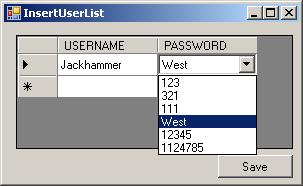
Now the main idea is to load all the data from a dataset into the one column of the datagridview. This works perfectly as shown in the image.
Now there is something that I want to happen, but just can't get it right.
when on the DataGridViewComboBox Column I also want to be able to type in my own data if the one I want is not available in the combobox.
Also if there are 50 values in my combobox and 2 of them are:
jacky, jacson
When i type jac
I want the combobox to only give me the options starting with "jac"
Here is the code that I'm currently using:
3 Code:
Dim dt As DataTable
    Dim dsNewDataset As New DataSet()
    Dim i = 0, intSetArray As Integer = 0
 Public Function JT_PullDataWithCOLUMNS1(ByVal Cols As String, ByVal TableName As String) As DataTable
        If dsNewDataset.Tables.Count >= 1 Then
            dsNewDataset.Clear()
            intSetArray = 0
            i = 0
        End If
        Dim conn As String = "Server=192.132.0.53;Port=3306;Database=wic;Uid=root;Pwd=12sw"
        Dim cmd As String = "SELECT " & Cols & " FROM " & TableName
        Dim ad As New MySql.Data.MySqlClient.MySqlDataAdapter(cmd, conn)
         ad.GetFillParameters()
        ad.Fill(dsNewDataset)
         dt = dsNewDataset.Tables(0)
         JT_PullDataWithCOLUMNS1 = dsNewDataset.Tables(0)
End Function
   Private Sub InsertUserList_Load(ByVal sender As System.Object, ByVal e As System.EventArgs) Handles MyBase.Load
        Dim aa As DataSet = JT_PassDataSet
        'DGV.DataSource =
        Call JT_PullDataWithCOLUMNS1("PASSWORD", "st_users")
         Dim comboboxcol As DataGridViewComboBoxColumn = Me.DGV.Columns("PASSWORD")
        comboboxcol.DataSource = dt
        comboboxcol.DisplayMember = "PASSWORD"
        comboboxcol.ValueMember = "PASSWORD"
        comboboxcol.ReadOnly = False
End Sub
-
May 7th, 2010, 02:31 AM
#2
Re: I'm having trouble entering data into my datagridviewer combobox column
The DataGridViewComboBoxColumn is not designed to work that way. You would have to create your own custom column.
-
May 7th, 2010, 02:35 AM
#3
Thread Starter
Addicted Member
Re: I'm having trouble entering data into my datagridviewer combobox column
Ok. I'm new to programming, can you perhaps give me a example by code?
-
May 7th, 2010, 03:23 AM
#4
Re: I'm having trouble entering data into my datagridviewer combobox column
It's a far from trivial exercise. You first need to understand the relationship between the column, cell and editing control classes. You then need to derive your own classes from the appropriate base classes, i.e. DataGridViewComboBoxColumn and DataGridViewComboBoxCell. If you're not comfortable with that then you've got a lot of reading and playing with code ahead of you. I'd suggest that you start by reading about the DataGridView and how it works on MSDN.
Tags for this Thread
 Posting Permissions
- You may not post new threads
- You may not post replies
- You may not post attachments
- You may not edit your posts
-
Forum Rules
|
Click Here to Expand Forum to Full Width
|



 Reply With Quote

