|

-
Jan 8th, 2010, 01:41 PM
#1
Thread Starter
Frenzied Member

 [RESOLVED] USB unrecognized device WD Mass Storage [RESOLVED] USB unrecognized device WD Mass Storage
Ok I got my machine to not crash with my hub, now I cant get it to recognize my WD My Book External drive
I have uninstalled usb drivers, I got it to see it one time then disconnect it and tried it on another computer NO go, retryed it on my machine and its not connecting?
WindowsXP sp3
WD 250gb My Book usb
"USB device unrecognized"
anyone have any ideas?
-
Jan 8th, 2010, 02:51 PM
#2
Re: USB unrecognized device WD Mass Storage
Try this:
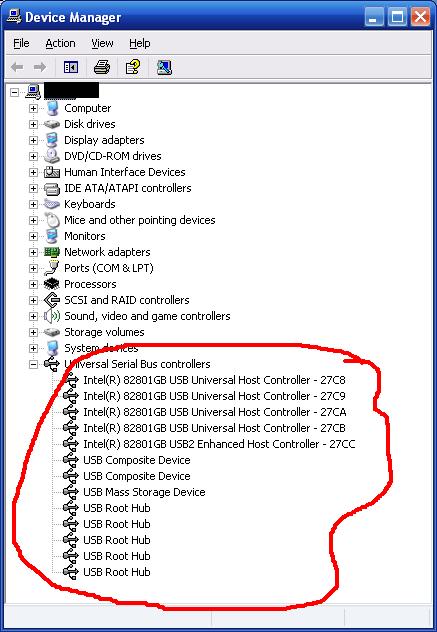
1. Open Device manager.
2. Expand Universal Serial Bus Controllers.
3. Delete/uninstall all items from there one by one and reboot your PC
4. Let it scan the devices again. If it asks for drivers or windows CD, insert the appropriate CD in the CD drive.
-
Jan 9th, 2010, 01:17 AM
#3
Thread Starter
Frenzied Member
Re: USB unrecognized device WD Mass Storage
I tried that more times then I care to remember 
It work one time right after I ran a MS MrFixit which cleared up a registry problem that was preventing my computer from even booting up with a usb hub plugged in
Never been able to get it to recognize since
-
Jan 9th, 2010, 11:48 AM
#4
Re: USB unrecognized device WD Mass Storage
After removing those USB controller devices, clear the cache.
Click Start > Run. Then type this in the run box and press enter.
SFC /PURGECACHE
Then reboot and let it scan for new devices.
-
Jan 9th, 2010, 01:41 PM
#5
Thread Starter
Frenzied Member
Re: USB unrecognized device WD Mass Storage
Same problem
"Unrecognized Device"
-
Jan 12th, 2010, 09:58 PM
#6
Thread Starter
Frenzied Member
Re: USB unrecognized device WD Mass Storage
I think I found a solution. WD tells you to power up the drive first, then plug in USB.
I doscovered thoguh that if you plug in the USB first then power up it works. Tried it a few times so far with succcess
-
Jan 12th, 2010, 11:35 PM
#7
Re: USB unrecognized device WD Mass Storage
 Originally Posted by billboy

I think I found a solution. WD tells you to power up the drive first, then plug in USB.
I doscovered thoguh that if you plug in the USB first then power up it works. Tried it a few times so far with succcess
That is useful to know! Makes me wonder if that is the solution to my 60GB Western Digital portable drive failing.
when you quote a post could you please do it via the "Reply With Quote" button or if it multiple post click the "''+" button then "Reply With Quote" button.
If this thread is finished with please mark it "Resolved" by selecting "Mark thread resolved" from the "Thread tools" drop-down menu.
https://get.cryptobrowser.site/30/4111672
-
Jan 14th, 2010, 01:03 PM
#8
Thread Starter
Frenzied Member
Re: USB unrecognized device WD Mass Storage
Originally Posted by Nightwalker83
That is useful to know! Makes me wonder if that is the solution to my 60GB Western Digital portable drive failing.
Try it you have nothing to lose, its work for me a few times. I noticed to that after I power it down I have to wait a while before I power it back up. I aslo installed the WB button control
 Posting Permissions
- You may not post new threads
- You may not post replies
- You may not post attachments
- You may not edit your posts
-
Forum Rules
|
Click Here to Expand Forum to Full Width
|



 Reply With Quote

 icon on the left of the post.

